

 中文
中文 
septemberhx deepin
2021-08-07 03:42 deepin 能通过配置文件去掉最大化的窗口的标题栏。问题是去掉了怎么移动窗口呢?
Reply Like 0 View the author
 deepin
 能通过配置文件去掉最大化的窗口的标题栏。问题是去掉了怎么移动窗口呢?

 deepin
 去掉最好是不要去掉。但可以缩小栏题栏的 大小。
将下文 复制 到 一个文本文件,然后重命名(含后缀名)成 titlebar.ini
[Active]
height=24
# https://www.fontke.com/tool/rgb/e9e9e9/
#backgroundColor=#E9E9E9
# https://www.fontke.com/tool/rgb/f6f8fa/
backgroundColor=#F6F8FA
[Inactive]
height=24
# https://www.fontke.com/tool/rgb/e3e3e3/
backgroundColor=#E3E3E3
其中的height就是 栏题栏的高度,可依据自己喜欢的设定。
把titelbar.ini 文件分别复制到 这两个个文件夹下。(如果没有对应的文件夹,就自己新建对应的目录)
/home/tange/.local/share/deepin/themes/deepin/light
/home/tange/.local/share/deepin/themes/deepin/Dark
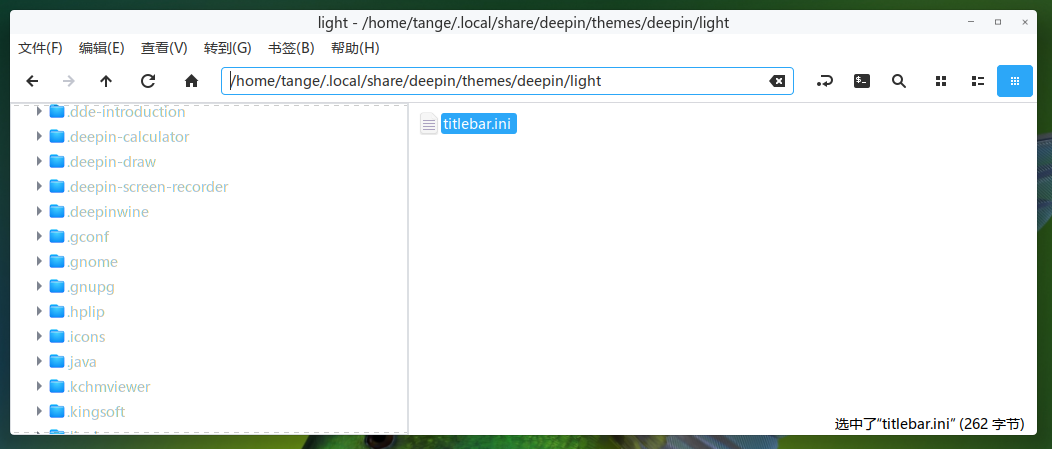
祝好运

 deepin
 能通过配置文件去掉最大化的窗口的标题栏。问题是去掉了怎么移动窗口呢?
就比如vscode和Chrome可以通过设置来去掉那个标题栏,去掉之后还是能拖动应用。但是其他的好像没有
deepin 就比如vscode和Chrome可以通过设置来去掉那个标题栏,去掉之后还是能拖动应用。但是其他的好像没有
那做不到。chrome能做到是它自己画了三个按钮,实现了拖动移动窗口功能(client side decoration),然而大部分程序都不是这样的,需要系统给他画个标题栏等,没办法实现。
如果觉得碍事,那么建议按照楼上减少标题栏高度。
Popular Events
More


 The settings menu needs to be translated into Russian.
一直被Linux下很多软件的标题栏困扰了很久,想问一下有没有什么方法可以很方便地去掉这些标题栏?