

 中文
中文 

 deepin
 终端下载慢,服务器复制链接下载后dpkg安装/////
sudo apt update && sudo LLVM=-19 LLVM_IAS=1 dpkg -i *.deb
/////
报错:AMD平台如下【intel 12400的也差不多】~~~~
dpkg: 依赖关系问题使得 linux-headers-7.0.5-cachyos 的配置工作不能继续:
linux-headers-7.0.5-cachyos 依赖于 lld-19;然而:
未安装软件包 lld-19。
dpkg: 处理软件包 linux-headers-7.0.5-cachyos (--install)时出错:
依赖关系问题 - 仍未被配置
正在设置 linux-image-7.0.5-cachyos (7.0.5-1) ...
Kernel config /lib/modules/7.0.5-cachyos/build/.config not found, modules won't be signed
Cleaning build area... done.
Building module(s)...(bad exit status: 2)
Failed command:
make -j16 KERNELRELEASE=7.0.5-cachyos -C /lib/modules/7.0.5-cachyos/build KBUILD_EXTMOD=/var/lib/dkms/deepin-anything/0.0/build modules
Error! Bad return status for module build on kernel: 7.0.5-cachyos (x86_64)
Consult /var/lib/dkms/deepin-anything/0.0/build/make.log for more information.
Autoinstall on 7.0.5-cachyos failed for module(s) deepin-anything(10).
Error! One or more modules failed to install during autoinstall.
Refer to previous errors for more information.
update-initramfs: Generating /boot/initrd.img-7.0.5-cachyos
setupcon is missing. Please install the 'console-setup' package.
I: The initramfs will attempt to resume from /dev/nvme0n1p10
I: (UUID=24d82bc7-ee46-4c55-bdb3-4e35a6f058b5)
I: Set the RESUME variable to override this.
live-boot: core filesystems devices utils udev blockdev iscsi dns.
fix systemd/logind config
正在生成 grub 配置文件 ...
找到主题:/boot/grub/themes/deepin/theme.txt
Found background image: /boot/grub/themes/deepin/background.jpg
警告: os-prober 将运行以检测其它可引导分区。
将使用 os-prober 的输出,以检测分区中可引导的二进制文件,并为其创建新的启动项。
发现了 Windows Boot Manager,位于 /dev/sdc1@/EFI/Microsoft/Boot/bootmgfw.efi
正在添加 UEFI 固件设置的引导菜单项……
完成
在处理时有错误发生:
linux-headers-7.0.5-cachyos




 List of bugs and suggestions


注意: 安装前请禁用deepin-anything-server服务, 否则进系统卡在桌面加载概不负责
禁用命令:
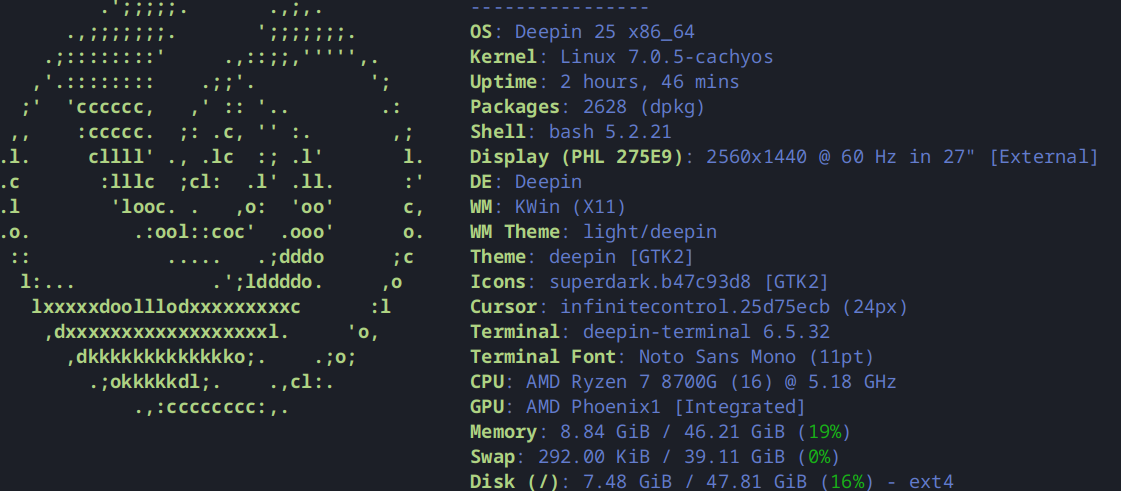
sudo systemctl disable deepin-anything-serverLinux 7.0.5-cachyos1内核已在我的电脑上通过测试, V2,V3,V4三版内核已完成编译, 现予以发布
DirtyFlag漏洞已修复
[使用前必看] deepin v25专用CachyOS内核源加源教程和使用说明: https://bbs.deepin.org.cn/post/296806
安装方式:
sudo apt update && sudo LLVM=-19 LLVM_IAS=1 apt install linux-headers-7.0.5-cachyos linux-image-7.0.5-cachyos -y如果你安装时忘记sudo后面加
LLVM=-19 LLVM_IAS=1两个环境变量导致dkms内核模块安装失败, 重启电脑进入桌面后, 打开终端, 输入sudo LLVM=-19 LLVM_IAS=1 dkms autoinstall回车并输入你的用户密码后即可[更新内容] 详细链接: https://github.com/CachyOS/linux/releases/tag/cachyos-7.0.5-1