

 中文
中文 
zccrs deepin
2026-08-05 10:37 deepin 这两个屏幕有相同的分辨率吗?
Reply Like 0 View the author
 deepin
 这两个屏幕有相同的分辨率吗?

 deepin
 xrandr --listproviders 执行看看输出什么
 deepin
 这两个屏幕有相同的分辨率吗?
不同
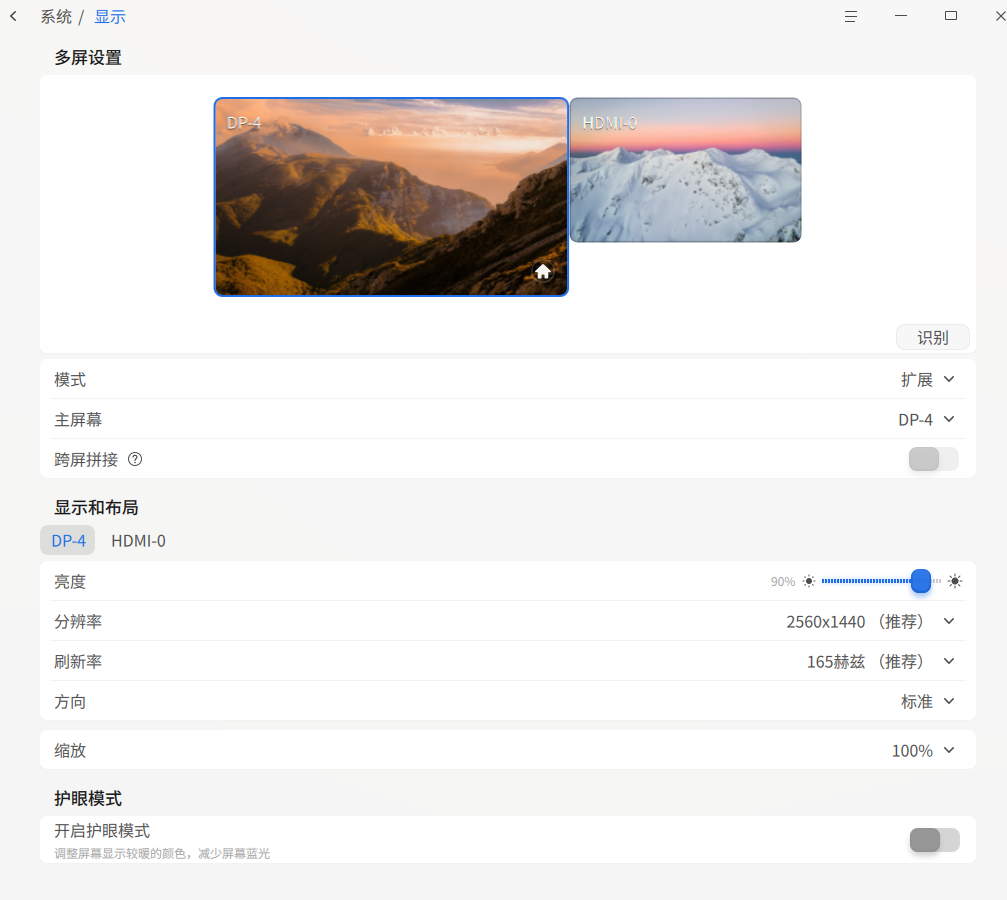
主屏:25601400
扩展屏: 16801050
deepin xrandr --listproviders 执行看看输出什么
今天在外面,没有外接显示器,输出如下:
hunter@hunter-PC:~$ xrandr --listproviders
Providers: number : 1
Provider 0: id: 0x1b8 cap: 0x1, Source Output crtcs: 4 outputs: 6 associated providers: 0 name:NVIDIA-0
deepin 今天在外面,没有外接显示器,输出如下:
hunter@hunter-PC:~$ xrandr --listproviders
Providers: number : 1
Provider 0: id: 0x1b8 cap: 0x1, Source Output crtcs: 4 outputs: 6 associated providers: 0 name:NVIDIA-0
到时候接一个外屏看看输出是什么
deepin 到时候接一个外屏看看输出是什么
HDMI接了一个显示器,显示如下,和没有外接显示器的是一样的
hunter@hunter-PC:~$ xrandr --listproviders
Providers: number : 1
Provider 0: id: 0x1b8 cap: 0x1, Source Output crtcs: 4 outputs: 6 associated providers: 0 name:NVIDIA-0
deepin 到时候接一个外屏看看输出是什么
使用--listmonitors参数可以看到当前的两个显示屏,0是笔记本电脑显示屏,1是扩展的显示器。
hunter@hunter-PC:~$ xrandr --listmonitors
Monitors: 2
0: +*DP-4 2560/340x1440/190+0+0 DP-4
1: +HDMI-0 1680/470x1050/300+2560+0 HDMI-0
Popular Ranking
ChangePopular Events
More


 List of bugs and suggestions
我的笔记本电脑外接显示器,只能屏幕扩展,不能复制屏幕,显卡为nvdia gefore rtx 3050,这个问题在deepin V20.9上面存在,目前安装v25.2,驱动也安装nvdia的闭源驱动,笔记本电脑外接显示器,只能屏幕扩展,不能复制屏幕,不知道这个问题是否有比较好的解决方法。
补充硬件基本信息
多屏幕设置
hunter@hunter-PC:~$ xrandr --query
Screen 0: minimum 8 x 8, current 4240 x 1440, maximum 32767 x 32767
DP-0 disconnected (normal left inverted right x axis y axis)
DP-1 disconnected (normal left inverted right x axis y axis)
DP-2 disconnected (normal left inverted right x axis y axis)
DP-3 disconnected (normal left inverted right x axis y axis)
HDMI-0 connected 1680x1050+2560+0 (normal left inverted right x axis y axis) 470mm x 300mm
1680x1050 59.95 + 74.89*
1600x900 60.00
1440x900 74.98 59.89
1366x768 59.79
1360x768 60.02
1280x1024 75.02 72.00 60.02
1280x800 59.81
1280x768 59.99
1280x720 60.00 59.94 50.00
1152x864 75.00
1024x768 75.03 70.07 60.00
800x600 75.00 72.19 60.32
720x576 50.00
720x480 59.94
640x480 75.00 72.81 59.94 59.93
DP-4 connected primary 2560x1440+0+0 (normal left inverted right x axis y axis) 340mm x 190mm
2560x1440 60.00 + 165.00*