

 中文
中文 
134******40 deepin
2026-07-27 00:43 deepin 网页端播放吗?我笔记本电脑试了一下,未复现楼主所说的情况。
Reply Like 0 View the author
deepin 网页端播放吗?我笔记本电脑试了一下,未复现楼主所说的情况。

看下显卡情况,先确认显卡是否被识别:lspci | grep -i "VGA\|3D"
查看驱动加载情况:lspci -k | grep -A 2 -i "VGA\|3D"
截图看看这两个命令的终端输出

 deepin
 用的什么浏览器,浏览器是否硬件加速是否正常工作。
chromium内核浏览器访问 chrome://gpu 查看硬解码状态
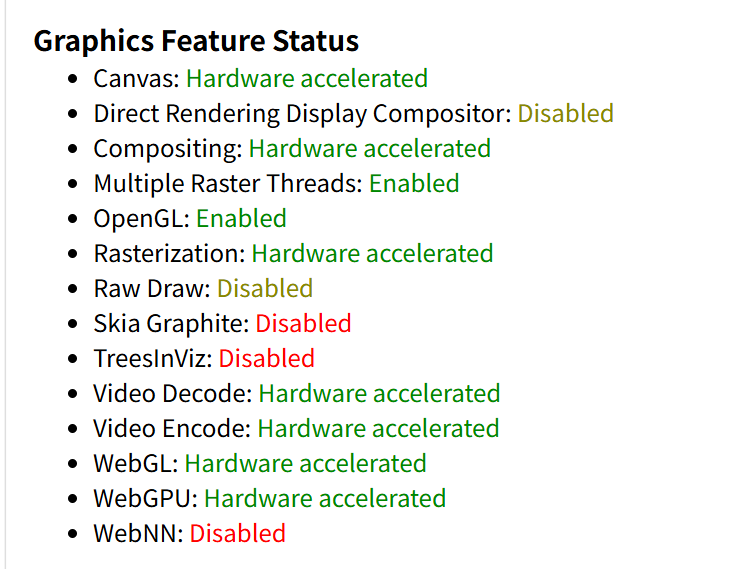
Firefox浏览器访问about:support 查看硬解码状态
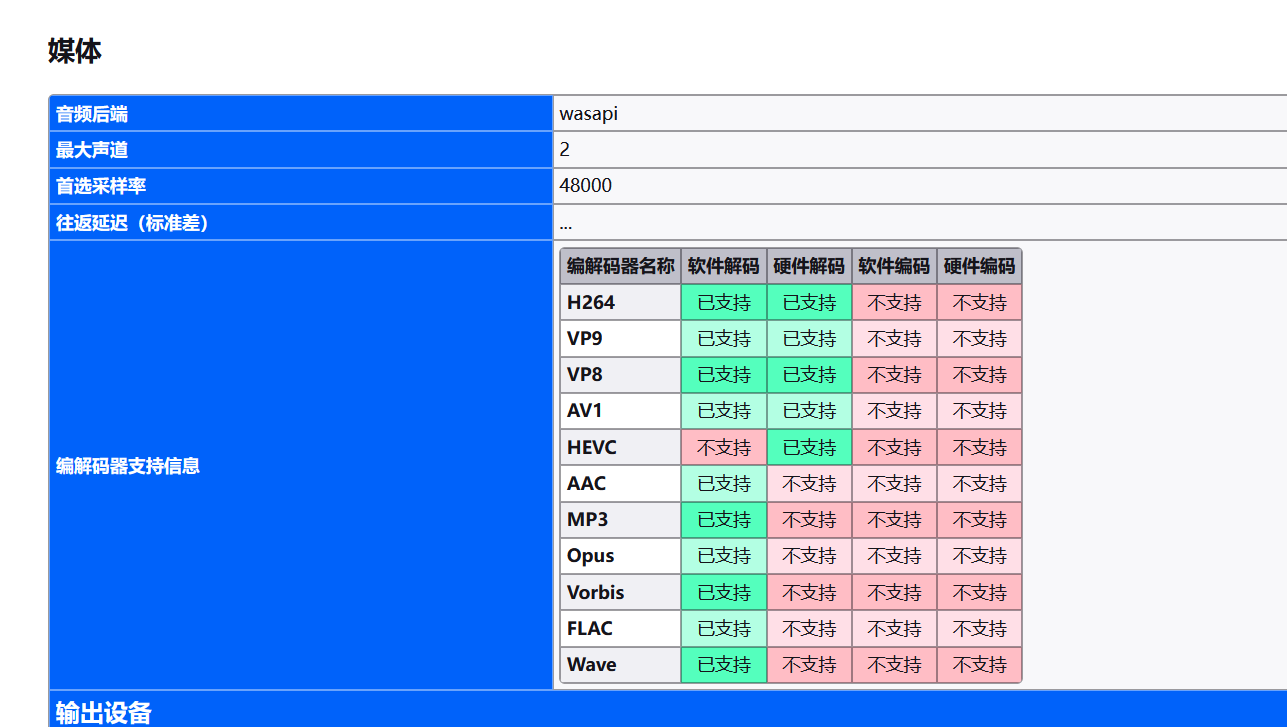

 deepin
 做个记号,我的笔记本也是,晚上我把硬件情况和视频情况截取出来

 deepin
 折腾过,除了firefox浏览器,其它浏览器在deepin上显卡硬件解码开不起来,纯靠CPU软解画质高了就会卡
 deepin deepin
 用的什么浏览器,浏览器是否硬件加速是否正常工作。
chromium内核浏览器访问 chrome://gpu 查看硬解码状态
Firefox浏览器访问about:support 查看硬解码状态
浏览器和视频播放器都是系统自带,网页端和播放器播放都是如此
deepin 看下显卡情况,先确认显卡是否被识别:lspci | grep -i "VGA\|3D"
查看驱动加载情况:lspci -k | grep -A 2 -i "VGA\|3D"
截图看看这两个命令的终端输出


deepin 我发现不是一开始就卡的。是浏览器看网页久了后才卡的。我是看淘宝2个小时后,突然就卡了。不但浏览器播放卡,连mpv也卡

 deepin
 视频在在哪里看,我也是Intel 核显想测试一下
deepin  deepin
 可以试试ubuntu 26.04
deepin deepin sudo apt update && sudo apt install vainfo
vainfo
#深度影院调用MPV加速
mkdir -p ~/.config/mpv
echo "hwdec=vaapi
vo=gpu
gpu-context=wayland
profile=gpu-hq" > ~/.config/mpv/mpv.conf
通过安装和对播放器的设置后,目前播放3D视频不卡塞,有同样问题的朋友可以参考。
deepin 我的处理方案
lspci -k | grep -A 2 -i "VGA\|3D"
00:02.0 VGA compatible controller: Intel Corporation Meteor Lake-P [Intel Arc Graphics] (rev 08)
        Subsystem: Lenovo Device 2327
        Kernel driver in use: i915
然后ai了一下
# 更新源+安装全套Intel视频硬解组件
sudo apt update
sudo apt install intel-media-va-driver vainfo mesa-vulkan-drivers libvdpau-dev
# 旧CPU(6代酷睿及更早)额外安装:sudo apt install libva-intel-driver
$ vainfo
Trying display: wayland
Trying display: x11
libva info: VA-API version 1.22.0
libva info: Trying to open /usr/lib/x86_64-linux-gnu/dri/iHD_drv_video.so
libva info: Found init function __vaDriverInit_1_20
libva info: va_openDriver() returns 0
vainfo: VA-API version: 1.22 (libva 2.22.0)
vainfo: Driver version: Intel iHD driver for Intel(R) Gen Graphics - 24.2.2 ()
vainfo: Supported profile and entrypoints
      VAProfileNone                   : VAEntrypointVideoProc
      VAProfileMPEG2Simple            : VAEntrypointVLD
      VAProfileMPEG2Main              : VAEntrypointVLD
      VAProfileH264Main               : VAEntrypointVLD
      VAProfileH264Main               : VAEntrypointEncSlice
      VAProfileH264High               : VAEntrypointVLD
      VAProfileH264High               : VAEntrypointEncSlice
      VAProfileJPEGBaseline           : VAEntrypointVLD
      VAProfileJPEGBaseline           : VAEntrypointEncPicture
      VAProfileH264ConstrainedBaseline: VAEntrypointVLD
      VAProfileH264ConstrainedBaseline: VAEntrypointEncSlice
      VAProfileVP8Version0_3          : VAEntrypointVLD
      VAProfileHEVCMain               : VAEntrypointVLD
      VAProfileHEVCMain               : VAEntrypointEncSlice
      VAProfileHEVCMain10             : VAEntrypointVLD
      VAProfileHEVCMain10             : VAEntrypointEncSlice
      VAProfileVP9Profile0            : VAEntrypointVLD
      VAProfileVP9Profile0            : VAEntrypointEncSlice
      VAProfileVP9Profile1            : VAEntrypointVLD
      VAProfileVP9Profile1            : VAEntrypointEncSlice
      VAProfileVP9Profile2            : VAEntrypointVLD
      VAProfileVP9Profile2            : VAEntrypointEncSlice
      VAProfileVP9Profile3            : VAEntrypointVLD
      VAProfileVP9Profile3            : VAEntrypointEncSlice
      VAProfileHEVCMain12             : VAEntrypointVLD
      VAProfileHEVCMain422_10         : VAEntrypointVLD
      VAProfileHEVCMain422_12         : VAEntrypointVLD
      VAProfileHEVCMain444            : VAEntrypointVLD
      VAProfileHEVCMain444            : VAEntrypointEncSlice
      VAProfileHEVCMain444_10         : VAEntrypointVLD
      VAProfileHEVCMain444_10         : VAEntrypointEncSlice
      VAProfileHEVCMain444_12         : VAEntrypointVLD
      VAProfileHEVCSccMain            : VAEntrypointVLD
      VAProfileHEVCSccMain            : VAEntrypointEncSlice
      VAProfileHEVCSccMain10          : VAEntrypointVLD
      VAProfileHEVCSccMain10          : VAEntrypointEncSlice
      VAProfileHEVCSccMain444         : VAEntrypointVLD
      VAProfileHEVCSccMain444         : VAEntrypointEncSlice
      VAProfileAV1Profile0            : VAEntrypointVLD
      VAProfileAV1Profile0            : VAEntrypointEncSlice
      VAProfileHEVCSccMain444_10      : VAEntrypointVLD
      VAProfileHEVCSccMain444_10      : VAEntrypointEncSlice
~/.config/mpv/mpv.conf中的配置
# 启用VAAPI硬解,只指定有效参数
hwdec=vaapi
hwdec-codecs=h264,hevc,vp9,av1

# 缓存配置(旧mpv只用cache-secs+demuxer-max-bytes)
cache-secs=12
demuxer-max-bytes=1GiB

# 解码线程
vd-lavc-threads=8

# 轻量化缩放,降低渲染负载
scale=bilinear
cscale=bilinear
dscale=bilinear

# 音频缓冲,解决音画不同步
audio-buffer=0.4

# 关闭HDR自动处理减少负载
hdr-compute-peak=no

# 直接禁用vulkan渲染避免报错
gpu-api=opengl
开机生效
echo "export MESA_VK_VIDEO_ALLOWED=0" >> ~/.profile
source ~/.profile
播放视频
mpv fkdwc1.mp4
● Video  --vid=1               (h264 1920x804 23.976 fps) [default]
● Audio  --aid=1  --alang=eng  (aac 48000 Hz 395 kbps) [default]
File tags:
 Title: Zootopia.2016.1080p.BluRay.DTS.4Audio.x265-10bit-HDSHDS
[vo/gpu] correct-downscaling requires non-bilinear scaler.
AO: [pipewire] 48000Hz 5.1 6ch floatp
VO: [gpu] 1920x804 yuv420p10
当前不卡,但是有一阵好像是系统在大量使用cpu后,变得整个系统卡顿,尤其是放视频,我再实验一段时间看看。
deepin 播放一阵后会报
Audio/Video desynchronisation detected! Possible reasons include too slow
hardware, temporary CPU spikes, broken drivers, and broken files. Audio
position will not match to the video (see A-V status field).
Consider trying `--profile=fast` and/or `--hwdec=auto` as they may help.

Audio device underrun detected.
Audio device underrun detected.
Audio device underrun detected.
然后整个系统会变得极卡,卡成ppt那种
deepin 我也装了iHD driver,比之前好多了,但播放吞噬星空时还是会卡,只能说是有所改善
Popular Ranking
ChangePopular Events
More


 List of bugs and suggestions
CPU:11th Gen Intel(R) Core(TM) i5-1135G7 @ 2.40GHz
系统:Deepin25.2
现象:播放完美世界等3D动画时卡塞,硬件加速开启也卡,网页播放也是如此,卡时CPU占用率达到87%以上,同样的硬件配置在Windows下流畅无卡塞
在Deepin25.2上有完美的解决方案吗?
浏览器和视频播放器都是系统自带。
显卡信息:
