[Technical exchange] 用AI优化dde-shell
Tofloor
poster avatar
米饭虚拟机-nana版
deepin
2026-07-22 12:37
Author

用deepin用久了,觉得任务栏有优化空间。我就拿 deepseek4 做了优化,目前就这样:

dde-shell.png

相比官方dde-shell,我做了几个优化:、

  • 任务栏右键菜单新增“系统监视器”和“显示桌面”选项
  • 时间显示秒针
  • 通知中心托盘右键菜单新增"清除所有消息"选项

怎么做到的? nana_nani.png 且听我详细道来———


一、任务栏右键菜单新增“系统监视器”和“显示桌面”选项

拉取dde-shell源码:git clone https://github.com/linuxdeepin/dde-shell

-> 找到并打开panels/dock/dockpanel.h,转到第 84-85 行声明 openSystemMonitor()toggleShowDesktop()

     Q_INVOKABLE void openDockSettings();
+    Q_INVOKABLE void openSystemMonitor();
+    Q_INVOKABLE void toggleShowDesktop();

-> 找到并打开panels/dock/dockpanel.cpp,转到第 380-400 行补充下列代码 ↓

void DockPanel::openSystemMonitor()
{
    qCDebug(dockLog) << "openSystemMonitor";
    auto *activation = new ds::XdgActivation(this);
    connect(activation, &ds::XdgActivation::tokenReady, this, [activation](const QString &token) {
        QStringList args = {"--by-user", "deepin-system-monitor"};
        if (!token.isEmpty()) {
            qCDebug(dockLog) << "Passing XDG_ACTIVATION_TOKEN to dde-am";
            args << "-e" << QStringLiteral("XDG_ACTIVATION_TOKEN=") + token;
        }
        QProcess::startDetached("dde-am", args);
        activation->deleteLater();
    });
    activation->requestToken();
}

void DockPanel::toggleShowDesktop()
{
    qCDebug(dockLog) << "toggleShowDesktop";
    QProcess::startDetached("/usr/lib/deepin-daemon/desktop-toggle", QStringList());
}

-> 找到并打开panels/dock/dockpanel.cpp,转到第 375-392 行补上qml:

             LP.MenuItem {
                 text: qsTr("Lock the Dock")
                 checked: Panel.locked
                 onTriggered: {
                     Panel.locked = !Panel.locked
                 }
             }
+            LP.MenuItem {
+                text: qsTr("System Monitor")
+                onTriggered: {
+                    Panel.openSystemMonitor()
+                }
+            }
+            LP.MenuItem {
+                text: qsTr("Show Desktop")
+                onTriggered: {
+                    Panel.toggleShowDesktop()
+                }
+            }
             LP.MenuItem {
                 text: qsTr("Dock Settings")
                 ...
             }

新增内容默认英文,需要在panels/dock/translations/org.deepin.ds.dock_zh_CN.ts补上汉化:

    
        Lock the Dock
        禁用自由调节
    
+    
+        System Monitor
+        系统监视器
+    
+    
+        Show Desktop
+        显示桌面
+    


保存、生成deb包、安装即可。

二、时间显示秒针

dde-shell的时间显示由dock插件的libdatetime.so管理,想要修改,把dde-tray-loader源码拉下来修改即可。

拉取dde-tray-loader源码:https://github.com/linuxdeepin/dde-tray-loader

找到并打开plugins/dde-dock/datetime/datetimewidget.cpp,在第120 行和第135 行都加ss:

-        m_timeLabel->setText(timeStr);
+        m_timeLabel->setText(timeStr + current.toString(":ss"));

保存即可。

三、通知中心托盘右键菜单新增"清除所有消息"选项

先进入dde-tray-loader目录

找到并打开plugins/dde-dock/notification/notification.h,加上定义:

     bool dndMode() const;
     void setDndMode(bool dnd);
+    void clearRecords();
     uint notificationCount() const;
 
     void watchNotification(bool newNotification);

找到并打开plugins/dde-dock/notification/notification.cpp,补上以下代码 ↓

     if (m_dbus) {
         m_dbus->call(QLatin1String("SetSystemInfo"), QVariant::fromValue(0u), QVariant::fromValue(QDBusVariant(dnd)));
     }
+}
+
+void Notification::clearRecords()
+{
+    if (m_dbus) {
+        m_dbus->call(QLatin1String("ClearRecords"));
+    }
+    m_notificationCount = 0;
+    m_hasNewNotification = false;
+    Q_EMIT notificationCountChanged(0);
+    Q_EMIT notificationStatusChanged();
 }
 
 uint Notification::notificationCount() const

找到并打开plugins/dde-dock/notification/notificationplugin.cpp,加上定义和有关代码:


@@ -14,6 +14,7 @@
 #define PLUGIN_STATE_KEY        "enable"
 #define TOGGLE_DND              "toggle-dnd"
+#define CLEAR_ALL               "clear-all"
 #define NOTIFICATION_SETTINGS   "notification-settings"
 
 DGUI_USE_NAMESPACE
@@ -113,6 +114,12 @@
     toggleDnd["isCheckable"] = false;
     toggleDnd["isActive"] = true;
     items.push_back(toggleDnd);
+
+    QMap clearAll;
+    clearAll["itemId"] = CLEAR_ALL;
+    clearAll["itemText"] = tr("Clear all notifications");
+    clearAll["isCheckable"] = false;
+    clearAll["isActive"] = true;
+    items.push_back(clearAll);
+
     QMap notificationSettings;
     notificationSettings["itemId"] = NOTIFICATION_SETTINGS;
     notificationSettings["itemText"] = tr("Notification settings");
@@ -131,6 +138,9 @@
     Q_UNUSED(checked)
     if (menuId == TOGGLE_DND) {
         m_notification->setDndMode(!m_notification->dndMode());
+    } else if (menuId == CLEAR_ALL) {
+        m_notification->clearRecords();
     } else if (menuId == NOTIFICATION_SETTINGS) {
         QStringList args {"--by-user", "org.deepin.dde.control-center", "--", "-p", "notification"};
         QProcess::startDetached("dde-am", args);

默认文本是英文,需要在plugins/dde-dock/translations/dde-dock_zh_CN.ts的第413行补上汉化:

         Notification
         通知
     
+    
+        Clear all notifications
+        清除所有消息
+    
 
 
     OnboardPlugin

接着进入dde-shell目录

找到并打开panels/notification/server/dbusadaptor.h,加上代码:

     void SetSystemInfo(uint configItem, const QDBusVariant &value);
     QDBusVariant GetSystemInfo(uint configItem);
 
+    void ClearRecords();
+
 private:
     NotificationManager *manager() const;

找到并打开panels/notification/server/dbusadaptor.cpp,加上代码:

 QDBusVariant DDENotificationDbusAdaptor::GetSystemInfo(uint configItem)
 {
     return QDBusVariant(manager()->GetSystemInfo(configItem));
 }
+
+void DDENotificationDbusAdaptor::ClearRecords()
+{
+    qInfo(notifyLog) << "ClearRecords";
+    manager()->removeNotifications();
+}
 
 } // notification

全部保存、生成deb包、安装即可。

去掉*-dev、* -dbgsym包后,使用apt一股脑安装剩下的包:sudo apt install ./*.deb -y

不要一个个装!会报缺依赖的错误

安装后,重启dde-shell即可:systemctl restart --user dde-shell@DDE.service

本人的修改放这里了,感兴趣的自行研究:saki_sleep.png

https://github.com/kota-rina3/dde-shell-otohime
https://github.com/kota-rina3/dde-tray-loader-otohime
Reply Favorite View the author
All Replies
avatar
MeGusta
deepin
2026-07-22 13:03
#1

加“系统监视器”是极好的~

Reply View the author
avatar
babyfengfjx
Super Moderator
CQA
2026-07-22 13:27
#2

相当不错,极其鼓励这种活动的分享👍

Reply View the author
avatar
我猜你比我懂得什么是快乐
deepin
2026-07-22 15:11
#3
babyfengfjx

相当不错,极其鼓励这种活动的分享👍

这几个功能很有必要添加进需求池,力挺。

Reply View the author
avatar
我要验牌
deepin
2026-07-22 15:26
#4

系统监视器 想必都是喜欢的吧

Reply View the author
avatar
HualetWang
deepin
2026-07-22 16:51
#5

@一头牛 可以考虑考虑

Reply View the author
avatar
𰻞𰻝面
deepin
2026-07-22 17:36
#6
MeGusta

加“系统监视器”是极好的~

加“系统监视器”这个是极好的!

@deepin流云可以考虑增加这个功能

deepin0.gif

Reply View the author
avatar
一粒
deepin
2026-07-22 17:58
#7

kissing_heart

Reply View the author
avatar
米饭虚拟机-nana版
deepin
2026-07-23 00:23
#8

第三点的代码有bug,已修复

Reply View the author
avatar
芭芭雅嘎
deepin
2026-07-23 02:35
#9

看来还是得 倒逼改革 呀joy

Reply View the author
avatar
lizhuojian
deepin
2026-07-25 11:19
#10
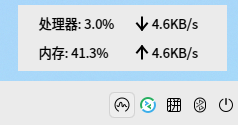
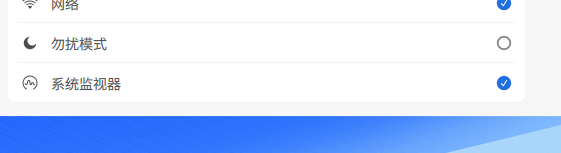
任务栏右键菜单新增“系统监视器”这个设置任务栏图标就可以吧,鼠标放上去就看到数据,一点就出来,一直这么设置

image.png
image.png

Reply View the author
avatar
米饭虚拟机-nana版
deepin
2026-07-25 11:26
#11
lizhuojian
任务栏右键菜单新增“系统监视器”这个设置任务栏图标就可以吧,鼠标放上去就看到数据,一点就出来,一直这么设置

image.png
image.png

这样也行。但我这个改动是向Windows使用习惯看齐

Reply View the author