

 中文
中文 
deepin流云
2026-06-24 10:59 Super Moderator
Community OP
https://bbs.deepin.org.cn/post/290663
搞个内核日志上来找内核的同学分析下看看(最好再来个有死机前的,上一次的-1)
Reply Like 1 View the author

https://bbs.deepin.org.cn/post/290663
搞个内核日志上来找内核的同学分析下看看(最好再来个有死机前的,上一次的-1)

 deepin
 https://bbs.deepin.org.cn/post/290663
搞个内核日志上来找内核的同学分析下看看(最好再来个有死机前的,上一次的-1)
为deepin的内核团队点赞
另外楼主可以先关闭下Wi-Fi再试试蓝牙是否有延迟,研发怀疑是WiFi驱动跟蓝牙之间有调度Coexistence问题,先提供日志吧,有日志他才好进一步分析,看看是什么网卡。
 deepin
 另外楼主可以先关闭下Wi-Fi再试试蓝牙是否有延迟,研发怀疑是WiFi驱动跟蓝牙之间有调度Coexistence问题,先提供日志吧,有日志他才好进一步分析,看看是什么网卡。
桌面的深度之家怎么反馈呢,界面翻了一遍愣是没找到新建反馈按钮。

 deepin
 桌面的深度之家怎么反馈呢,界面翻了一遍愣是没找到新建反馈按钮。
这里;
另外,如果你的耳机支持连接双设备,记得把另一个设备断开。我的小米蓝牙音箱在同时连接两个设备的时候deepin这边播放音乐会有噪音,断开另一个设备就好了
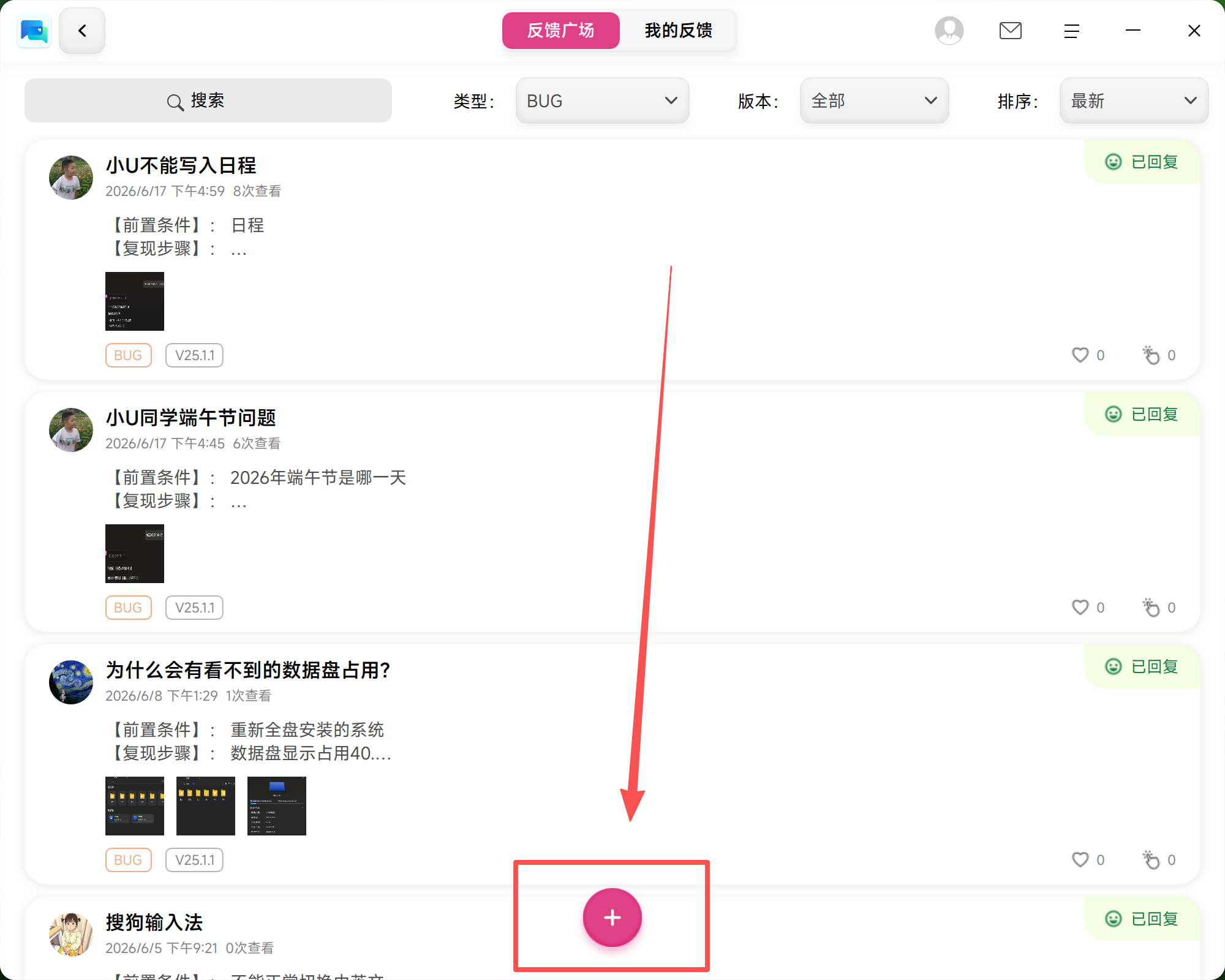
桌面的深度之家怎么反馈呢,界面翻了一遍愣是没找到新建反馈按钮。
内核日志直接论坛贴上来就行,不大
deepin 这里;
另外,如果你的耳机支持连接双设备,记得把另一个设备断开。我的小米蓝牙音箱在同时连接两个设备的时候deepin这边播放音乐会有噪音,断开另一个设备就好了
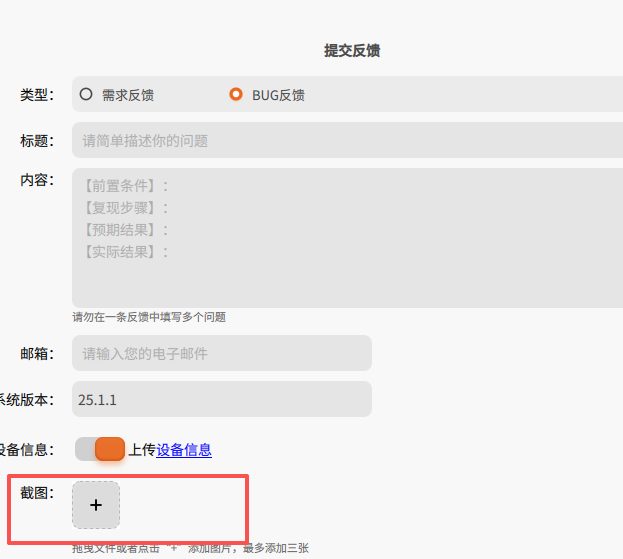
只能提交截图,无法提交附件比如log日志这种文件
deepin https://bbs.deepin.org.cn/post/290663
搞个内核日志上来找内核的同学分析下看看(最好再来个有死机前的,上一次的-1)
6月 24 09:50:47 officepc4-2 kernel: x86/cpu: SGX disabled or unsupported by BIOS.
6月 24 09:50:48 officepc4-2 kernel: intel_oc_wdt INT3F0D:00: probe with driver intel_oc_wdt failed with error -13
6月 24 09:50:48 officepc4-2 kernel: Error: Driver 'pcspkr' is already registered, aborting...
6月 24 09:50:48 officepc4-2 kernel: pcieport 0000:00:1d.0: AER: Error of this Agent is reported first
6月 24 09:50:48 officepc4-2 kernel: pcieport 0000:00:1d.0: AER: Error of this Agent is reported first
6月 24 09:50:48 officepc4-2 kernel: pcieport 0000:00:1d.0: AER: Error of this Agent is reported first
6月 24 09:50:48 officepc4-2 kernel: pcieport 0000:00:1d.0: AER: Error of this Agent is reported first
6月 24 09:50:58 officepc4-2 kernel: pcieport 0000:00:1d.0: AER: Error of this Agent is reported first
6月 24 09:50:58 officepc4-2 kernel: pcieport 0000:00:1d.0: AER: Error of this Agent is reported first
6月 24 09:50:58 officepc4-2 kernel: pcieport 0000:00:1d.0: AER: Error of this Agent is reported first
6月 24 09:50:58 officepc4-2 kernel: pcieport 0000:00:1d.0: AER: Error of this Agent is reported first
6月 24 13:04:02 officepc4-2 kernel: Bluetooth: hci0: corrupted SCO packet
6月 24 13:04:02 officepc4-2 kernel: Bluetooth: hci0: corrupted SCO packet
6月 24 13:04:02 officepc4-2 kernel: Bluetooth: hci0: corrupted SCO packet
6月 24 13:04:02 officepc4-2 kernel: Bluetooth: hci0: corrupted SCO packet
6月 24 13:04:02 officepc4-2 kernel: Bluetooth: hci0: corrupted SCO packet
6月 24 13:04:15 officepc4-2 kernel: Bluetooth: hci0: corrupted SCO packet
6月 24 13:04:15 officepc4-2 kernel: Bluetooth: hci0: corrupted SCO packet
6月 24 13:04:15 officepc4-2 kernel: Bluetooth: hci0: corrupted SCO packet
6月 24 13:04:15 officepc4-2 kernel: Bluetooth: hci0: corrupted SCO packet
6月 24 13:06:27 officepc4-2 kernel: Bluetooth: hci0: SCO packet for unknown connection handle 5
6月 24 13:06:27 officepc4-2 kernel: Bluetooth: hci0: SCO packet for unknown connection handle 8
6月 24 13:06:27 officepc4-2 kernel: Bluetooth: hci0: SCO packet for unknown connection handle 8
6月 24 13:10:30 officepc4-2 kernel: Bluetooth: hci0: SCO packet for unknown connection handle 8
6月 24 13:10:30 officepc4-2 kernel: Bluetooth: hci0: corrupted SCO packet
6月 24 13:10:30 officepc4-2 kernel: Bluetooth: hci0: corrupted SCO packet
6月 24 13:10:30 officepc4-2 kernel: Bluetooth: hci0: corrupted SCO packet
6月 24 13:10:30 officepc4-2 kernel: Bluetooth: hci0: corrupted SCO packet
6月 24 13:10:30 officepc4-2 kernel: Bluetooth: hci0: corrupted SCO packet
6月 24 13:11:07 officepc4-2 kernel: Bluetooth: hci0: SCO packet for unknown connection handle 9
6月 24 13:11:07 officepc4-2 kernel: Bluetooth: hci0: SCO packet for unknown connection handle 10
6月 24 13:11:07 officepc4-2 kernel: Bluetooth: hci0: SCO packet for unknown connection handle 10
deepin 重启之后,蓝牙就正常了。
6月 24 09:50:47 officepc4-2 kernel: x86/cpu: SGX disabled or unsupported by BIOS.
6月 24 09:50:48 officepc4-2 kernel: intel_oc_wdt INT3F0D:00: probe with driver intel_oc_wdt failed with error -13
6月 24 09:50:48 officepc4-2 kernel: Error: Driver 'pcspkr' is already registered, aborting...
6月 24 09:50:48 officepc4-2 kernel: pcieport 0000:00:1d.0: AER: Error of this Agent is reported first
6月 24 09:50:48 officepc4-2 kernel: pcieport 0000:00:1d.0: AER: Error of this Agent is reported first
6月 24 09:50:48 officepc4-2 kernel: pcieport 0000:00:1d.0: AER: Error of this Agent is reported first
6月 24 09:50:48 officepc4-2 kernel: pcieport 0000:00:1d.0: AER: Error of this Agent is reported first
6月 24 09:50:58 officepc4-2 kernel: pcieport 0000:00:1d.0: AER: Error of this Agent is reported first
6月 24 09:50:58 officepc4-2 kernel: pcieport 0000:00:1d.0: AER: Error of this Agent is reported first
6月 24 09:50:58 officepc4-2 kernel: pcieport 0000:00:1d.0: AER: Error of this Agent is reported first
6月 24 09:50:58 officepc4-2 kernel: pcieport 0000:00:1d.0: AER: Error of this Agent is reported first
6月 24 13:04:02 officepc4-2 kernel: Bluetooth: hci0: corrupted SCO packet
6月 24 13:04:02 officepc4-2 kernel: Bluetooth: hci0: corrupted SCO packet
6月 24 13:04:02 officepc4-2 kernel: Bluetooth: hci0: corrupted SCO packet
6月 24 13:04:02 officepc4-2 kernel: Bluetooth: hci0: corrupted SCO packet
6月 24 13:04:02 officepc4-2 kernel: Bluetooth: hci0: corrupted SCO packet
6月 24 13:04:15 officepc4-2 kernel: Bluetooth: hci0: corrupted SCO packet
6月 24 13:04:15 officepc4-2 kernel: Bluetooth: hci0: corrupted SCO packet
6月 24 13:04:15 officepc4-2 kernel: Bluetooth: hci0: corrupted SCO packet
6月 24 13:04:15 officepc4-2 kernel: Bluetooth: hci0: corrupted SCO packet
6月 24 13:06:27 officepc4-2 kernel: Bluetooth: hci0: SCO packet for unknown connection handle 5
6月 24 13:06:27 officepc4-2 kernel: Bluetooth: hci0: SCO packet for unknown connection handle 8
6月 24 13:06:27 officepc4-2 kernel: Bluetooth: hci0: SCO packet for unknown connection handle 8
6月 24 13:10:30 officepc4-2 kernel: Bluetooth: hci0: SCO packet for unknown connection handle 8
6月 24 13:10:30 officepc4-2 kernel: Bluetooth: hci0: corrupted SCO packet
6月 24 13:10:30 officepc4-2 kernel: Bluetooth: hci0: corrupted SCO packet
6月 24 13:10:30 officepc4-2 kernel: Bluetooth: hci0: corrupted SCO packet
6月 24 13:10:30 officepc4-2 kernel: Bluetooth: hci0: corrupted SCO packet
6月 24 13:10:30 officepc4-2 kernel: Bluetooth: hci0: corrupted SCO packet
6月 24 13:11:07 officepc4-2 kernel: Bluetooth: hci0: SCO packet for unknown connection handle 9
6月 24 13:11:07 officepc4-2 kernel: Bluetooth: hci0: SCO packet for unknown connection handle 10
6月 24 13:11:07 officepc4-2 kernel: Bluetooth: hci0: SCO packet for unknown connection handle 10
sudo journalctl -k > ~/Desktop/kernel_journal.txt
传桌面上这个完整的日志txt吧
deepin sudo journalctl -k > ~/Desktop/kernel_journal.txt
传桌面上这个完整的日志txt吧
日志
关于需求反馈:工具栏右下快捷工具栏的蓝牙设备列表竟然没有直接断开的按钮,必须进入蓝牙更多设备才能点击对应的断开按钮
这个目前已经确定会优化了,到时候蓝牙和网络都会有个类似“断开”的按钮
Popular Ranking
ChangePopular Events
More


 List of bugs and suggestions
6.18.34-amd64
点击断开蓝牙耳机后,系统宕机,只得冷启动。