

 中文
中文 
deepin流云
2026-06-11 15:36 Super Moderator
Community OP
You may try run the terminal command to update:
sudo apt update && sudo apt dist-upgrade
Reply Like 4 View the author

You may try run the terminal command to update:
sudo apt update && sudo apt dist-upgrade
 deepin
 sudo apt update then
sudo apt dist-upgrade
Very Helpful , deepin流云 , Thank you !
 deepin
 You may try run the terminal command to update:
sudo apt update && sudo apt dist-upgrade
deepin流云 - Huge thanks! I'll try this out. But...
"sumary.sig" - what's a file is that essentially?! Could you please explain. 🙂 And why my system "Deepin 25.0.10" couldn't find it, and upgrade through the convenient command *sudo deepin-immutable-ctl upgrade?
Thank you for your time!
deepin流云 - Huge thanks! I'll try this out. But...
"sumary.sig" - what's a file is that essentially?! Could you please explain. 🙂 And why my system "Deepin 25.0.10" couldn't find it, and upgrade through the convenient command *sudo deepin-immutable-ctl upgrade?
Thank you for your time!
I'd like to know what "summary.sig" is. What issue did you encounter during the update? Please provide a screenshot so I can better assist you. Also, the command sudo deepin-immutable-ctl upgrade has been deprecated. To update the system, we still recommend using the command I provided earlier.
deepin I'd like to know what "summary.sig" is. What issue did you encounter during the update? Please provide a screenshot so I can better assist you. Also, the command sudo deepin-immutable-ctl upgrade has been deprecated. To update the system, we still recommend using the command I provided earlier.
First of all, I appreciate your help, I really do.
Regrettably the command "sudo apt update && sudo apt dist-upgrade" doesn't work for me. 🙂 When I use "sudo apt update", I just get a bunch of connection errors (as seen on the screenshot below).
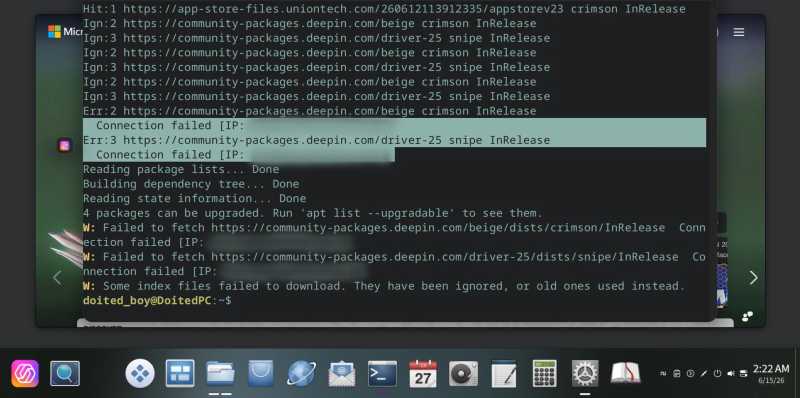
And using "sudo apt dist-upgrade" aftewards brings no changes at all. :) It says "0 packages to upgrade..." and so on. The system won't even try to upgrade.
By the way, my internet connnection is OK. However there is not any sub-folder named "Driver-25" in the folder "https://community-packages.deepin.com".
First of all, I appreciate your help, I really do.
Regrettably the command "sudo apt update && sudo apt dist-upgrade" doesn't work for me. 🙂 When I use "sudo apt update", I just get a bunch of connection errors (as seen on the screenshot below).
And using "sudo apt dist-upgrade" aftewards brings no changes at all. :) It says "0 packages to upgrade..." and so on. The system won't even try to upgrade.
By the way, my internet connnection is OK. However there is not any sub-folder named "Driver-25" in the folder "https://community-packages.deepin.com".
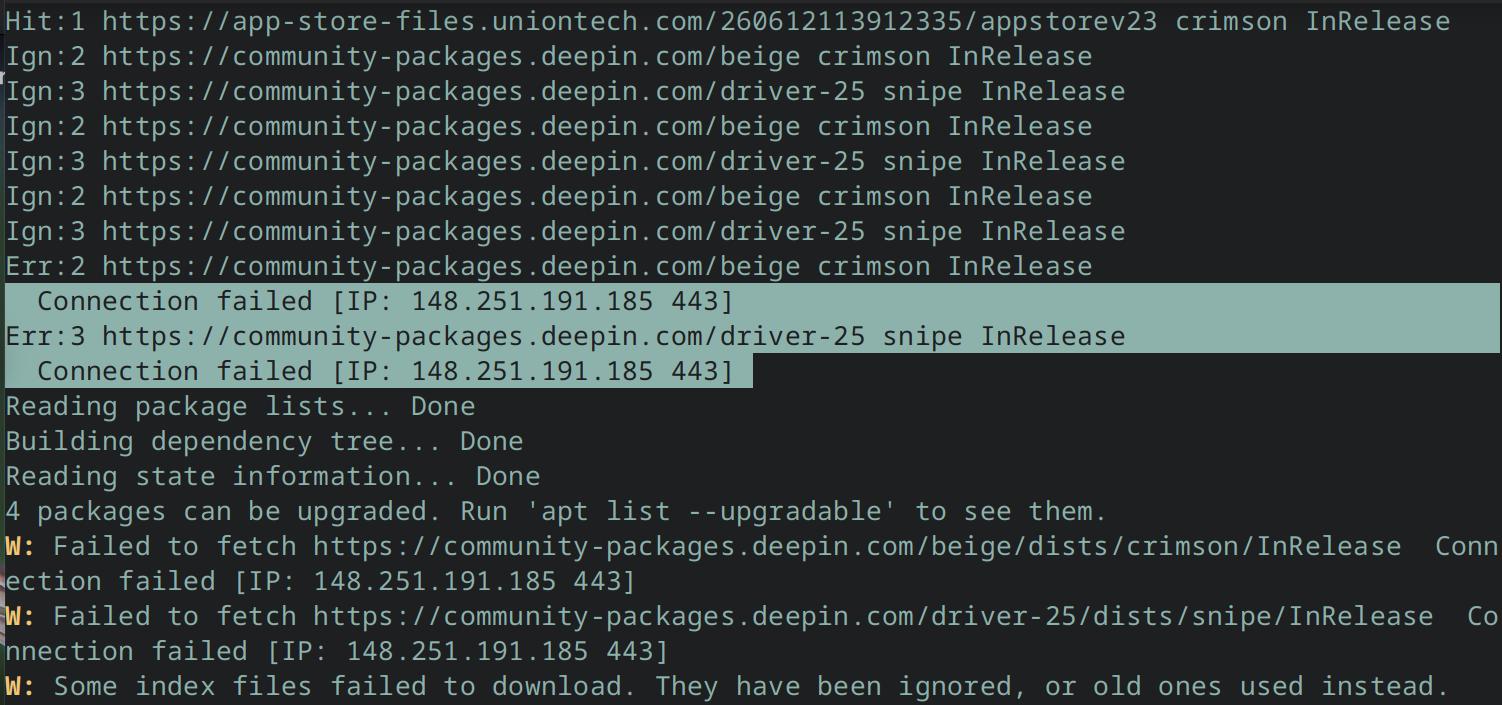
Well, actually the IP you blurred out is the IP address of our update server. That IP is what can help us locate the problem, since you're currently unable to connect to the update server. We need to see where that IP is connecting to.
deepin Well, actually the IP you blurred out is the IP address of our update server. That IP is what can help us locate the problem, since you're currently unable to connect to the update server. We need to see where that IP is connecting to.
Oh I'm so sorry, shouldn't blur the IP. 🙁 A stupid thing it was, and I did it spontaneously, without rhyme or reason. There below is the full screenshot:

 deepin
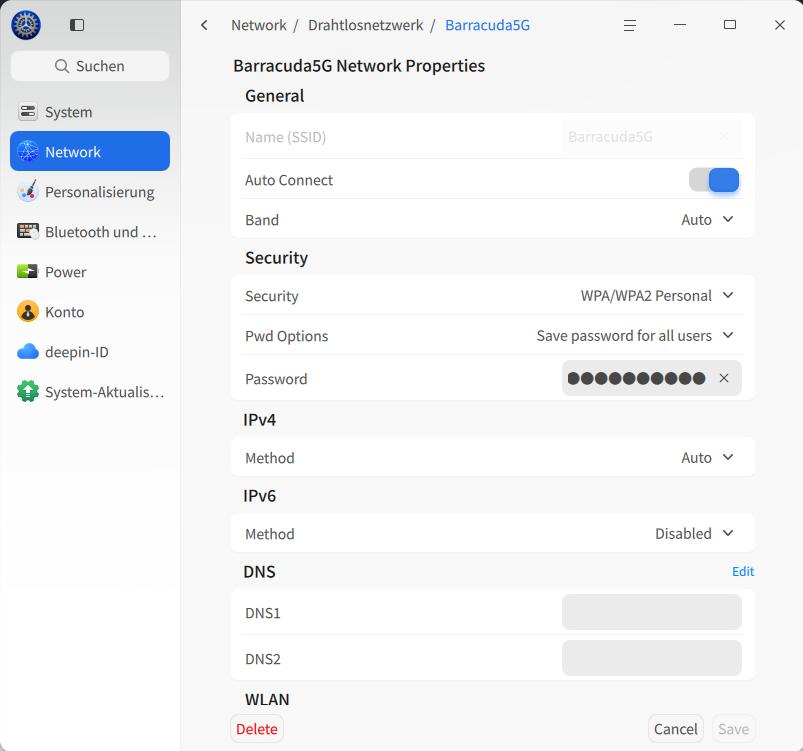
 I found that IPv6 still doesn’t work properly, especially in my European region, so please disable it in Deepin Linux under network settings and test again. Just a moment ago, I couldn’t log in to bbs.deepin.org with my WeChat account, regardless of the browser (I’m currently “working” on my second computer) — disabling IPv6 fixed the issue. Sometimes it works and sometimes it doesn’t; for the life of me, I can’t imagine where the bug in Deepin could be. I think it’s more likely an ISP issue, since my router (Huawei) also supports IPv6. Try disabling it on your currently active network connection and give it another try.
Sorry, my Deepin is setup to german.
deepin I found that IPv6 still doesn’t work properly, especially in my European region, so please disable it in Deepin Linux under network settings and test again. Just a moment ago, I couldn’t log in to bbs.deepin.org with my WeChat account, regardless of the browser (I’m currently “working” on my second computer) — disabling IPv6 fixed the issue. Sometimes it works and sometimes it doesn’t; for the life of me, I can’t imagine where the bug in Deepin could be. I think it’s more likely an ISP issue, since my router (Huawei) also supports IPv6. Try disabling it on your currently active network connection and give it another try.
Sorry, my Deepin is setup to german.
Thank you for the brilliant advice! 👍 It doesn't help to upgrade the system though — I'm still facing the same issues in the console. But now I can open the "Application Center"! A very nice and neat App to be shure. However it's not able to upgrade the whole system per se.
Now I strongly suspect something is deeply wrong with my /etc/apt/sources.list file. It looks like:
Generated by deepin installer deb https://community-packages.deepin.com/beige/ crimson main commercial community #deb-src https://community-packages.deepin.com/beige/ crimson main commercial community
And I just feel something is wrong there. For example, when I open the link on the web, there is no any folder named "crimson" or "main" or "community". There are only two folders by the names "dists" and "pool"
deepin Thank you for the brilliant advice! 👍 It doesn't help to upgrade the system though — I'm still facing the same issues in the console. But now I can open the "Application Center"! A very nice and neat App to be shure. However it's not able to upgrade the whole system per se.
Now I strongly suspect something is deeply wrong with my /etc/apt/sources.list file. It looks like:
Generated by deepin installer deb https://community-packages.deepin.com/beige/ crimson main commercial community #deb-src https://community-packages.deepin.com/beige/ crimson main commercial community
And I just feel something is wrong there. For example, when I open the link on the web, there is no any folder named "crimson" or "main" or "community". There are only two folders by the names "dists" and "pool"
It looks that you have issue's with the repositories in my opinion.
I know that there are a lot of "helpfull" reports out there where you have to edit the repository list, I did the same long time ago, but it always makes me way more trouble than benefits.
It is not an issue per default by the Deepin Linux system, it is a costomed related issue.
I really would like to recommend you to make a clean, fresh installation with Deepin, so you can choose any 25.x.x Release and update it then to 25.2.2, no problems at all, just don't try to create workarounds with repositories.
deepin This is my resources.list
rainer@HP:/etc/apt$ more sources.list
#######################################################################################
deb https://community-packages.deepin.com/beige/ crimson main commercial community
#deb-src https://community-packages.deepin.com/beige/ crimson main commercial community
#######################################################################################
Popular Ranking
ChangePopular Events
More


 Unable to install HP Laserject Pro M15a Printer
Hello my friends! First of all, thank you for amazing work on "Deepin-desktop-community-25.0.10". I'm using this system, and it's just so cool, but I cannot upgrade it in any way.
I've tried the following command in terminal:
sudo deepin-immutable-ctl upgradeAnd I got the following message:
Fetching summary from remote default Failed to fetch summary: while fetching https://community-packages.deepin.com/deepin/immutable-repos/summary.sig: [28] Timeout was reachedI've looked up this address on the internet and there wasn't any file named "summary.sig". So it's a bit confusing to me.
I cannot use "AppCenter" or "System Settings"'s sub-menu as an alternative way of upgrading. Neither of them is working alas. It's never worked actually, since my first days of using "Deepin25". "AppCenter" doesn't even open.
So I need your help desperately. Thanks anyway. :)