

 中文
中文 
jjcui8595 deepin
2026-06-02 06:04 deepin 不要手动编辑boot/grub/grub.cfg。建议使用efibootmgr添加引导项,也可以Windows PE 引导后修复引导
Reply Like 0 View the author
 deepin
 不要手动编辑boot/grub/grub.cfg。建议使用efibootmgr添加引导项,也可以Windows PE 引导后修复引导
grub-update
一个命令就能处理
 deepin
 一个命令就能处理
update-grub与update-grub2 尝试过多次不行,应该是损坏比较严重不能自动修复,需要手动重新添加

 deepin
 做一个PE启动U盘 ,启动到PE系统,使用dism++来修复Windows引导。记得先备份一下efi分区的文件。
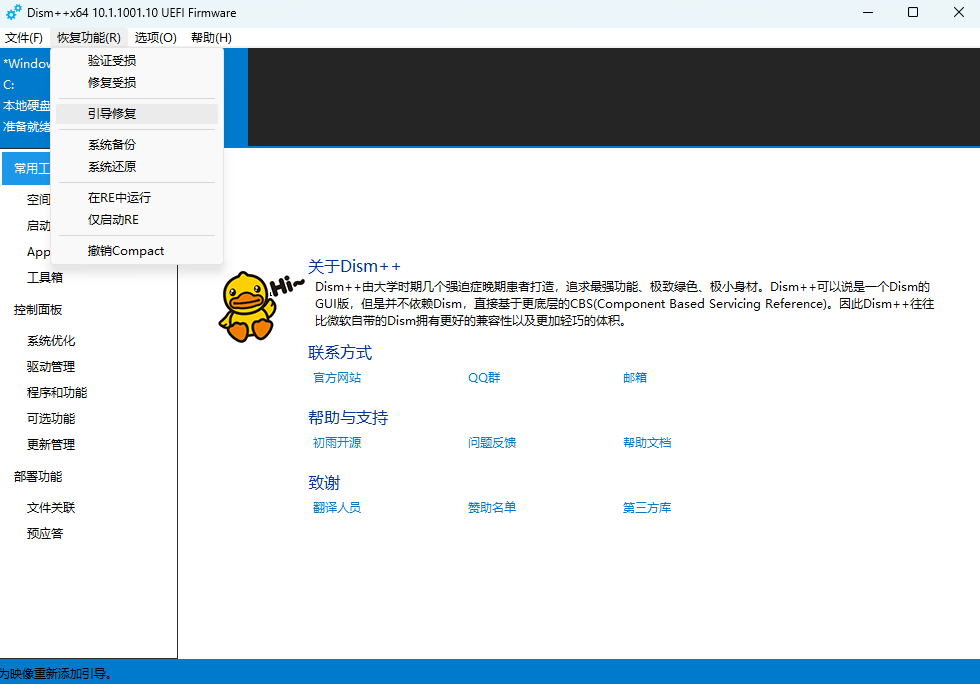
deepin 做一个PE启动U盘 ,启动到PE系统,使用dism++来修复Windows引导。记得先备份一下efi分区的文件。
老师这个方法可以👍 ,折腾几天终于搞定,感谢!
deepin 学习了
Popular Ranking
ChangePopular Events
More


 List of bugs and suggestions
我安装双系统,误操作把windows引导搞没有了,在deepin下怎么才能重新添加回来
windows的efi 与系统分区均无损坏,目前grub菜单中无windows的启动项
尝试在/etc/default/grub中启用os-prober并更新GRUB没有用
在/boot/grub/grub.cfg 添加windows的引导项,也没有成功,感觉此文件一刷新就恢复原状了