

 中文
中文 
WangZhongyun deepin
2026-04-16 16:50 deepin 罐子:
https://obsci.odata.cc/uos1070/Deepin_25/
下载我这个的玲珑看看。
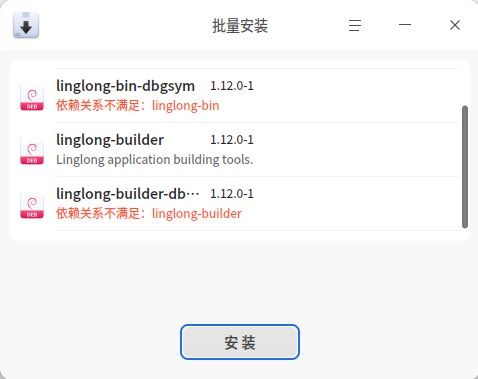
还有个linglong-bin已安装较新版本
Reply Like 0 View the author
 deepin
 https://obsci.odata.cc/uos1070/Deepin_25/
下载我这个的玲珑看看。
还有个linglong-bin已安装较新版本

还有个linglong-bin已安装较新版本
https://obsci.odata.cc/uos1070/Deepin_25/amd64/linglong-bin_1.12.0-1_amd64.deb
就下载安装这个就好了。
把安装的linglong-bin 卸载替换我这个。
deepin https://obsci.odata.cc/uos1070/Deepin_25/amd64/linglong-bin_1.12.0-1_amd64.deb
就下载安装这个就好了。
把安装的linglong-bin 卸载替换我这个。
以后更新会自动又升级到原来的版本吗?那又怎么彻底解决呢?
deepin https://obsci.odata.cc/uos1070/Deepin_25/amd64/linglong-bin_1.12.0-1_amd64.deb
就下载安装这个就好了。
把安装的linglong-bin 卸载替换我这个。
换成“linglong-bin_1.12.0-1_amd64.deb”安装也无效。
https://bbs.deepin.org.cn/phone/zh/post/297232
以后更新会自动又升级到原来的版本吗?那又怎么彻底解决呢?
目前不会有这个问题。
因为磐石相关组件直接没有了,
后面升级也不会有他的包名,
除非官方作妖。
deepin https://f.odata.cc/bK41bf576j/deepin-desktop-community-25.1.0-amd64-no-immutable.iso
最低要求40G
用这个镜像安装的分区容量要求很好了。
安装后两个内核都没支持我的DVI-D直连的1920*1080分辨率的HKC显示器,不过影院能正常播放。
用6.6内核相合的老N卡配置470闭源驱动后,对我的显示器都支持好了,但玲珑影院播放视频时却无图像了。
用这个镜像安装的分区容量要求很好了。
安装后两个内核都没支持我的DVI-D直连的1920*1080分辨率的HKC显示器,不过影院能正常播放。
用6.6内核相合的老N卡配置470闭源驱动后,对我的显示器都支持好了,但玲珑影院播放视频时却无图像了。
玲珑影院播放视频时却无图像
官方原版镜像应该也一样吧,
你安装闭源驱动后安装下我提供的N卡透传玲珑版本应该能正常吧。
 deepin
 目前不会有这个问题。
因为磐石相关组件直接没有了,
后面升级也不会有他的包名,
除非官方作妖。
作妖很正常,微信都检测发行版。
如果官方加入检测是否背有石头,没有就废掉,那得另寻出路了。

作妖很正常,微信都检测发行版。
如果官方加入检测是否背有石头,没有就废掉,那得另寻出路了。
官方加磐石检测没看出意义在哪
如果是信创场景开机就直接检测系统,不是信创系统直接不让启动
然后DDE的组件代码都在 https://github.com/linuxdeepin 下也不是不能移植,楼主已经移植过了
最后,微信莫名其妙调用ip命令,因此我的选择是直接塞busybox的ip链接进去只给阉割版
deepin 玲珑影院播放视频时却无图像
官方原版镜像应该也一样吧,
你安装闭源驱动后安装下我提供的N卡透传玲珑版本应该能正常吧。
安装有闭源驱动,进入系统用影院播放视频有声音没图像。
再安装下你提供的N卡透传玲珑版本后还是一样,重启系统进入还是一样。
安装有闭源驱动,进入系统用影院播放视频有声音没图像。
再安装下你提供的N卡透传玲珑版本后还是一样,重启系统进入还是一样。
咦,能不能远程,看看,这个问题官方镜像应该也一样存在吧。
deepin 咦,能不能远程,看看,这个问题官方镜像应该也一样存在吧。
官方UOS25的影院也一样存在这个问题
deepin 官方UOS25的影院也一样存在这个问题
刚又更新了UOS25,UOS25的影院能正常播放了。
非磐石版Deepin25.1的再更新后,那个包又更新成原来的了,影院还是不能正常播放。
deepin 咦,能不能远程,看看,这个问题官方镜像应该也一样存在吧。
用什么远程?
用什么远程?
向日葵。看我描述加我,
deepin 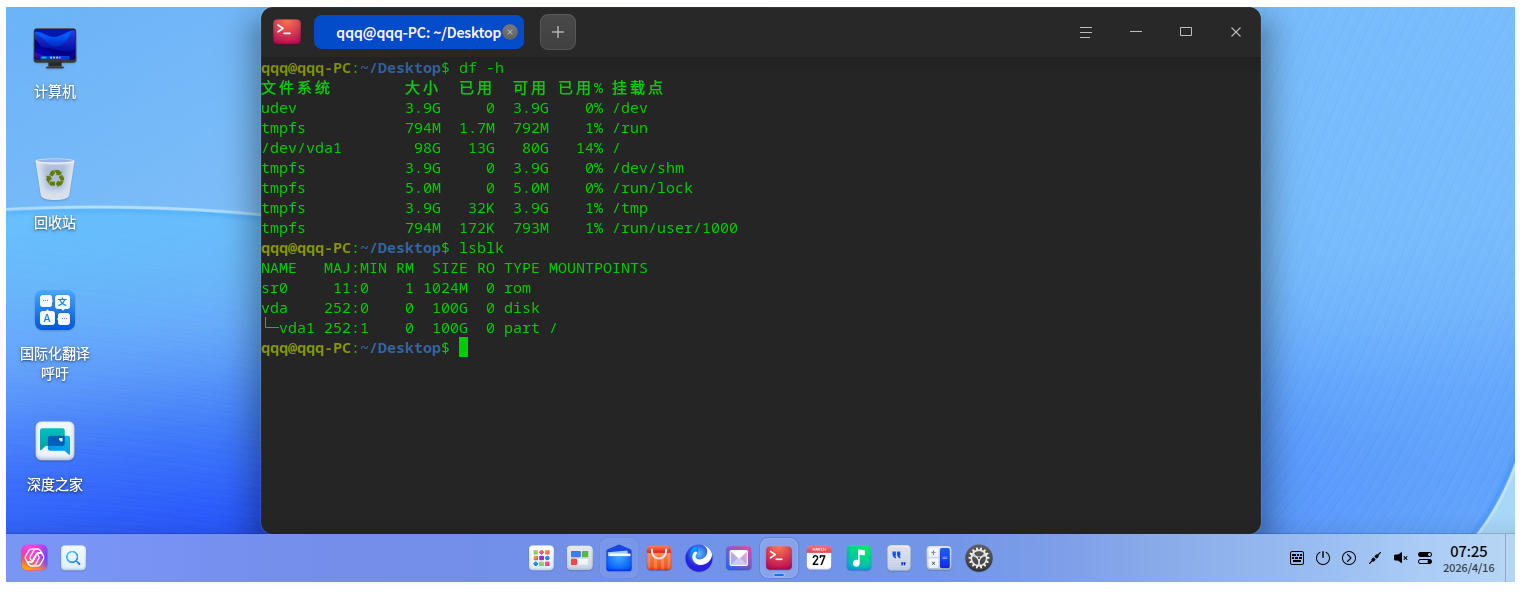
不怎么安装软件已经占了13G的硬盘空间了,剥离磐石系统还是这么浪费空间,还不如直接用debian或者openkylin2.0sp1,deepin操作系统越来越胖了
deepin l-cli run org.deepin.movie -- /bin/bash
use host NVIDIA driver fallback for org.deepin.driver.display.nvidia.470-256-02
dircolors: no SHELL environment variable, and no shell type option given
deepin export VDPAU_DRIVER=va_gl后没任何信息
deepin /opt/apps/org.deepin.movie/files/bin/deepin-movie
Initializing HwdecProbe
Initializing FileFilter
Entering CompositingManager::isMpvExists()
MPV library not loaded. Attempting to load libmpv.so.
Checking library existence: "libmpv.so"
Attempting to load library: "libmpv"
Successfully loaded library: "libmpv"
Exiting CompositingManager::isMpvExists() with result: true
MPV exists: true
Getting library path for: "libavformat.so"
Library search path: "/usr/lib/x86_64-linux-gnu"
No matching library found for: "libavformat.so"
Getting library path for: "libgstreamer-1.0.so"
Library search path: "/usr/lib/x86_64-linux-gnu"
Found library variant: "libgstreamer-1.0.so.0.2406.0"
Getting library path for: "libgstpbutils-1.0.so"
Library search path: "/usr/lib/x86_64-linux-gnu"
Found library variant: "libgstpbutils-1.0.so.0.2406.0"
Failed to create discoverer instance: Couldn't create 'uridecodebin' element
(deepin-movie:3672): GLib-GObject-CRITICAL **: 19:15:55.861: invalid (NULL) pointer instance
(deepin-movie:3672): GLib-GObject-CRITICAL **: 19:15:55.867: g_signal_connect_data: assertion 'G_TYPE_CHECK_INSTANCE (instance)' failed
(deepin-movie:3672): GLib-GObject-CRITICAL **: 19:15:55.867: invalid (NULL) pointer instance
(deepin-movie:3672): GLib-GObject-CRITICAL **: 19:15:55.867: g_signal_connect_data: assertion 'G_TYPE_CHECK_INSTANCE (instance)' failed
(deepin-movie:3672): GStreamer-PBUtils-CRITICAL **: 19:15:55.867: gst_discoverer_start: assertion 'GST_IS_DISCOVERER (discoverer)' failed
FileFilter initialization completed
Initializing GstUtils
Getting library path for: "libgstreamer-1.0.so"
Library search path: "/usr/lib/x86_64-linux-gnu"
Found library variant: "libgstreamer-1.0.so.0.2406.0"
Getting library path for: "libgstpbutils-1.0.so"
Library search path: "/usr/lib/x86_64-linux-gnu"
Found library variant: "libgstpbutils-1.0.so.0.2406.0"
Failed to create discoverer instance: Couldn't create 'uridecodebin' element
(deepin-movie:3672): GLib-GObject-CRITICAL **: 19:15:55.869: invalid (NULL) pointer instance
(deepin-movie:3672): GLib-GObject-CRITICAL **: 19:15:55.869: g_signal_connect_data: assertion 'G_TYPE_CHECK_INSTANCE (instance)' failed
(deepin-movie:3672): GLib-GObject-CRITICAL **: 19:15:55.869: invalid (NULL) pointer instance
(deepin-movie:3672): GLib-GObject-CRITICAL **: 19:15:55.869: g_signal_connect_data: assertion 'G_TYPE_CHECK_INSTANCE (instance)' failed
(deepin-movie:3672): GStreamer-PBUtils-CRITICAL **: 19:15:55.869: gst_discoverer_start: assertion 'GST_IS_DISCOVERER (discoverer)' failed
GstUtils initialization completed
Starting deepin-movie application
Unset QT_WAYLAND_RECONNECT environment variable.
XDG_CURRENT_DESKTOP already starts with Deepin.
x86_64 defined.
Checking Wayland environment
Not running in Wayland environment
Hardware decoding check not requested or invalid arguments.
Checking Wayland environment
Not running in Wayland environment
Not running in Wayland environment.
mips not defined.
STATIC_LIB not defined.
JM GPU device not detected.
DTK version >= 5.4.0.0 - getting global DApplication.
Accessible factory installed.
Locale set to C.
mips not defined - setting DApplication attributes.
DApplication attributes set.
Application initialized with version:= 6.0.0 - theme saving handled automatically.
dtk.core.dsg: AppId is fetched from AM, and value is "deepin-terminal"
log path: "/home/wzr/.cache/deepin/deepin-movie/deepin-movie.log"
Entering CommandLineManager::get().
_instance is null, creating new CommandLineManager instance.
Entering CommandLineManager constructor.
Exiting CommandLineManager constructor. Options added.
Exiting CommandLineManager::get(). Returning _instance.
Command line options processed.
No positional arguments found.
Translator loaded and application display name/description set.
Entering CommandLineManager::debug().
Exiting CommandLineManager::debug(). Returning: false
failed to create drawable
failed to create drawable
failed to create drawable
Cannot load libcuda.so.1
open system csv
open system csv
Failed to open VDPAU backend libvdpau_va_gl.so: cannot open shared object file: No such file or directory
MAGIC_DECODER_PROBE
Popular Ranking
ChangePopular Events
More


 List of bugs and suggestions
记得保存数据。
使用过程中后期可能有升级失败风险。
2026年4月16日更新。
http://f.odata.cc/zJ1wivVVcV/deepin-desktop-community-25.1.0-amd64-no-immutable.iso
https://f.odata.cc/oJ8UmFGPwW/deepin-desktop-community-25.1.0-amd64-no-immutable.iso
目前最终版本了:https://f.odata.cc/bK41bf576j/deepin-desktop-community-25.1.0-amd64-no-immutable.iso