

 中文
中文 

Hi,
Thank you for reporting the issue. I understand that you're unable to change the keyboard layout from us to jp in ~/.config/fcitx5/profile – the file keeps reverting or permissions/seem to enforce the default US layout.
Our engineer has provided the following solution. Please try it step by step:
1. Stop Fcitx5 first
Open a terminal and run:
killall fcitx5-help
killall fcitx5
2. Edit the profile file
Open the configuration file with a text editor (e.g., nano):
nano ~/.config/fcitx5/profile
Find the section [Groups/0] (or the group that contains Mozc). Change Layout=us to Layout=jp.
Example:
[Groups/0]
Name=Default
DefaultIM=mozc

[Groups/0/Items/0]
Name=keyboard-jp
Layout=jp   <-- change this to jp
Save the file and exit.
3. Restart Fcitx5
Start it again:
fcitx5 -d &
After this, the Japanese layout should be active for Mozc.
Alternative suggestion (GUI method):
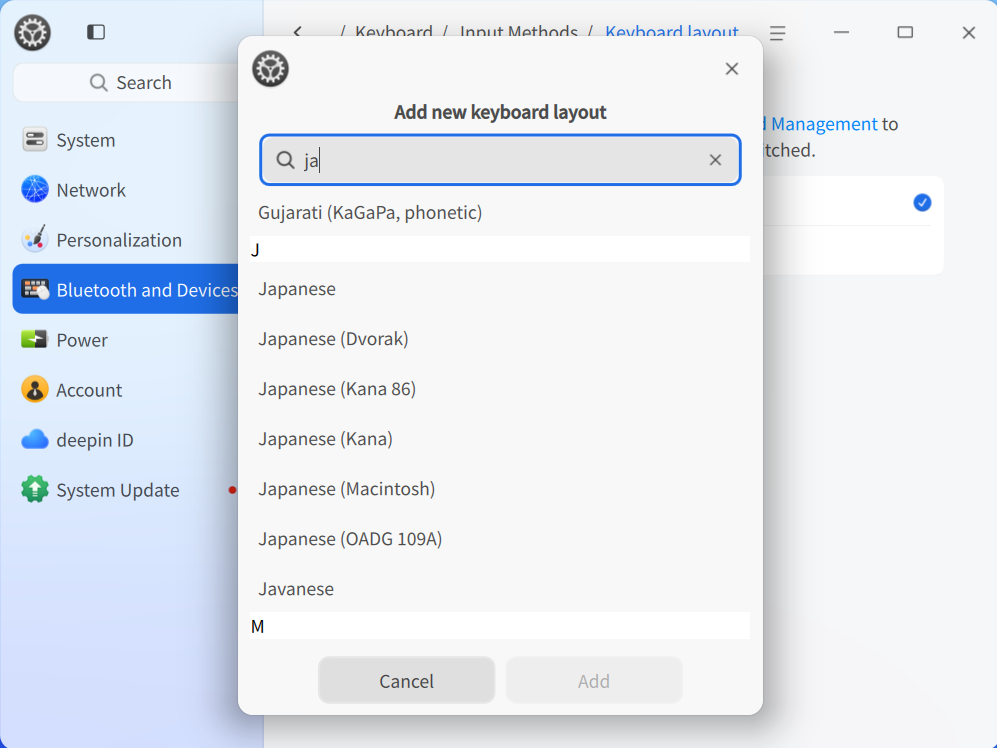
You can also add the Japanese keyboard layout via the system settings:
Go to Control Center → Bluetooth & Devices → Keyboard → Input Method (or Keyboard Layout), then add Japanese (jp) layout. This might be easier and also avoids permission issues.


 List of bugs and suggestions


fcitx5-mozc of japanese keyboard have to use of JP layout.
Default layout = us or Layout = us in .config/fcitx5/profile.
us have to change of jp.
Unable to change layout us to jp.
Unable to change permissions and Default settings are enforced.
Can I change and rewrite of .config/fcitx5/profile file and .config/fcitx5/config file ?