

 中文
中文 
𰻞𰻝面 deepin
2026-04-11 13:41 deepin 那就直接用Ubuntu喽
Reply Like 0 View the author
 deepin
 那就直接用Ubuntu喽
 deepin
 那就直接用Ubuntu喽
你说的对啊!哪个好用就用哪个,以后我闭嘴。
deepin 你说的对啊!哪个好用就用哪个,以后我闭嘴。
我只是建议,你为什么这么大敌意?

 deepin
 显卡驱动适配问题,国产显卡量产的话,适配性也是会丝般顺滑的,比如砺算显卡,6月18日发布,性能=4060,驱动已经适配deepin了。

这应该不是桌面问题,是deepin目前的Mesa3D版本太低所以对于RDNA4系列的显卡支持不是很好,后续升级应该就好了

你装25.1用的哪个内核呢?6.6还是6.18?内核日志:sudo journalctl -k > ~/Desktop/kernel_journal.txt
帮导个内核日志看看

 deepin
 显卡驱动适配问题,国产显卡量产的话,适配性也是会丝般顺滑的,比如砺算显卡,6月18日发布,性能=4060,驱动已经适配deepin了。
好消息!等。
研发分析了下,AMD 9060XT显卡需要高版本的mesa驱动,可以添加下这个仓库,把系统的mesa更新下,你这个卡应该就可以驱动了。终端里面执行
sudo nano /etc/apt/sources.list
然后把这一行加到系统源下面(粘贴完ctrl+o写入,ctrl+x退出):
deb https://ci.deepin.com/repo/deepin/deepin-community/hwe-25/ unstable main community commercial
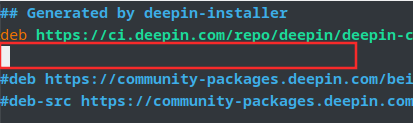
再执行 sudo apt update&&sudo apt dist-upgrade更新mesa驱动,重启系统。
deepin 研发分析了下,AMD 9060XT显卡需要高版本的mesa驱动,可以添加下这个仓库,把系统的mesa更新下,你这个卡应该就可以驱动了。终端里面执行
sudo nano /etc/apt/sources.list
然后把这一行加到系统源下面(粘贴完ctrl+o写入,ctrl+x退出):
deb https://ci.deepin.com/repo/deepin/deepin-community/hwe-25/ unstable main community commercial
再执行 sudo apt update&&sudo apt dist-upgrade更新mesa驱动,重启系统。
我回来了,管用,更新完之后,非常丝滑了。谢谢大神!
Popular Ranking
ChangePopular Events
More


 List of bugs and suggestions
处理器5700X,显卡amdrx9060xt,两个屏幕,一个4k.一个2k.早先就卡成ppt了,我换成了ubuntu,丝般顺滑,我以为deepin内核太旧呢,对新显卡不怎么支持。这次升级到了25.1,我又装了一次,还是卡成ppt.这就不是内核问题了,这是桌面的问题了啊。建议放开桌面,允许大家安装xfce或者是gnome,这样能解决很大的问题。