[Problem feedback] 打印机驱动
Tofloor
poster avatar
Rafine
deepin
5 hours ago
Author

小米K200打印机,可以搜索到,但是没有驱动,安装不了。怎么解决?

Reply Favorite View the author
All Replies
晚秋(lateautumn)
Moderator
5 hours ago
#1

想用linux系统,买打印机时,一定在关注一下有没有linux系统的驱动。尤其是这种杂牌applaud

Reply View the author
jjcui8595
deepin
5 hours ago
#2

咨询打印机厂商客服

Reply View the author
LiuYongzhang
deepin
3 hours ago
#3

USB 直连(最稳,优先)

  1. 打印机通电、USB 线连 Deepin 电脑
  2. 打开 Deepin 启动器 → 搜索「打印管理器」打开
  3. 点左下角「+ 添加打印机」,系统自动扫描 USB 设备
  4. 选中「Xiaomi K200」(或显示为 USB 打印机)→ 下一步
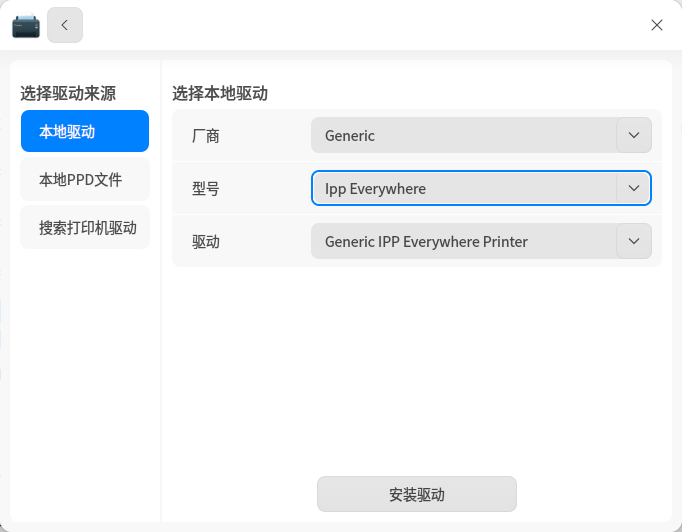
  5. 驱动选择:Generic → IPP Everywhere → Generic IPP Everywhere Printer
  6. 完成添加 → 右键打印机 → 「打印测试页」验证

WiFi 网络打印(同局域网)

Step1:获取打印机 IP(米家 APP)

  • 手机连同 WiFi → 打开米家 APP → 进入 K200 → 设置 → 设备信息 → 记下IP 地址(如 192.168.1.100)

Step2:Deepin 添加网络打印机

  1. 打印管理器 → + 添加打印机 → 选择「手动查找」或「URI 查找
  2. 手动查找:输入打印机 IP → 下一步
  3. URI 查找(更准):输入 ipp://打印机IP:631/ipp/print → 下一步
  4. 驱动同样选:Generic → IPP Everywhere → Generic IPP Everywhere Printer
  5. 完成 → 测试页

手动 CUPS 网页添加(图形界面失败时用)

  1. 浏览器打开:http://localhost:631
  2. 进入「Administration」→ 输入 Deepin 管理员密码
  3. Add Printer → 选择「Internet Printing Protocol (ipp)」→ Continue
  4. 输入:ipp://打印机IP:631/ipp/print → Continue
  5. Name/Description 随便填 → Make 选「Generic」→ Model 选「IPP Everywhere」→ Add Printer
  6. 设置默认选项 → 打印测试页
Reply View the author
huaqi
deepin
3 hours ago
#4

换个打印机呢亲

Reply View the author