

 中文
中文 
出售星辰之书的书商
2026-03-28 18:57 Moderator
大佬太厉害了!
Reply Like 0 View the author

大佬太厉害了!

 deepin
 开源真好,可以互通有无

 deepin
 太强了
 deepin
 一个现代,一个古董,都是用了心的作业。

 deepin

 deepin
 大佬太厉害了
 deepin
 楼主威武
 deepin
 一个现代,一个古董,都是用了心的作业。
deepin那个其实是公版的onboard(

 deepin
 deepin那个其实是公版的onboard(
麒麟那个我记得是和 fcitx 作者一起搞的 但 fcitx 作者不是在 deepin 么 为啥 deepin 官方不弄呢😂
deepin 

 deepin
 大佬,太牛了,不知道其他发行版能不能用呢,
我是cachy,niri桌面,早上用distrobox创建一个deepin的容器,安装之后,一直闪退,好像是没有图形界面的问题。然后一直问ai搞得乱七八糟的。
麻烦有空看看,然后我需要提供什么信息呢?
 deepin
 大佬,太牛了,不知道其他发行版能不能用呢,
我是cachy,niri桌面,早上用distrobox创建一个deepin的容器,安装之后,一直闪退,好像是没有图形界面的问题。然后一直问ai搞得乱七八糟的。
麻烦有空看看,然后我需要提供什么信息呢?
这个屏幕键盘不能在容器里用的,是需要搭配 fcitx5 才能用的
wayland 下的效果也无法保证,kylin 官方是只做了 wlcom 的支持的
deepin 大佬,太牛了,不知道其他发行版能不能用呢,
我是cachy,niri桌面,早上用distrobox创建一个deepin的容器,安装之后,一直闪退,好像是没有图形界面的问题。然后一直问ai搞得乱七八糟的。
麻烦有空看看,然后我需要提供什么信息呢?
不同桌面的 wayland 窗管是有差异的,估计需要专门适配
deepin 不同桌面的 wayland 窗管是有差异的,估计需要专门适配
这个项目是真好看,不过我不会搞,那就等日后吧。
deepin 不同桌面的 wayland 窗管是有差异的,估计需要专门适配
谢谢解答
Popular Ranking
ChangePopular Events
More


 List of bugs and suggestions
这个是目前 deepin25 的虚拟键盘,看起来着实不大美观
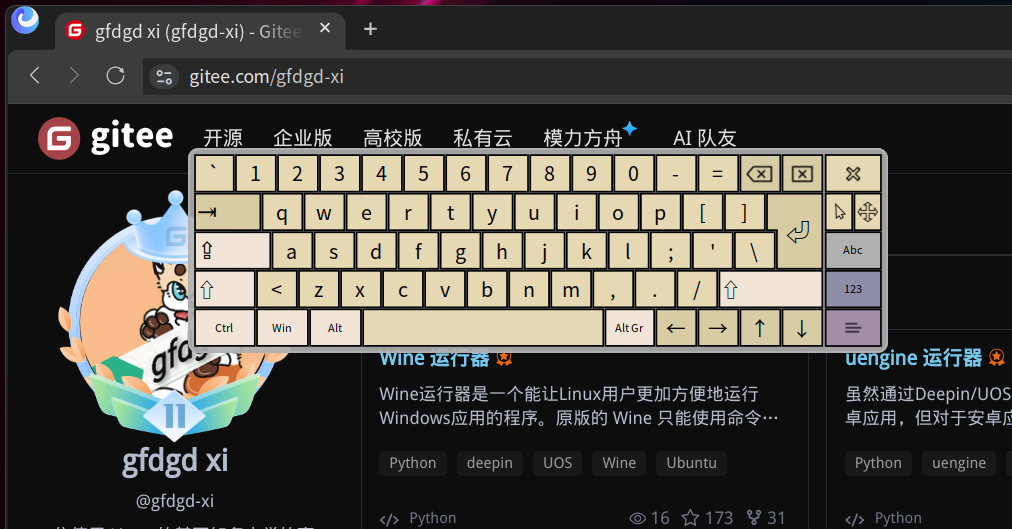
而这个是麒麟的虚拟键盘,着实美观多了,现在也成功移植到 deepin25/GXDE 了
我针对 DDE 做了一点特殊优化,如支持调用 deepin 的启动器等
以及这个是依赖 fcitx5 的,所以如果您使用 fcitx4 或者 ibus 就无法使用这个虚拟键盘
安装后注销/重启系统后就会在桌面右下角看到这样的图标(GXDE 用户则直接使用系统自带的屏幕键盘插件启用即可,不会显示该图标),点击该图标即可调用屏幕键盘,当用实体键盘输入内容时屏幕键盘会自动隐藏
我改后的源码放这了:
https://gitee.com/GXDE-OS/kylin-virtual-keyboard/
https://github.com/GXDE-OS/kylin-virtual-keyboard/
GXDE 用户添加内测源更新至最新版本即可
deepin 用户可从以下链接下载 deb 安装(已编译 x86、arm、loong64、riscv64 的包):
蓝奏:https://gfdgdxi.lanzouw.com/b0pnhz64b
密码:9c4k
城通网盘: https://ctfile.gfdgdxi.top#/d/31540479-162135805-42b814?p=2061 (访问密码: 2061)