

 中文
中文 
Ligocut光剪视频剪辑软件 deepin
2026-02-01 23:23 deepin Backbone of ecological co-construction group
你得去问打包flatpak包的那个人了
Reply Like 1 View the author
 deepin
 你得去问打包flatpak包的那个人了

 deepin
 乱码了这是,中文无法解析
 deepin
 1 安装Flatseal
sudo flatpak install flathub com.github.tchx84.Flatseal
2 将系统字体复制到家目录下
sudo cp -r /usr/share/fonts ~/.local/share/
3 通过Flatseal设置 krename 访问 字体目录
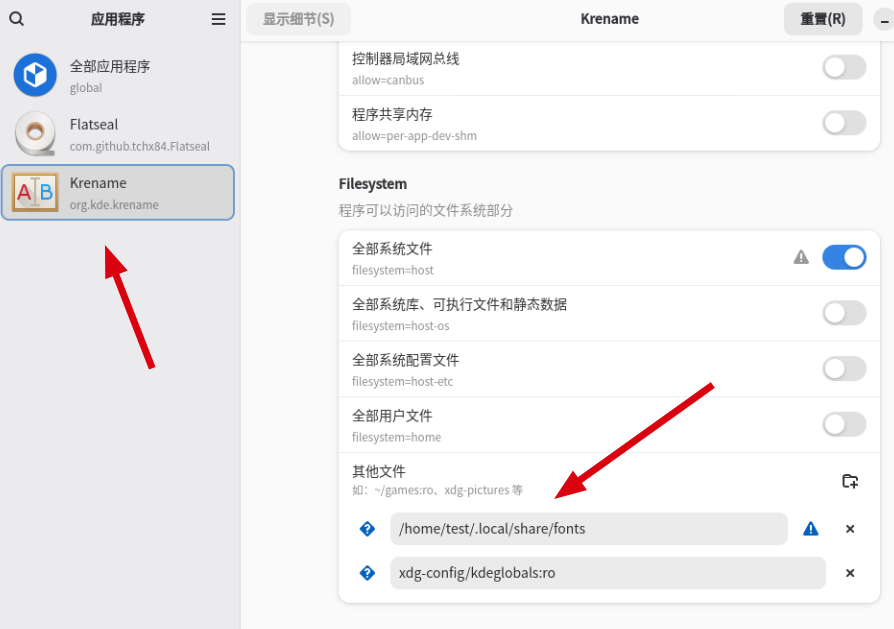
如此,应该能正常显示中文了
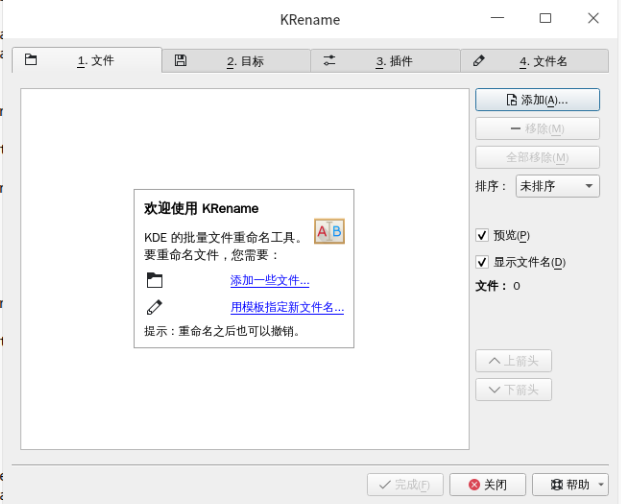

 deepin
 建议用玲珑,对中文支持的好些
 deepin
 1 安装Flatseal
sudo flatpak install flathub com.github.tchx84.Flatseal
2 将系统字体复制到家目录下
sudo cp -r /usr/share/fonts ~/.local/share/
3 通过Flatseal设置 krename 访问 字体目录
如此,应该能正常显示中文了
找了好久的方法,这个确实有效👍
 deepin
 建议用玲珑,对中文支持的好些
玲珑那个根本就没法运行 !
deepin 1 安装Flatseal
sudo flatpak install flathub com.github.tchx84.Flatseal
2 将系统字体复制到家目录下
sudo cp -r /usr/share/fonts ~/.local/share/
3 通过Flatseal设置 krename 访问 字体目录
如此,应该能正常显示中文了
谢谢 ~
deepin 玲珑那个根本就没法运行 !
提bug,让玲珑更新下

 deepin
 玲珑那个根本就没法运行 !
您好,是玲珑组件起不来还是玲珑版本的这个应用用不了
Popular Ranking
ChangePopular Events
More


 List of bugs and suggestions
这个 怎么弄 啊 !