

 中文
中文 
enforcee deepin
2022-12-11 18:59 deepin 可以chroot到原系统用里面的命令

Reply Like 1 View the author
 deepin
 可以chroot到原系统用里面的命令

 deepin
 电脑给另外一块硬盘只装了一个系统的话,这个引导就要装到这个硬盘的MBR上。这样你把这个硬盘移到哪台电脑,只要设置这块硬盘为第一启动盘,就都能引导起来。并且多块硬盘都装有系统的话,你进入任一Linux系统,可终端更新这台电脑内的所有系统引导:sudo update-grub

 deepin
 启动盘grub界面编辑内核启动常数删除installer项就行了,只是要自己grub-install操作

 deepin
 启动盘grub界面编辑内核启动常数删除installer项就行了,只是要自己grub-install操作
就是这么进入的,但是这么进入的不知道为什么命令行中就是没有 grub-install 命令,而且还专门测试了一下官方提供的 live 镜像,进入后里面也没有 grub-install 命令,带的引导修复工具也无法正常修复成功
deepin 电脑给另外一块硬盘只装了一个系统的话,这个引导就要装到这个硬盘的MBR上。这样你把这个硬盘移到哪台电脑,只要设置这块硬盘为第一启动盘,就都能引导起来。并且多块硬盘都装有系统的话,你进入任一Linux系统,可终端更新这台电脑内的所有系统引导:sudo update-grub
我这边主要是遇到了不知道怎么操作就无法正常进入引导了,所以需要想办法进行引导修复,重新安装引导需要使用 grub-install 命令,但是这个命令进入 live 系统里面没有这命令
deepin 可以chroot到原系统用里面的命令
是说我需要先使用u盘引导(引导时删除 install 启动项),进入后使用chroot切换到原系统目录,然后就能使用 grub-install 命令了?
deepin 启动盘grub界面编辑内核启动常数删除installer项就行了,只是要自己grub-install操作
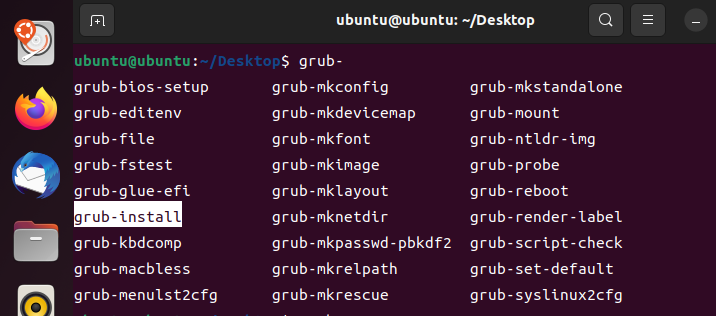
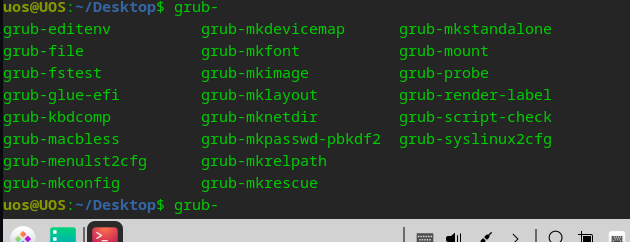
是想使用 grub-install 命令重新安装grub,只是遇到了实际进入live后grub-install命令找不到,我看有一些grub-开头的命令,但是就是没有grub-install,我试了ubuntu进入的try ubuntu,里面能够使用grub-install,所以就奇怪deepin中为什么就单单缺少了这个命令,我看安装好的deepin系统进入后里面其实是有grub-install命令的😂
deepin 我这边主要是遇到了不知道怎么操作就无法正常进入引导了,所以需要想办法进行引导修复,重新安装引导需要使用 grub-install 命令,但是这个命令进入 live 系统里面没有这命令
试试deepin live镜像系统里的修复系统引导程序
deepin 
deepin
用的就是这个,不行,里面没有 grub-install 命令
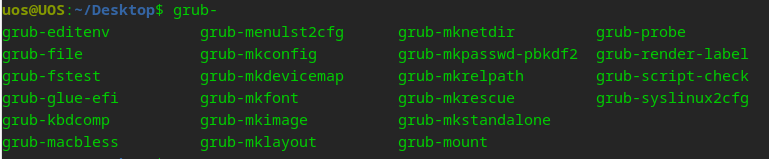
deepin 补充两个系统中的grub开头的命令列表

 deepin
 用的就是这个,不行,里面没有 grub-install 命令
有一个“深度系统修复工具”的软件,点开后再找“引导修复”就好了
Popular Ranking
ChangePopular Events
More


 is Deepin 25 using OSTree?
【系统环境】
镜像版本:20.7和20.8
【操作步骤】
电脑给另外一块硬盘装了系统,发现硬盘拔下来在插回去就引导不起来了,也无法进入grub(可能是哪里操作不对),接下来就是引导修复,发现进入deepin的live模式后命令行中缺少grub-install命令,非常奇怪。最后不得已只能在做个ubuntu的u盘进入live模式然后通过grub-install修复deepin的启动引导。😨
【问题现象】
无法单独通过deepin的u盘修复引导