

 中文
中文 
luzhishen deepin
2022-12-09 22:40 deepin 深度操作系统 20.8 新增社区自研应用“深度之家”,打通社区与用户之间的“信息墙”,将从社区产品、质量、软件、硬件生态等方面着手,更好地为社区用户提供服务。
Reply Like 0 View the author
 deepin
 深度操作系统 20.8 新增社区自研应用“深度之家”,打通社区与用户之间的“信息墙”,将从社区产品、质量、软件、硬件生态等方面着手,更好地为社区用户提供服务。

 deepin
 深度操作系统 20.8 新增社区自研应用“深度之家”,打通社区与用户之间的“信息墙”,将从社区产品、质量、软件、硬件生态等方面着手,更好地为社区用户提供服务。

就是这个??点哪里 都是返回论坛 只能说用户体验 真差 垃圾app

 deepin
 你买人家东西,人家当然要回复你快一点啦
deepin-movie打不开的情况,论坛的兄弟们很少遇到,所以没人回复你,很正常
楼上兄弟热情给你提供一个反馈渠道,你还看不上那个app,看不上论坛,你自己也没有贴一些日志之类的,指望着天降神兵?
去医院看病,也得挂个号,排个队,拍个片子抽个血,问问诊。啥也没有,想帮你都没法帮
deepin 你买人家东西,人家当然要回复你快一点啦
deepin-movie打不开的情况,论坛的兄弟们很少遇到,所以没人回复你,很正常
楼上兄弟热情给你提供一个反馈渠道,你还看不上那个app,看不上论坛,你自己也没有贴一些日志之类的,指望着天降神兵?
去医院看病,也得挂个号,排个队,拍个片子抽个血,问问诊。啥也没有,想帮你都没法帮
打开帖子时上传了日志文件,那我在上传一下日志

deepin-movie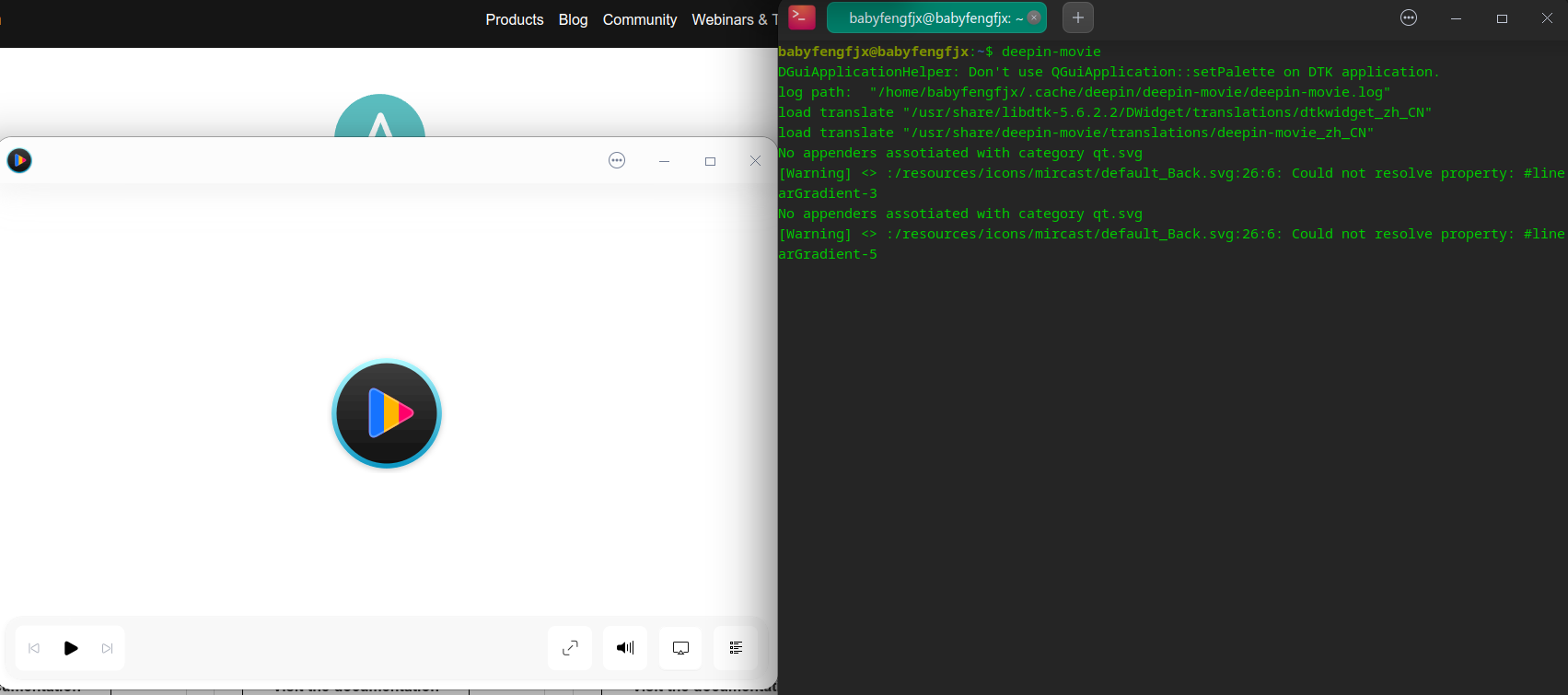 deepin
 deepin-movie段错误
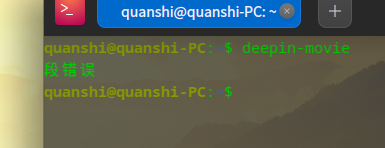
段错误
麻烦用终端复制下面所有内容,一次性执行然后输出个截图信息看:
sudo apt install inxi -y && inxi -F && cat /etc/apt/sources.list /etc/apt/sources.list.d/*.list |grep -v ^# && apt policy deepin-movie
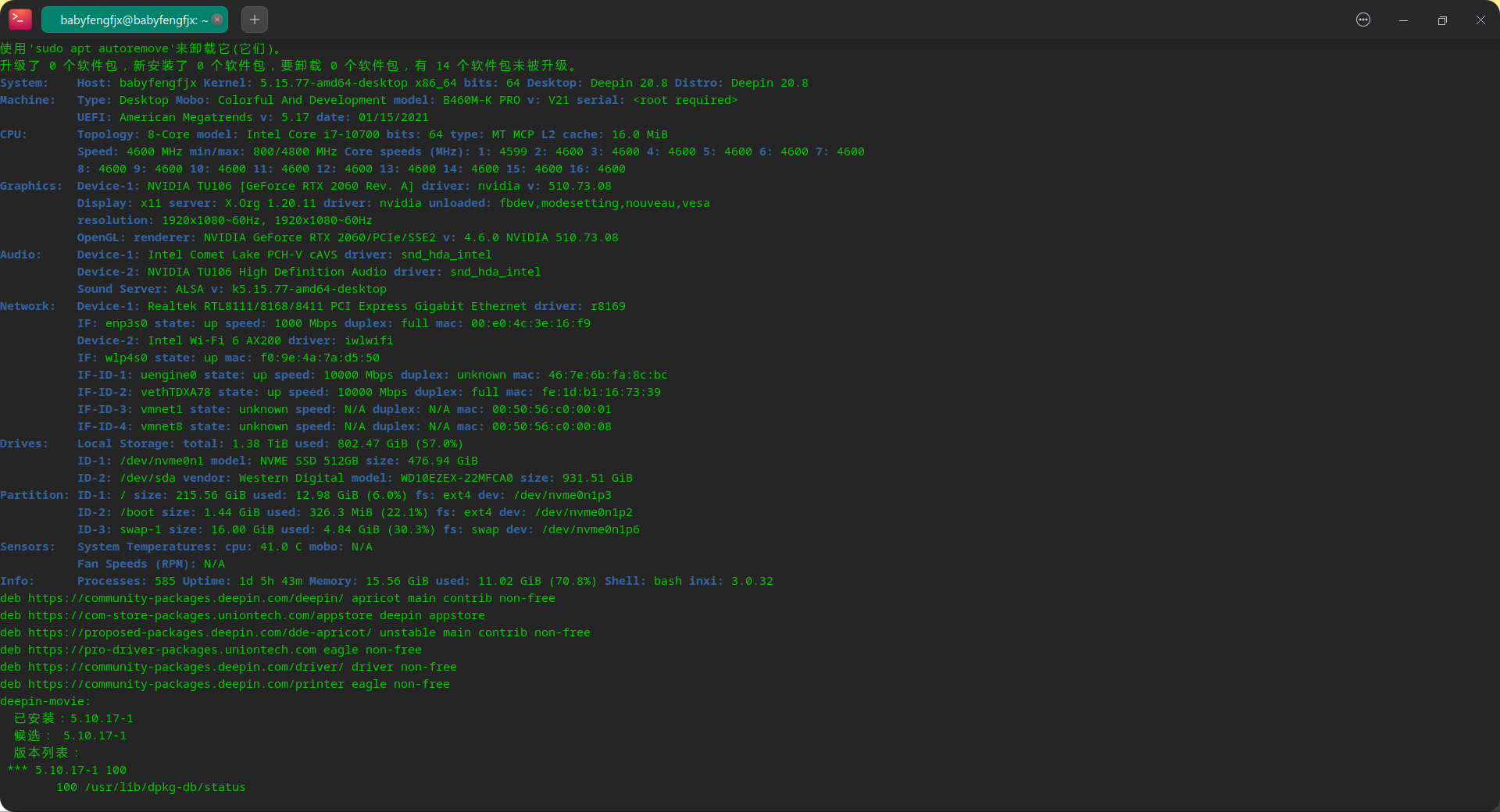
deepin 麻烦用终端复制下面所有内容,一次性执行然后输出个截图信息看:
sudo apt install inxi -y && inxi -F && cat /etc/apt/sources.list /etc/apt/sources.list.d/*.list |grep -v ^# && apt policy deepin-movie
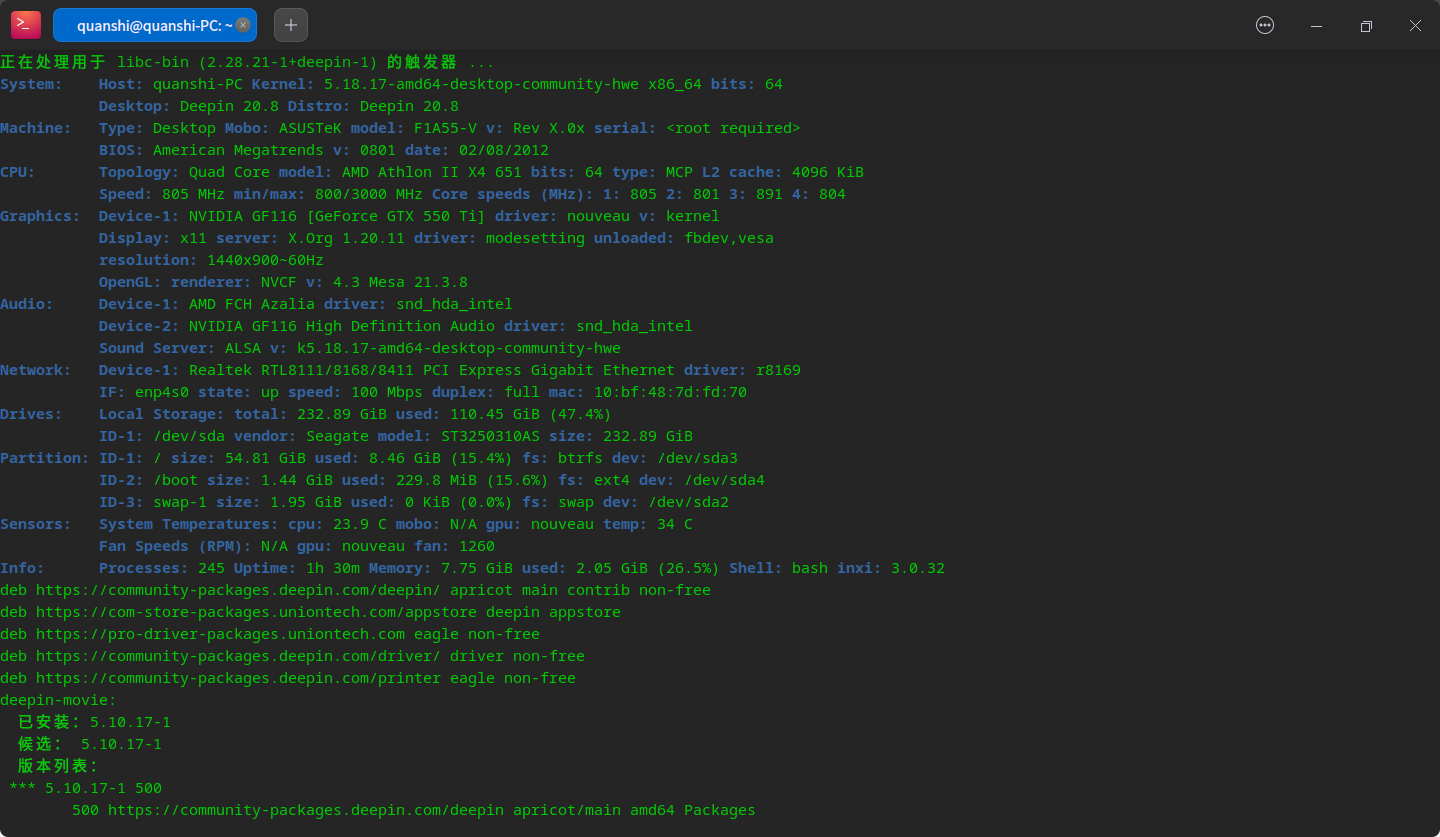
如果上述日志内容没啥可用信息,估计得用崩溃日志了,可以参考下这个帖子,将模块换成deepin-movie就可以,提供下coredump信息可以:https://bbs.deepin.org/zh/post/235642
deepin 楼主是双显卡吗?换成集显试试看
deepin 终端deepin-movie 还有双击影院图标 我操作了好几遍 deepin-movie文件夹始终不存在
[ 目录“/home/quanshi/.cache/deepin/deepin-movie”不存在 ]
从日志看好像是这个开源驱动加载有问题:
尝试安装闭源驱动试试:sudo apt install nvidia-driver
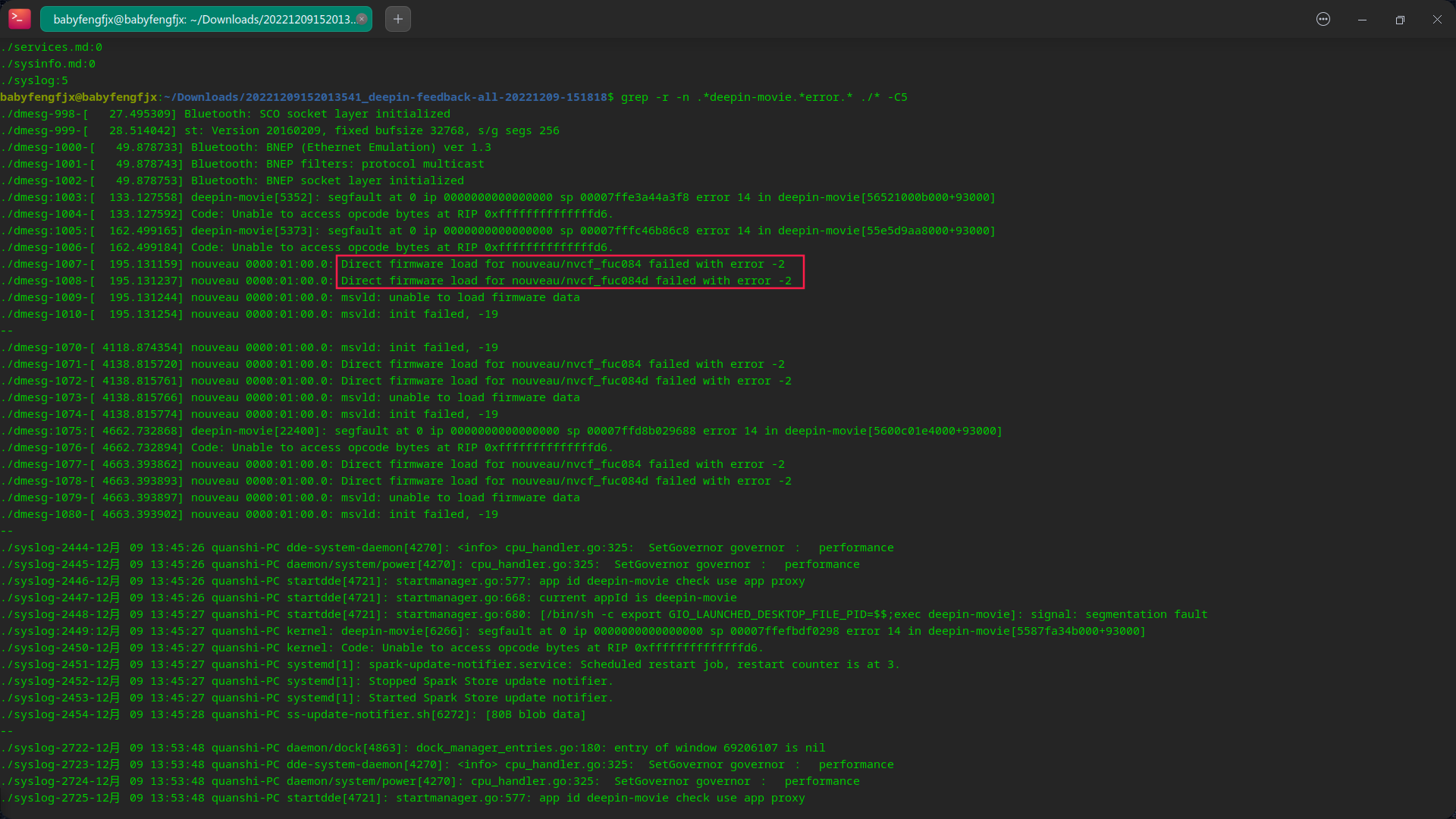
deepin 从日志看好像是这个开源驱动加载有问题:
尝试安装闭源驱动试试:sudo apt install nvidia-driver
我在V20.71 5.15内核时使用N卡的390 闭源驱动也是一样打不开
现在是v20.8 5.18内核 开源驱动 用的20.71镜像全新安装升级的20.8 还是打不开
按照你说的看崩溃日志
quanshi@quanshi-PC:$ deepin-movie$ sudo coredumpctl list
段错误 (核心已转储)
quanshi@quanshi-PC:
TIME PID UID GID SIG COREFILE EXE SIZE
Fri 2022-12-09 15:55:11 CST 7421 1000 1000 SIGSEGV present /usr/bin/deepin-movie 1.4M
Fri 2022-12-09 15:55:30 CST 7473 1000 1000 SIGSEGV present /usr/bin/deepin-movie 1.4M
Fri 2022-12-09 15:58:53 CST 7575 1000 1000 SIGSEGV present /usr/bin/deepin-movie 1.4M
quanshi@quanshi-PC:~$ sudo coredumpctl debug 7575 > ~/Desktop/dde-dock.log
Failed to invoke gdb: 没有那个文件或目录
quanshi@quanshi-PC:$ sudo coredumpctl debug 7473 >/Desktop/dde-dockl.log
Failed to invoke gdb: 没有那个文件或目录

 deepin
 直接执行下coredumpctl info试试呢
deepin 直接执行下coredumpctl info试试呢
PID: 7575 (deepin-movie)
UID: 1000 (quanshi)
GID: 1000 (quanshi)
Signal: 11 (SEGV)
Timestamp: Fri 2022-12-09 15:58:52 CST (24min ago)
Command Line: deepin-movie
Executable: /usr/bin/deepin-movie
Control Group: /user.slice/user-1000.slice/session-2.scope
Unit: session-2.scope
Slice: user-1000.slice
Session: 2
Owner UID: 1000 (quanshi)
Boot ID: d9b19f809d4f44c0b3fd3a339992076a
Machine ID: ac61d737f40b4d9390f7c3e692d042b6
Hostname: quanshi-PC
Storage: /var/lib/systemd/coredump/core.deepin-movie.1000.d9b19f809d4f44c0b3fd3a339992076a.7575.1670572732000000.zst (present)
Disk Size: 1.4M
Message: Process 7575 (deepin-movie) of user 1000 dumped core.
            Module linux-vdso.so.1 with build-id 5b61310c931aeab5963e8484df40e4af65a91cff
            Module libgstreamer-1.0.so.0.1404.0 with build-id 9c24eba3a8346b3c767429e9b70d2c606a3c7c1b
            Module libdatrie.so.1 with build-id 0e9bc29d3dd11ec2d771c137946192be18a79c19
            Module libfribidi.so.0 with build-id 71d302436711f952d7d68bc42fd281ab9fbbdebd
            Module libthai.so.0 with build-id 949290ee5e43ca8bad46da7b1c62101bd1d07f19
            Module libgomp.so.1 with build-id 65e03abb737c70bee04a63505da736178a081a54
            Module libexpat.so.1 with build-id 9cae37a7ca16ff80dba643a1067ac857dddd3c81
            Module libnuma.so.1 with build-id 7a9228e714484377414fe748d8b65c0c016d4126
            Module libXrender.so.1 with build-id 8374216f2563ffc3ec7f663311b7294c868fc5be
            Module libxcb-render.so.0 with build-id 16ee39846c07b82ebf7e48184cfc322b57c81e79
            Module libxcb-shm.so.0 with build-id 212e7e0edf02ecb898c61edbc204c38d1839172c
            Module libpixman-1.so.0 with build-id 338c8076f388daa0d3bd72c43bcdf01e9c3c8107
            Module libcroco-0.6.so.3 with build-id 32755fce70c4028eb396eb051cc465ebbef4827f
            Module libpango-1.0.so.0 with build-id af732e4aa98306030aed29d96e5fcb4ef1f01f72
            Module libpangoft2-1.0.so.0 with build-id 355cd83003a98f595bfa7f975f19996a4fbd9064
PID: 7575 (deepin-movie)
UID: 1000 (quanshi)
GID: 1000 (quanshi)
Signal: 11 (SEGV)
Timestamp: Fri 2022-12-09 15:58:52 CST (24min ago)
Command Line: deepin-movie
Executable: /usr/bin/deepin-movie
Control Group: /user.slice/user-1000.slice/session-2.scope
Unit: session-2.scope
Slice: user-1000.slice
Session: 2
Owner UID: 1000 (quanshi)
Boot ID: d9b19f809d4f44c0b3fd3a339992076a
Machine ID: ac61d737f40b4d9390f7c3e692d042b6
Hostname: quanshi-PC
Storage: /var/lib/systemd/coredump/core.deepin-movie.1000.d9b19f809d4f44c0b3fd3a339992076a.7575.1670572732000000.zst (present)
Disk Size: 1.4M
Message: Process 7575 (deepin-movie) of user 1000 dumped core.
            Module linux-vdso.so.1 with build-id 5b61310c931aeab5963e8484df40e4af65a91cff
            Module libgstreamer-1.0.so.0.1404.0 with build-id 9c24eba3a8346b3c767429e9b70d2c606a3c7c1b
            Module libdatrie.so.1 with build-id 0e9bc29d3dd11ec2d771c137946192be18a79c19
            Module libfribidi.so.0 with build-id 71d302436711f952d7d68bc42fd281ab9fbbdebd
            Module libthai.so.0 with build-id 949290ee5e43ca8bad46da7b1c62101bd1d07f19
            Module libgomp.so.1 with build-id 65e03abb737c70bee04a63505da736178a081a54
            Module libexpat.so.1 with build-id 9cae37a7ca16ff80dba643a1067ac857dddd3c81
            Module libnuma.so.1 with build-id 7a9228e714484377414fe748d8b65c0c016d4126
            Module libXrender.so.1 with build-id 8374216f2563ffc3ec7f663311b7294c868fc5be
            Module libxcb-render.so.0 with build-id 16ee39846c07b82ebf7e48184cfc322b57c81e79
            Module libxcb-shm.so.0 with build-id 212e7e0edf02ecb898c61edbc204c38d1839172c
            Module libpixman-1.so.0 with build-id 338c8076f388daa0d3bd72c43bcdf01e9c3c8107
            Module libcroco-0.6.so.3 with build-id 32755fce70c4028eb396eb051cc465ebbef4827f
            Module libpango-1.0.so.0 with build-id af732e4aa98306030aed29d96e5fcb4ef1f01f72
            Module libpangoft2-1.0.so.0 with build-id 355cd83003a98f595bfa7f975f19996a4fbd9064
后面信息是全的么,好像没啥有用信息呢。
 deepin
 gsettings set com.deepin.deepin-movie composited 'DisableComposited'
执行这个把影院的硬件加速关了试试?
deepin 从日志看好像是这个开源驱动加载有问题:
尝试安装闭源驱动试试:sudo apt install nvidia-driver
deepin-feedback-all-20221209-163557.tar.gz
里面有两个log 7575是用的开源驱动 5566是执行 sudo apt install nvidia-driver 后的文件
同时带上新的日志
现在还是打不开
安装nvidia-driver最后显示 这个
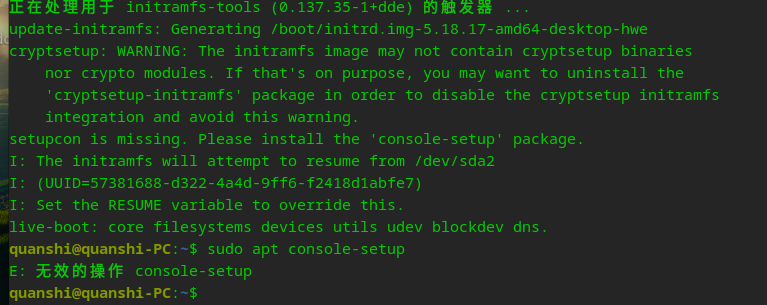
前天20.71用的nvidia-legacy-390xx-driver 也没有打开 影院。后来20.8出来后又全新装的20.8
deepin gsettings set com.deepin.deepin-movie composited 'DisableComposited'
执行这个把影院的硬件加速关了试试?
`quanshi@quanshi-PC:$ gsettings set com.deepin.deepin-movie composited 'DisableComposited'$ deepin-movie
quanshi@quanshi-PC:
段错误 (核心已转储)
quanshi@quanshi-PC:~$
Popular Ranking
ChangePopular Events
More


 is Deepin 25 using OSTree?
V20.8 5.18内核 影院打不开 终端直接deepin-movie显示段错误 双击影院图标没有反应
并且 在文件管理器 打开视频文件夹会闪退 。关闭视频预览就不会退出
20.7 使用5.15内核 也有同样的问题 系统是刚刚装完的
单显卡N卡 550ti 开源驱动 20.7时用闭源驱动也是一样的问题
deepin-feedback-all-20221209-151818.tar.gz
19楼有安装
nvidia-driver后的最新崩溃日志 和coredumpctl info顺便*吐槽 一下 论坛反馈问题的方式真的很慢 效率低下 还不如 购物时客服聊天 快 。建议搞一个反馈问题的聊天室或者客服聊天系统
12月10日没有后续 不知道为什么打不开 失望!!! 改用vlc