

 中文
中文 
whoam1 deepin
2022-11-15 16:37 deepin 是不是创建系统备份分区了
Reply Like 0 View the author
 deepin
 是不是创建系统备份分区了

 deepin
 开始菜单 ---> 系统管理 ---> 磁盘管理
自己看看空间到哪去了
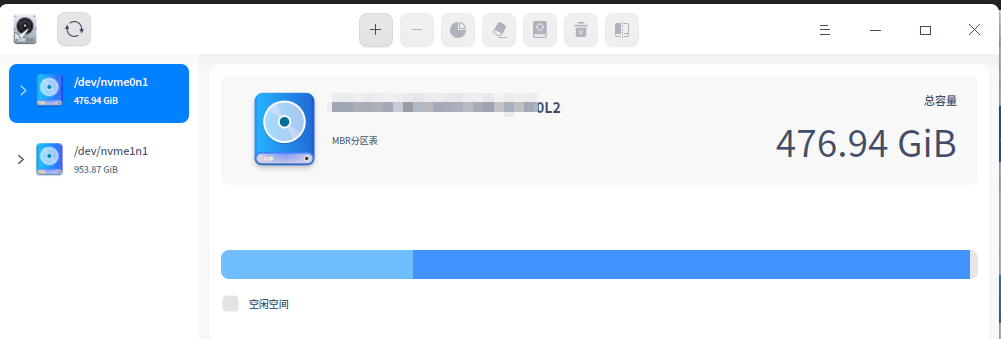
 deepin
 应该是deepin的A/B分区的原因,简单来说,就是在你的磁盘上分出来两个大小一样的分区,一个用来运行系统,另一个用来备份系统
 deepin
 你这是全盘安装的吧?
全盘安装会创建一个与系统盘同样大小的更新备份盘(隐藏),同时会创建一个10几个G的系统备份盘(隐藏),还会创建一个与内存大小相同的swap分区(隐藏)。
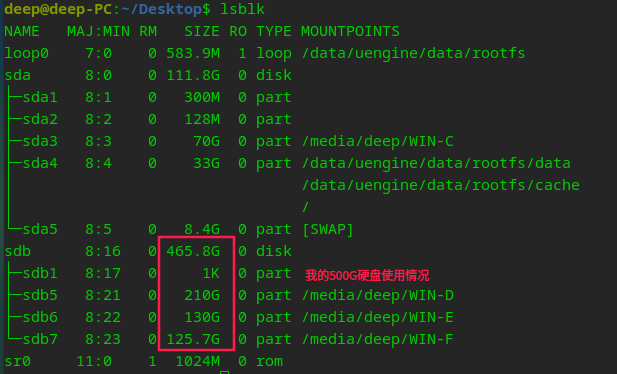
500G的硬盘实际使用空间只有460G左右,总的使用情况是:
系统盘80G+更新备份盘80G+数据盘270G+系统备份盘15G(估计)+swap分区8G(估计),另外还有EFI分区300M,boot分区2G。
你可以使用lsblk命令查看
 deepin
 全盘安装的话就是两个系统分区 一个A 一个B 所以会只有一半显示。和小米的双系统有点像
deepin 要解决的话就手动分区 一个 300M的 EFI 一个你需要的/分区 一个/home

 deepin
 你是全局安装的,要手动哦

在终端输入 lsblk 看下信息


我是deepin新手,刚装了系统,500G的硬盘怎么少了这么多?系统盘80G,数据盘270G?谢谢!