[Seek Help] 20.7.1搞不出来声音,怎么整!!
Tofloor
poster avatar
hanson1968
deepin
2022-11-14 16:27
Author

image.png

Reply Favorite View the author
All Replies
hanson1968
deepin
2022-11-14 16:40
#1

名称 : Intel Corporation
制造商 : Intel Corporation
型号 : Intel Audio device
版本 : 11
总线信息 : /devices/pci0000:00/0000:00:1f.3
中断 : 126
内存地址 : 0x51000000-0x510fffff (rw,non-prefetchable)
功能 : pm msi bus_master cap_list
芯片 : Realtek ALC897
子制造商 : Gigabyte Technology Co., Ltd
子设备 : pci 0xa194
延迟 : 32
物理ID : 1f.3
设备名称 : Onboard - Sound
驱动 : snd_hda_intel
驱动激活命令 : modprobe snd_hda_intel
驱动状态 : snd_hda_intel is active

Reply View the author
sammy-621
deepin
2022-11-14 17:03
#2

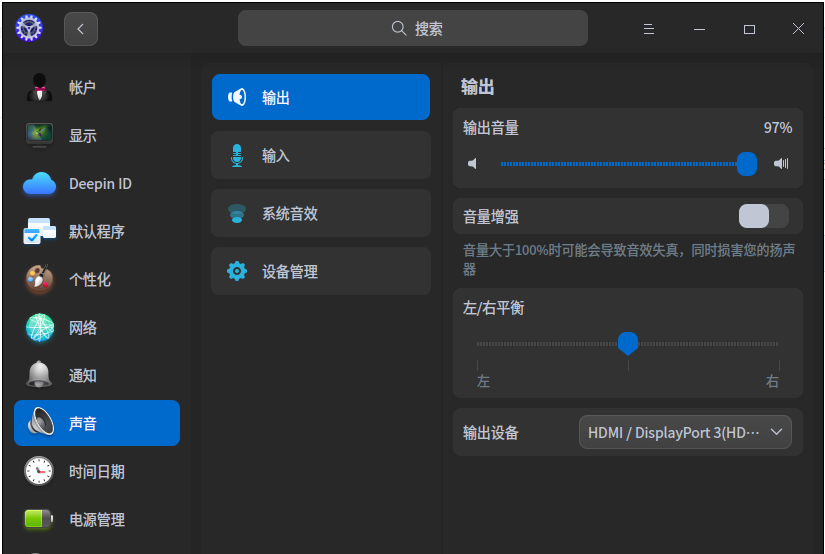
输出设备那里点一下,看下有没有其它设备。怎么整个HDMI啊?

Reply View the author
138******40
deepin
2022-11-14 17:03
#3

如果是用系统自带浏览器播放的话,建议换个浏览器试试,这个好像是通病

Reply View the author
hanson1968
deepin
2022-11-14 17:07
#4
sammy-621

输出设备那里点一下,看下有没有其它设备。怎么整个HDMI啊?

没有其他设备,这个系统默认是这样的,刚装的系统。

Reply View the author
hanson1968
deepin
2022-11-14 17:08
#5
hanson1968

没有其他设备,这个系统默认是这样的,刚装的系统。

啥声音都没有,插个USB蓝牙也没反应,控制中心没有蓝牙图标😂

Reply View the author
hanson1968
deepin
2022-11-14 17:09
#6
138******40

如果是用系统自带浏览器播放的话,建议换个浏览器试试,这个好像是通病

什么都没声音

Reply View the author
hanson1968
deepin
2022-11-14 17:12
#7
hanson1968

啥声音都没有,插个USB蓝牙也没反应,控制中心没有蓝牙图标😂

win下通过禁用前置面板检测就有声音!deepin下就不知道在那里可以设置禁用前置面板检测。你知道不?

Reply View the author
wlly-lzh
deepin
2022-11-14 17:13
#8

试一试有线耳机吧,插拔一下,看有没有用。

Reply View the author
hanson1968
deepin
2022-11-14 17:17
#9
wlly-lzh

试一试有线耳机吧,插拔一下,看有没有用。

没反应

Reply View the author
Jokul
deepin
2022-11-14 17:23
#10

USB蓝牙设备在window可能是免驱的,但在deepin(linux)可能需要驱动的

Reply View the author
云的眼泪
deepin
2022-11-14 17:51
#11

你的输出设备栏显示的是显卡带的声卡,不是主板声卡。

如果只有这个选项,就是板载声卡驱动没有正确安装。

Reply View the author
hanson1968
deepin
2022-11-14 22:35
#12
It has been deleted!
hanson1968
deepin
2022-11-14 22:36
#13
hanson1968 It has been deleted!

显示有ALC897呀

Reply View the author
jiong9
deepin
2022-11-14 23:28
#14

输出设备那边点一下,看看是不是有其他的选项。有的话切换成其他的输出模式看看。

Reply View the author
hanson1968
deepin
2022-11-15 00:31
#15
jiong9

输出设备那边点一下,看看是不是有其他的选项。有的话切换成其他的输出模式看看。

就是没有,苦恼!!

Reply View the author
川顺页
deepin
2022-11-16 17:51
#16

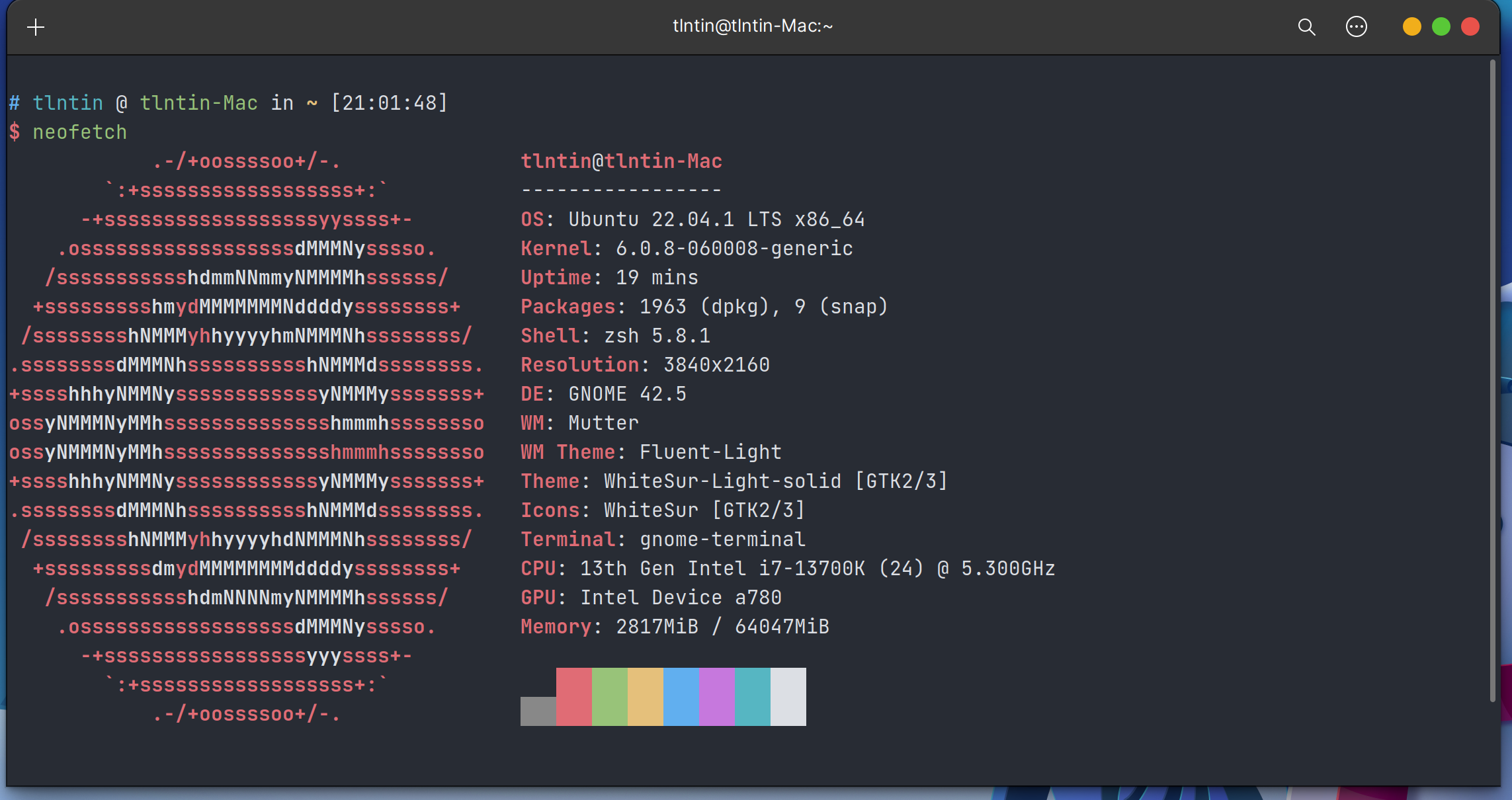
可能要升级内核,估计是你的CPU太新了导致的。

我最近装了一台13700k,Ubuntu22.04下也是没声音,且显示器刷新率识别异常(60HZ识别成了88.8HZ)。

最后升级了6.0.8 Linux内核,就一切正常了。

截图如下(40系显卡还没买到,勿嘲笑):
飞书20221116-095025.png

Reply View the author
hanson1968
deepin
2022-11-17 17:35
#17
川顺页

可能要升级内核,估计是你的CPU太新了导致的。

我最近装了一台13700k,Ubuntu22.04下也是没声音,且显示器刷新率识别异常(60HZ识别成了88.8HZ)。

最后升级了6.0.8 Linux内核,就一切正常了。

截图如下(40系显卡还没买到,勿嘲笑):
飞书20221116-095025.png

稳定吗?

Reply View the author
川顺页
deepin
2022-11-17 17:37
#18
hanson1968

稳定吗?

还行,反正不会蓝屏死机就对了😁

Reply View the author
hanson1968
deepin
2022-11-17 18:43
#19
川顺页

还行,反正不会蓝屏死机就对了😁

那怎么升级?

Reply View the author