中文
中文 
vivian_me
2022-11-15 01:23 deepin testing team
- 亲您在终端执行下这条命令,并将输出内容截图出来看看哈
- sudo apt install inxi -y && inxi -F && cat /etc/apt/sources.list /etc/apt/sources.list.d/*.list |grep -v ^#
Reply Like 0 View the author

 deepin
 你好 我的笔记本也是一直从20.3版本一路升级到20.8声卡就是识别不了,不知道何时能解决,按照你上面的命令输出如下。希望能找到解决方法。
System: Host: lee-PC Kernel: 5.18.4-amd64-desktop-hwe x86_64 bits: 64 Console: tty 0 Distro: Deepin 20.8
Machine: Type: Laptop System: JD product: JDBook-14i31115G48G256GS v: V20 serial: 69415927142550119W1995
Mobo: IP3 model: TN6 v: V20 serial: TN619321809S0222 UEFI: INSYDE v: TN6V2.3 date: 06/18/2021
Battery: ID-1: BAT0 charge: 43.8 Wh condition: 53.7/53.2 Wh (101%)
CPU: Topology: Dual Core model: 11th Gen Intel Core i3-1115G4 bits: 64 type: MT MCP L2 cache: 6144 KiB
Speed: 1016 MHz min/max: 400/4100 MHz Core speeds (MHz): 1: 1016 2: 888 3: 978 4: 870
Graphics: Device-1: Intel driver: i915 v: kernel
Display: server: X.Org 1.20.11 driver: modesetting unloaded: fbdev,vesa resolution: 1920x1080~60Hz
OpenGL: renderer: Mesa Intel UHD Graphics (TGL GT2) v: 4.6 Mesa 21.3.8
Audio: Device-1: Intel Tiger Lake-LP Smart Sound Audio driver: sof-audio-pci-intel-tgl
Sound Server: ALSA v: k5.18.4-amd64-desktop-hwe
Network: Device-1: Intel Wi-Fi 6 AX201 driver: iwlwifi
IF: wlp0s20f3 state: up mac: 38:87:d5:e3:bf:f7
IF-ID-1: uengine0 state: down mac: 4e:63:98:b8:01:7c
Drives: Local Storage: total: 238.47 GiB used: 35.49 GiB (14.9%)
ID-1: /dev/nvme0n1 vendor: Foresee model: 256GB SSD size: 238.47 GiB
Partition: ID-1: / size: 225.30 GiB used: 35.48 GiB (15.7%) fs: ext4 dev: /dev/nvme0n1p3
ID-2: swap-1 size: 8.00 GiB used: 1024 KiB (0.0%) fs: swap dev: /dev/nvme0n1p2
Sensors: System Temperatures: cpu: 40.0 C mobo: N/A
Fan Speeds (RPM): N/A
Info: Processes: 247 Uptime: 6h 21m Memory: 7.56 GiB used: 4.97 GiB (65.7%) Shell: bash inxi: 3.0.32
你好 我的笔记本也是一直从20.3版本一路升级到20.8声卡就是识别不了,不知道何时能解决,按照你上面的命令输出如下。希望能找到解决方法。
System: Host: lee-PC Kernel: 5.18.4-amd64-desktop-hwe x86_64 bits: 64 Console: tty 0 Distro: Deepin 20.8
Machine: Type: Laptop System: JD product: JDBook-14i31115G48G256GS v: V20 serial: 69415927142550119W1995
Mobo: IP3 model: TN6 v: V20 serial: TN619321809S0222 UEFI: INSYDE v: TN6V2.3 date: 06/18/2021
Battery: ID-1: BAT0 charge: 43.8 Wh condition: 53.7/53.2 Wh (101%)
CPU: Topology: Dual Core model: 11th Gen Intel Core i3-1115G4 bits: 64 type: MT MCP L2 cache: 6144 KiB
Speed: 1016 MHz min/max: 400/4100 MHz Core speeds (MHz): 1: 1016 2: 888 3: 978 4: 870
Graphics: Device-1: Intel driver: i915 v: kernel
Display: server: X.Org 1.20.11 driver: modesetting unloaded: fbdev,vesa resolution: 1920x1080~60Hz
OpenGL: renderer: Mesa Intel UHD Graphics (TGL GT2) v: 4.6 Mesa 21.3.8
Audio: Device-1: Intel Tiger Lake-LP Smart Sound Audio driver: sof-audio-pci-intel-tgl
Sound Server: ALSA v: k5.18.4-amd64-desktop-hwe
Network: Device-1: Intel Wi-Fi 6 AX201 driver: iwlwifi
IF: wlp0s20f3 state: up mac: 38:87:d5:e3:bf:f7
IF-ID-1: uengine0 state: down mac: 4e:63:98:b8:01:7c
Drives: Local Storage: total: 238.47 GiB used: 35.49 GiB (14.9%)
ID-1: /dev/nvme0n1 vendor: Foresee model: 256GB SSD size: 238.47 GiB
Partition: ID-1: / size: 225.30 GiB used: 35.48 GiB (15.7%) fs: ext4 dev: /dev/nvme0n1p3
ID-2: swap-1 size: 8.00 GiB used: 1024 KiB (0.0%) fs: swap dev: /dev/nvme0n1p2
Sensors: System Temperatures: cpu: 40.0 C mobo: N/A
Fan Speeds (RPM): N/A
Info: Processes: 247 Uptime: 6h 21m Memory: 7.56 GiB used: 4.97 GiB (65.7%) Shell: bash inxi: 3.0.32
亲,看您现在是 5.18.4的内核,您可以尝试下升级内核到5.18.17,sudo apt install linux-image-5.18.17-amd64-desktop-hwe linux-headers-5.18.17-amd64-desktop-hwe
deepin 亲,看您现在是 5.18.4的内核,您可以尝试下升级内核到5.18.17,sudo apt install linux-image-5.18.17-amd64-desktop-hwe linux-headers-5.18.17-amd64-desktop-hwe
内核升级好了还是老样子
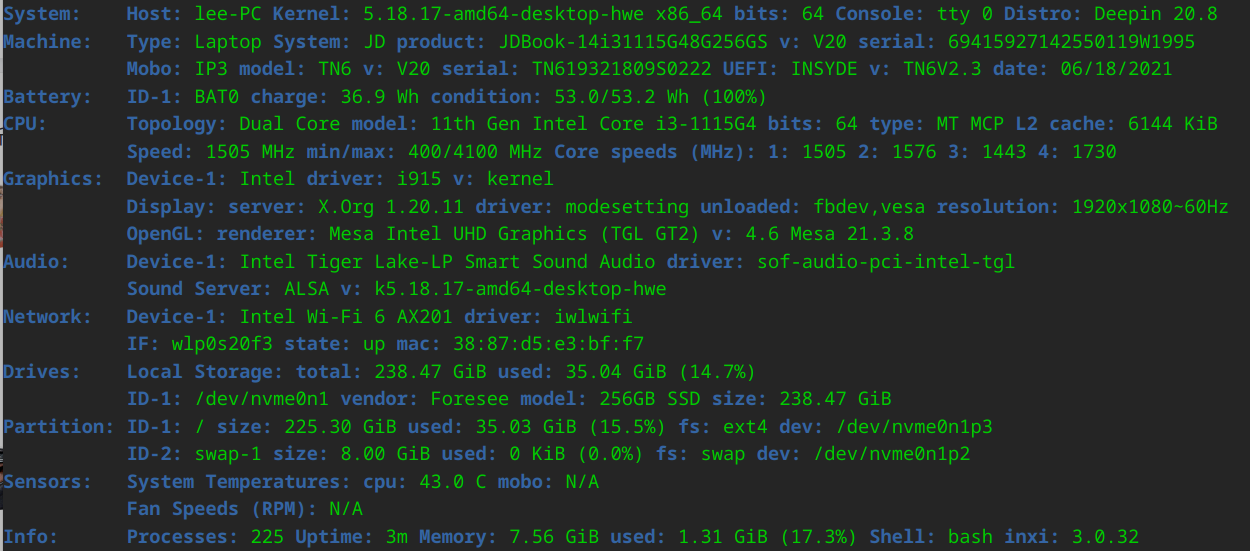
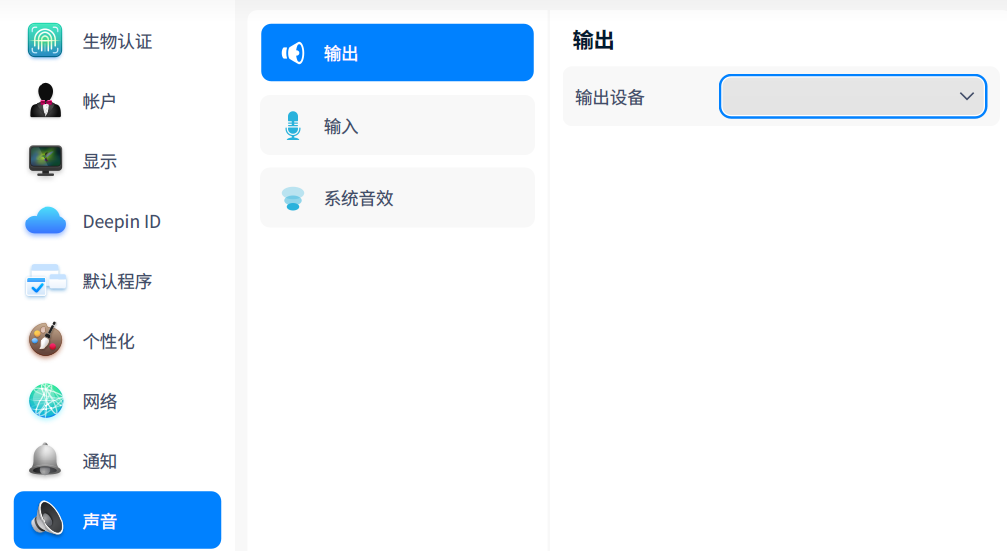


声音那里是个叉求解决办法
如图