[Control Center] 无法检测更新
Tofloor
poster avatar
菰城鸥鹭
deepin
2022-11-11 23:39
Author

截图_dde-control-center_20221111153557.png

网络连接正常的情况下(很稳定)无法检测

Reply Favorite View the author
All Replies
菰城鸥鹭
deepin
2022-11-11 23:50
#1

操作系统: Deepin 20 Community Linux version 5.18.17-amd64-desktop-hwe (uos@x86-compile-PC) (gcc (Uos 8.3.0.5-1+dde) 8.3.0, GNU ld (GNU Binutils for Uos) 2.31.1) #20.01.00.01 SMP PREEMPT_DYNAMIC Tue Sep 13 11:35:10 CST 2022

Reply View the author
deepin
2022-11-12 01:40
#2

这种出错了,就用终端

sudo su
apt-get update
apt upgrade
apt autoremove
apt clean

这样如果还不行,把报错发上来

Reply View the author
185******62
deepin
2022-11-12 04:02
#3

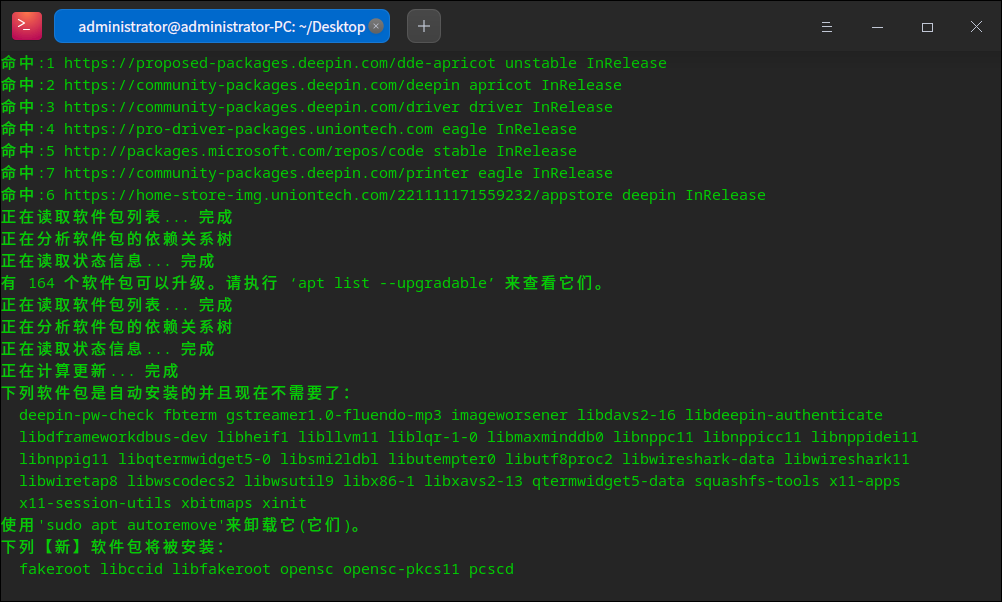
你可以看下是不是你自己安装某个软件时,不小心添加了某个仓源,你可以

打开终端输入sudo apt update &&sudo apt upgrade

看下仓源

命中:1 https://community-packages.deepin.com/deepin apricot InRelease
命中:2 https://community-packages.deepin.com/driver driver InRelease
命中:3 https://pro-driver-packages.uniontech.com eagle InRelease
命中:5 https://community-packages.deepin.com/printer eagle InRelease
命中:4 https://home-store-img.uniontech.com/221111171559232/appstore deepin InRelease

移除仓库方法:移动到目录:cd /etc/apt/sources.list.d 查看:ls 移除:sudo rm xxxx(地址名)

Reply View the author
bigben446
deepin
2022-11-12 06:06
#4

尽量使用命令行更新

可以做一个alias,下次直接输入uos-update

alias uos-update='sudo apt update && sudo apt dist-upgrade'

Reply View the author
菰城鸥鹭
deepin
2022-11-13 04:27
#5
185******62

你可以看下是不是你自己安装某个软件时,不小心添加了某个仓源,你可以

打开终端输入sudo apt update &&sudo apt upgrade

看下仓源

命中:1 https://community-packages.deepin.com/deepin apricot InRelease
命中:2 https://community-packages.deepin.com/driver driver InRelease
命中:3 https://pro-driver-packages.uniontech.com eagle InRelease
命中:5 https://community-packages.deepin.com/printer eagle InRelease
命中:4 https://home-store-img.uniontech.com/221111171559232/appstore deepin InRelease

移除仓库方法:移动到目录:cd /etc/apt/sources.list.d 查看:ls 移除:sudo rm xxxx(地址名)

image.png

Reply View the author