

 中文
中文 
逃离喧嚣 deepin
2022-11-07 21:56 deepin 生命在于折腾,deepin就是专门给你折腾的。😄
Reply Like 0 View the author
 deepin
 生命在于折腾,deepin就是专门给你折腾的。😄
 deepin
 试下单独升级内核看看,是不是和内核相关。
 deepin
 生命在于折腾,deepin就是专门给你折腾的。😄
每次大版本升级都得试试,然后又不得不降下来。
难受
deepin 试下单独升级内核看看,是不是和内核相关。
越升级不应该是内核越新吗??
是不是应该降内核呢?
deepin 升级之后这里选项就什么都没有了
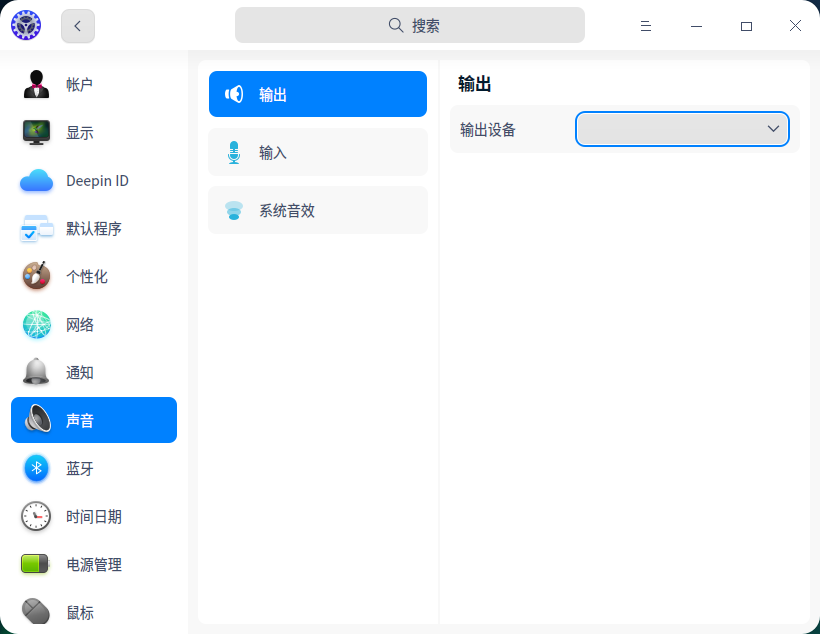
 deepin
 试试这个方法
sudo vi /etc/default/grub
下面这个选项后面添加snd_hda_intel.dmic_detect=0
GRUB_CMDLINE_LINUX_DEFAULT="${这里你的原有配置不要动} snd_hda_intel.dmic_detect=0"
sudo update-grub
reboot
例如:
修改前:
GRUB_CMDLINE_LINUX_DEFAULT="splash quiet "
修改后:
GRUB_CMDLINE_LINUX_DEFAULT="splash quiet snd_hda_intel.dmic_detect=0"
deepin 试试这个方法
sudo vi /etc/default/grub
下面这个选项后面添加snd_hda_intel.dmic_detect=0
GRUB_CMDLINE_LINUX_DEFAULT="${这里你的原有配置不要动} snd_hda_intel.dmic_detect=0"
sudo update-grub
reboot
例如:
修改前:
GRUB_CMDLINE_LINUX_DEFAULT="splash quiet "
修改后:
GRUB_CMDLINE_LINUX_DEFAULT="splash quiet snd_hda_intel.dmic_detect=0"
我重试了两下,居然可以了
谢谢大佬的方法。
感激不尽!!!!!


【系统环境】
镜像版本:20.3
CPU:J4125
GPU:核显
GK-mini 小主机
只有20.3之前有声音,之后就再也没声音过。
只得退回20.3使用了。
试过论坛中的很多方法,换文件(default.conf),更新库等等,都不行。
pulseaudio里面配置都是空白 没得选择。。
下图是20.3 有输出设备的截图。。
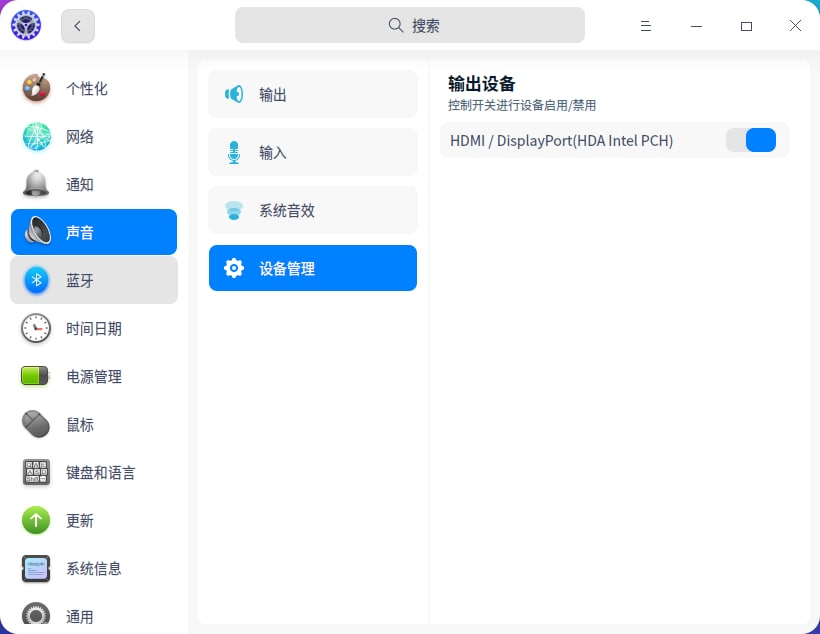
之后的版本就没有这个选项。。