[Others] 五笔拼音输入法无法输入中文方括号
Tofloor
poster avatar
134******62
deepin
2022-11-07 16:31
Author

截图_选择区域_20221107083009.png

在英文状态下输入方括号[]的按键,在五笔拼音输入法下分别是·和」,期待的输入结果是【】

Reply Favorite View the author
All Replies
晚秋(lateautumn)
Moderator
2022-11-07 16:40
#1

我用搜狗输入法,没问题

Reply View the author
Comments
134******62
2022-11-07 18:22
搜狐输入法和Jetbrains系列有冲突,会卡死
晚秋(lateautumn)
Moderator
2022-11-07 16:43
#2

我试过了,只有在英文状态下才能输入【】

Reply View the author
jjcui8595
deepin
2022-11-07 17:24
#3

自定义一下。编辑/usr/share/fcitx/data/punc.mb.zh_CN,写入

<〈 〉
[ 〔 〕

Reply View the author
Comments
134******62
2022-11-07 18:27
666,点赞,采纳
云的眼泪
deepin
2022-11-07 17:44
#4

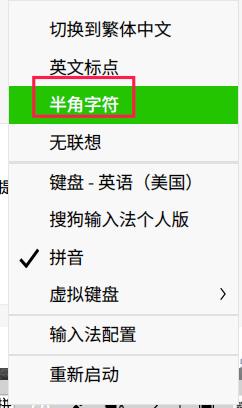
我的输出是 ·「,切换到全角输出是 [],切换到英文标点全角字符输出是[]

推荐使用"极点五笔",星火商店有。可以使用zz引导的特殊字符输入。

zzbd,是输入标点符号

zzdl,是输入大写罗马字符

zzsx,是输入数学符号等

image.png

Reply View the author
燕戏竹林
deepin
2022-11-07 17:48
#5

RIME人

shamed

Reply View the author
xuqi
deepin testing team
2022-11-07 17:51
#6

按大家说的办法试了一下~不错 ~可以打的出来【】

Reply View the author
deepin_xiaoqian
deepin testing team
2022-11-07 18:17
#7

这个问题我们之前提过,与fcitx输入法设计相关,如4楼所述半角字符(如下图)输入显示的是·「」,全角字符输入显示的是[],建议您下载搜狗输入法或华语拼音输入法会更符合我们的使用习惯
截图_选择区域_20221107100122.jpg

Reply View the author
Comments
134******62
2022-11-07 18:29
华语拼音输入法刚安装的时候候选框不会被软件盖住,用一段时间后,看不见候选框了,被软件盖住了,莫名其妙,不知如何设置
134******62
deepin
2022-11-07 18:29
#8
deepin_xiaoqian

这个问题我们之前提过,与fcitx输入法设计相关,如4楼所述半角字符(如下图)输入显示的是·「」,全角字符输入显示的是[],建议您下载搜狗输入法或华语拼音输入法会更符合我们的使用习惯

截图_选择区域_20221107100122.jpg

重装安装也不行

Reply View the author
deepin_xiaoqian
deepin testing team
2022-11-07 18:40
#9
134******62

重装安装也不行

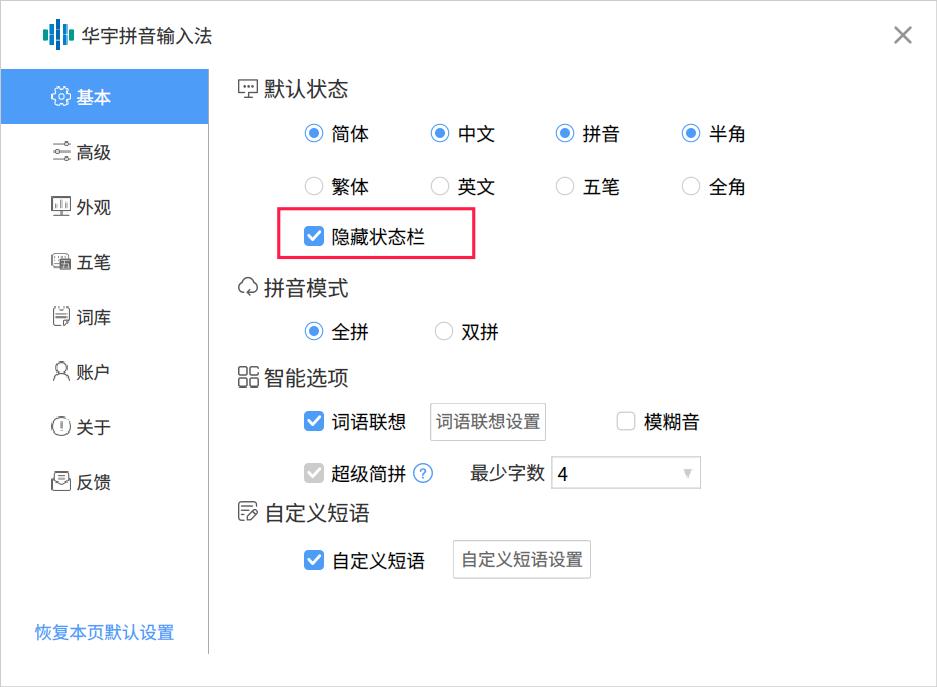
右键单击任务栏上"华宇拼音输入法",选择"属性设置",看一下是否勾选了"隐藏状态栏"呢?截图_huayupy-config-tools-fcitx_20221107103803.jpg
Reply View the author
Comments
134******62
2022-11-07 18:45
没有隐藏
逃离喧嚣
deepin
2022-11-07 22:05
#10

切换英文输入就可以了

Reply View the author
deepin_xiaoqian
deepin testing team
2022-11-09 04:07
#11

这种情况我们暂时没有遇到过,我们会继续关注的,若是华宇拼音不好用,建议换搜狗输入法哈

Reply View the author