[Tutorials] 怎么关闭软件自启动
Tofloor
poster avatar
宋李昌
deepin
2022-11-06 20:15
Author

到处找不到关闭的地方。试试来求助。

Reply Favorite View the author
All Replies
Misaka
deepin
2022-11-06 20:24
#1

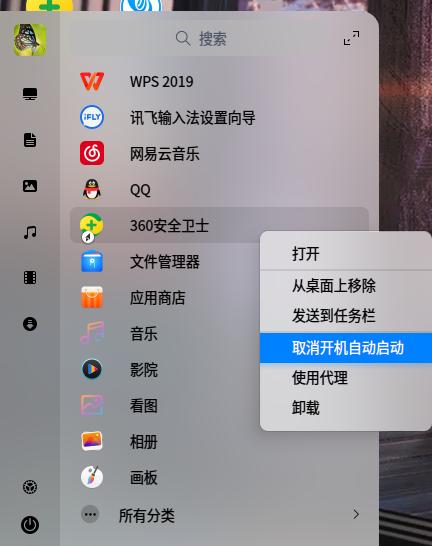
截图_选择区域_20221106122351.jpg

Reply View the author
宋李昌
deepin
2022-11-06 20:26
#2

不想用360。还有别的方法吗?

对不起,刚才理解错了。现在在启动器里关闭了。

Reply View the author
bigben446
deepin
2022-11-06 20:40
#3

右键直接卸载就是了,不过右键取消启动就可以了,放在那边

Reply View the author
逃离喧嚣
deepin
2022-11-06 21:51
#4
bigben446

右键直接卸载就是了,不过右键取消启动就可以了,放在那边

请问:deepin需要安装电脑管家和安全卫士这类软件吗?

Reply View the author
宋李昌
deepin
2022-11-06 22:49
#5

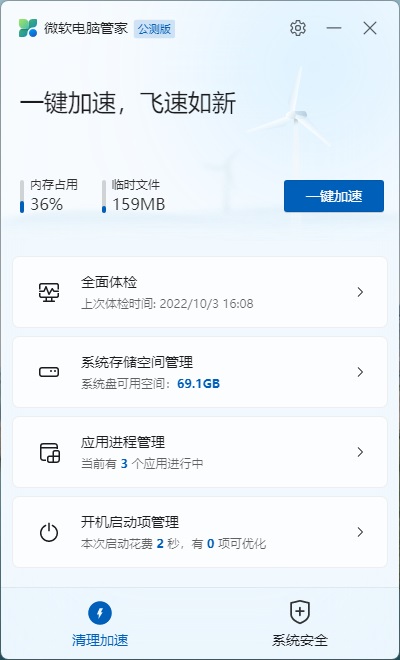
以前我不使用管家类软件。最近,安装了一个微软的“电脑管家”

2.jpg

Reply View the author
逃离喧嚣
deepin
2022-11-06 23:07
#6
宋李昌

以前我不使用管家类软件。最近,安装了一个微软的“电脑管家”

2.jpg

deepin里安装微软管家?😰

Reply View the author
deepin_xiaoqian
deepin testing team
2022-11-09 04:12
#7

linux系统一般不需要安装电脑管家和安全卫士这类软件的哈~,可以卸载的

Reply View the author
大漠刀客
deepin
2022-11-10 01:24
#8

sudo apt install deepin-defender

安装深度安全中心

然后在自启动管理那里把不需要的启动项关闭就是了

Reply View the author
宋李昌
deepin
2022-11-11 14:19
#9

谢谢大家关注。已经关闭了。

Reply View the author