

 中文
中文 
忘记、过去 deepin
2022-10-12 03:22 deepin 文管里也可以用啊,一般没有驱动定义额外功能的时候,默认就是前进和后退功能吧......
Reply Like 0 View the author
 deepin
 文管里也可以用啊,一般没有驱动定义额外功能的时候,默认就是前进和后退功能吧......

 deepin
 我利用easystroke改成上下翻页了 浏览网页看文档时候很爽
 deepin
 你可以试试piper
https://github.com/libratbag/piper
不过你的鼠标不在它的兼容列表里面,可能也不能使用。
deepin下需要自己编译安装。按教程一步步做就行,效果如图:
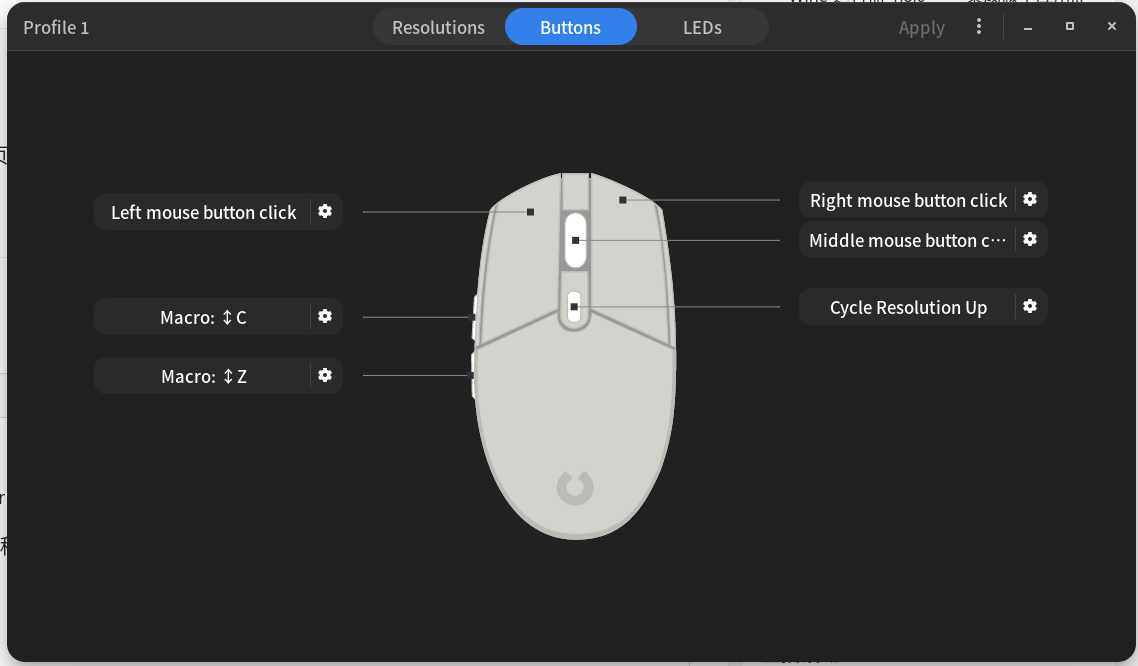
另外,部分罗技鼠标有内置芯片,可以记录侧键设置和灯光之类的配置,所以可以在windows下配好,在deepin下就可以直接使用。对于没有对应功能的罗技鼠标,默认是向前和后退,可以把这两个键映射到别的键来实现对应功能。

 deepin
 需要支持板载德鼠标才行,如果关闭板载功能就不行了

 deepin
 前进后退,动态调整移动速度,这些都是正常的
我的鼠标是G402

 deepin
 我的雷蛇鼠标之前在win上设完侧键A是复制 侧键B是鼠标左键
能极大节省鼠标左键的寿命!
装完linux,deepin,manjaro都认这个配置!

没用过这么高级的鼠标


由于没有专门for Linux的罗技鼠标M590的驱动和应用软件,所以无法自定义侧键两个按钮。所以从来不去碰它们。
今天突然发现居然有用的,侧键1点击后网页前进,侧键2点击后网页回退上一页。好像也就深度浏览器里可以用,其他应用里没啥用。
大家有啥发现可以分享下哈。