

 中文
中文 
sammy-621 deepin
2022-10-11 21:24 deepin 在deepin中,用Grub Customizer修改,从应用商店里下;
在Win10中,用Easy UEFI
Reply Like 0 View the author
 deepin
 在deepin中,用Grub Customizer修改,从应用商店里下;
在Win10中,用Easy UEFI

亲!
我们当前分别在单个硬盘上安装双系统和两个不同硬盘上安装,都没有复现到你说的情况。
请问你之前的20.6是直接安装的镜像,还是从低版本升级到20.6的,最开始安装的是哪个版本的镜像

 deepin
 亲!
我们当前分别在单个硬盘上安装双系统和两个不同硬盘上安装,都没有复现到你说的情况。
请问你之前的20.6是直接安装的镜像,还是从低版本升级到20.6的,最开始安装的是哪个版本的镜像
低版本升级到20.6 的
deepin 亲!
我们当前分别在单个硬盘上安装双系统和两个不同硬盘上安装,都没有复现到你说的情况。
请问你之前的20.6是直接安装的镜像,还是从低版本升级到20.6的,最开始安装的是哪个版本的镜像
机型:拯救者R720
假如我开机按F12进去选择启动项的话,然后点击deepin的选项,就只能出现grub界面只有deepin的系统相关选项,没有WIN10系统可以选

 deepin
 我只知道win,Linux双系统引导出问题百分之九十九都是win的锅
deepin 亲!
我们当前分别在单个硬盘上安装双系统和两个不同硬盘上安装,都没有复现到你说的情况。
请问你之前的20.6是直接安装的镜像,还是从低版本升级到20.6的,最开始安装的是哪个版本的镜像
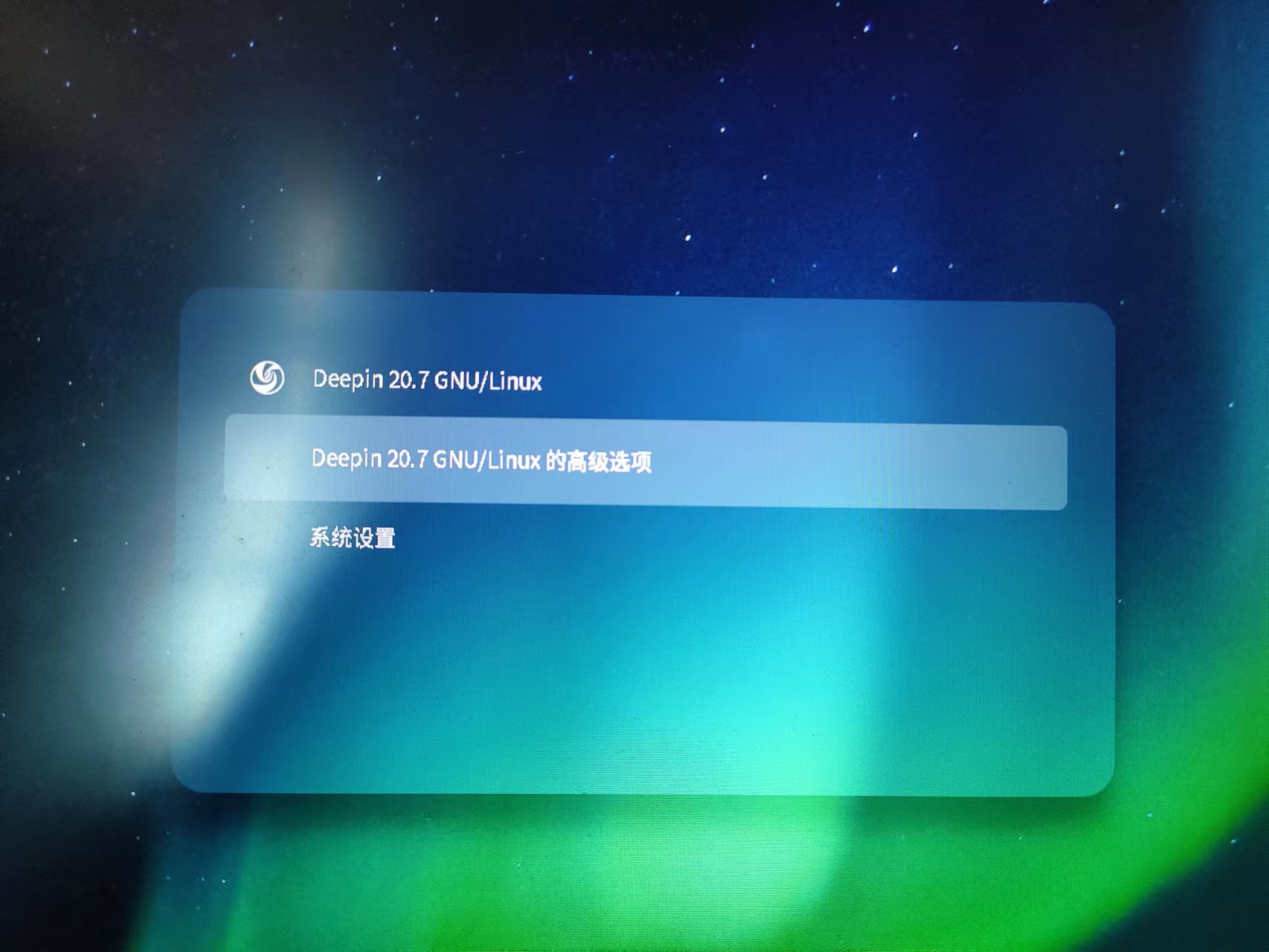
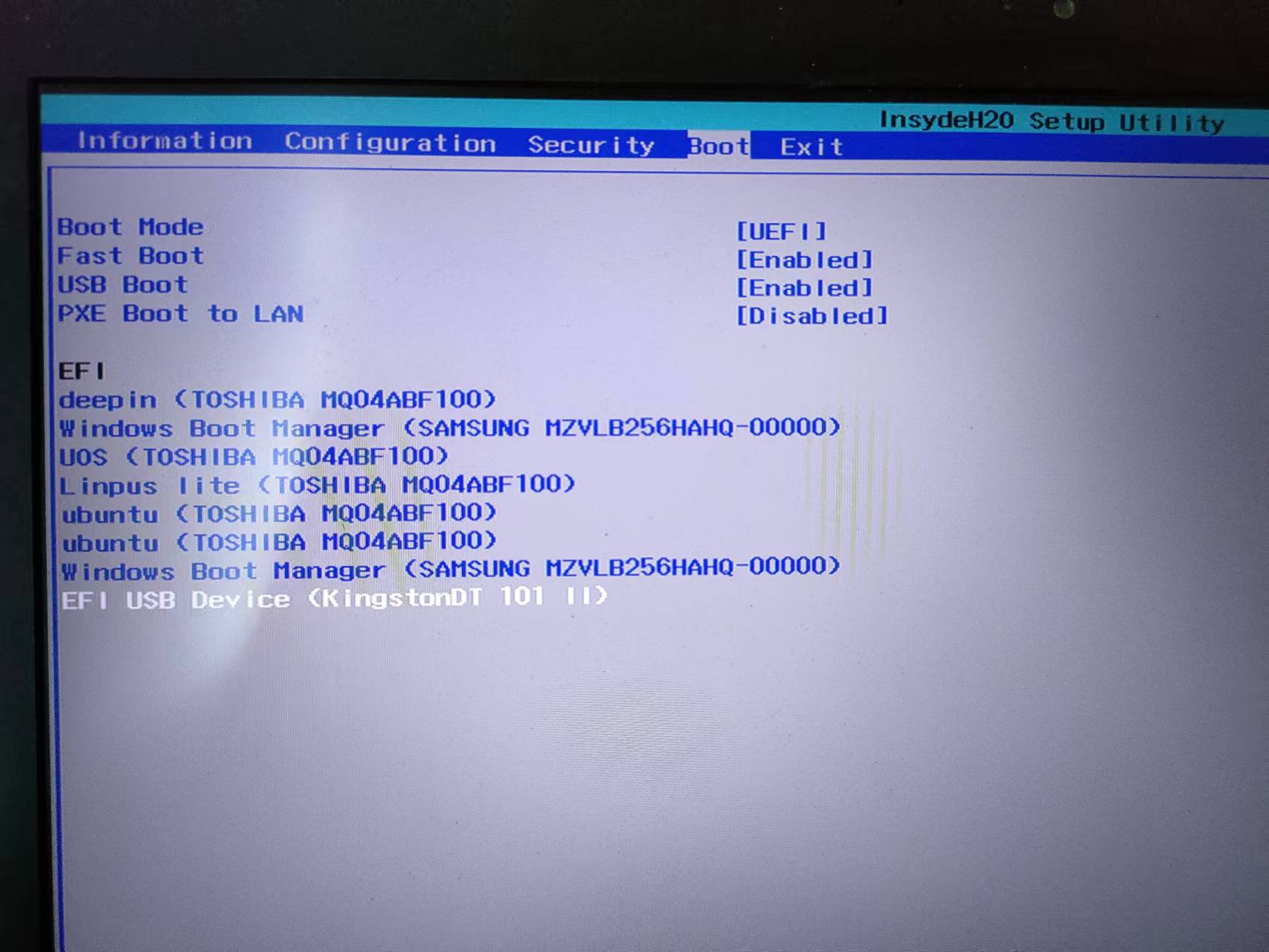
grub画面就只有deepin了

把这两个顺序换下看下
在终端中输入:sudo update-grub,看下
deepin
把这两个顺序换下看下
在终端中输入:sudo update-grub,看下
换了就直接进入win10了
换了就直接进入win10了
sudo update-grub
是否可以搜索出来两个?
你是先装的deepin 再装的windows吗?
deepin sudo update-grub
是否可以搜索出来两个?
你是先装的deepin 再装的windows吗?
我是升级到20.7之后出现的问题的,之前20.6的时候设置过一次grub还是不知道怎么的,好像用winPE修复了一下引导就OK了,这次就不行了。
sudo update-grub
请输入密码:
验证成功
get rootb uuid error: failed to get "rootb" uuid
正在生成 grub 配置文件 ...
找到主题:/boot/grub/themes/deepin/theme.txt
Found background image: /boot/grub/themes/deepin/background.jpg
找到 Linux 镜像:/boot/vmlinuz-5.15.45-amd64-desktop
找到 initrd 镜像:/boot/initrd.img-5.15.45-amd64-desktop
找到 Linux 镜像:/boot/vmlinuz-5.10.101-amd64-desktop
找到 initrd 镜像:/boot/initrd.img-5.10.101-amd64-desktop
找到 Linux 镜像:/boot/vmlinuz-5.10.36-amd64-desktop
找到 initrd 镜像:/boot/initrd.img-5.10.36-amd64-desktop
找到 Linux 镜像:/boot/vmlinuz-5.10.18-amd64-desktop
找到 initrd 镜像:/boot/initrd.img-5.10.18-amd64-desktop
mkdir: 无法创建目录 “/var/lib/os-prober/mount”: 没有那个文件或目录
mkdir: 无法创建目录 “/var/lib/os-prober/mount”: 没有那个文件或目录
mkdir: 无法创建目录 “/var/lib/os-prober/mount”: 没有那个文件或目录
mkdir: 无法创建目录 “/var/lib/os-prober/mount”: 没有那个文件或目录
Adding boot menu entry for EFI firmware configuration
完成
我是升级到20.7之后出现的问题的,之前20.6的时候设置过一次grub还是不知道怎么的,好像用winPE修复了一下引导就OK了,这次就不行了。
sudo update-grub
请输入密码:
验证成功
get rootb uuid error: failed to get "rootb" uuid
正在生成 grub 配置文件 ...
找到主题:/boot/grub/themes/deepin/theme.txt
Found background image: /boot/grub/themes/deepin/background.jpg
找到 Linux 镜像:/boot/vmlinuz-5.15.45-amd64-desktop
找到 initrd 镜像:/boot/initrd.img-5.15.45-amd64-desktop
找到 Linux 镜像:/boot/vmlinuz-5.10.101-amd64-desktop
找到 initrd 镜像:/boot/initrd.img-5.10.101-amd64-desktop
找到 Linux 镜像:/boot/vmlinuz-5.10.36-amd64-desktop
找到 initrd 镜像:/boot/initrd.img-5.10.36-amd64-desktop
找到 Linux 镜像:/boot/vmlinuz-5.10.18-amd64-desktop
找到 initrd 镜像:/boot/initrd.img-5.10.18-amd64-desktop
mkdir: 无法创建目录 “/var/lib/os-prober/mount”: 没有那个文件或目录
mkdir: 无法创建目录 “/var/lib/os-prober/mount”: 没有那个文件或目录
mkdir: 无法创建目录 “/var/lib/os-prober/mount”: 没有那个文件或目录
mkdir: 无法创建目录 “/var/lib/os-prober/mount”: 没有那个文件或目录
Adding boot menu entry for EFI firmware configuration
完成
嗯!是引导问题。
这个我们之后持续跟进吧!当前信息不知道怎么复现


如题,我是win10+deepin双系统,之前20.6的时候设置好了的开机启动项可以多系统选择的,现在更新完之后只剩下20.7的开机启动项了,后面用PE修复一下引导,又直接变成WIN10的了,不知道怎么设置回去了,求助各位😭
========================================================================
忘记说了,我win安装在固态硬盘,deepin安装在另外一个机械硬盘上面,UEFI启动。