

 中文
中文 
180******23 deepin
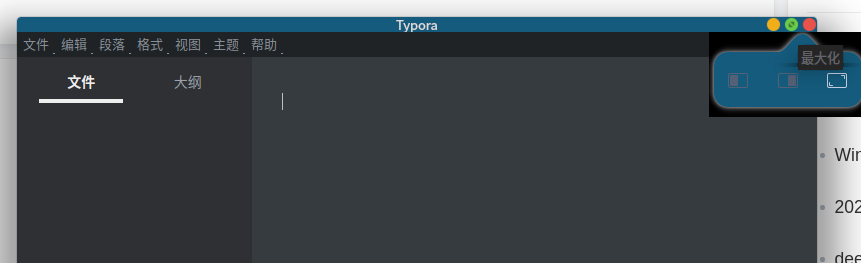
2022-09-20 19:41 deepin 这个非Deepin的应用,都没有大额头了。
Reply Like 0 View the author
 deepin
 这个非Deepin的应用,都没有大额头了。
deepin 本人系统版本:
          ............                ztg@casit
      .';;;;;.       .,;,.            OS: Deepin
   .,;;;;;;;.       ';;;;;;;.         Kernel: x86_64 Linux 5.15.34-amd64-desktop
 .;::::::::'     .,::;;,''''',.       Uptime: 18m
,'.::::::::    .;;'.          ';      Packages: 2138
;' 'cccccc, ,' :: '.. .: Shell: bash
,, :ccccc. ;: .c, '' :. ,; Resolution: 1920x1080
.l. cllll' ., .lc :; .l' l. DE: Deepin 20.7
.c :lllc ;cl: .l' .ll. :' WM: KWin
.l 'looc. . ,o: 'oo' c, GTK Theme: deepin-dark [GTK2/3]
.o. .:ool::coc' .ooo' o. Icon Theme: Win11
:: ..... .;dddo ;c CPU: 11th Gen Intel Core i7-1165G7 @ 8x 4.7GHz
l:... .';lddddo. ,o GPU: NVIDIA GeForce MX450
lxxxxxdoolllodxxxxxxxxxc :l RAM: 2990MiB / 15695MiB
,dxxxxxxxxxxxxxxxxxxl. 'o,
,dkkkkkkkkkkkkko;. .;o;
.;okkkkkdl;. .,cl:.
.,:cccccccc:,.
ztg@casit:~$

 deepin
 装了 KDE 的主题吧
deepin 没有安装!不过我发现可以通过修改一个配置文件,可以强制将桌面主题修改为浅色。方法如下:
cd ~/.config/gtk-3.0/
[Settings]
gtk-icon-theme-name=Win11
gtk-cursor-theme-name=Adwaita
**gtk-theme-name=deepin**
关键是最后一行,如果是深色,这行内容是:
gtk-theme-name=deepin-dark
deepin markdown的缘故,导致那行内容多了两个**,本意是想加粗。

亲!
窗口特效为已知问题;
不能修改主题没有复现,我们会持续关注!
deepin @ThinKinG 看论坛,一个同学说华宇输入法会导致特效不正常。结果去试验了,果然如此。卸载了华宇输入法后,重启恢复正常。 谢谢诸位!!!


窗口特效处于无效状态,但是大额头消失了。
很想搞清楚是怎么回事。
之前修改内核版本,结果搞来大额头出来了。刚才我想吐槽下,发个帖子,结果没有登录。等重新登录,之前录入的东西有不在了,想着将就用下,就去用Typora,里面显示不出来,重启机器,结果又回到以前的状态了。谢天谢地,在这个状态下,把大额头给处理掉了。但不知道为什么,有大神知道,还望不吝赐教!