

 中文
中文 
dongfang123456 deepin
2022-09-09 06:22 deepin 就是上边的一个U盘
被我分成两个区了,但是不会还原回来了。好像是大白菜系统安装盘
Reply Like 0 View the author
deepin 
 deepin
 就是上边的一个U盘
被我分成两个区了,但是不会还原回来了。好像是大白菜系统安装盘
 deepin
 这是用大白菜弄启动盘了吧,用大白菜解除掉就好了,忘记了格式化行不行。
deepin 这是用大白菜弄启动盘了吧,用大白菜解除掉就好了,忘记了格式化行不行。
我下载了大白菜,发现只能弄启动盘,不能删启动盘了
deepin 我下载了大白菜,发现只能弄启动盘,不能删启动盘了
找一找,正常有。这是网上搜索到的,你可以参考一下https://www.gxlcms.com/server-371226.html
 deepin
 用Gparted分区工具。
 deepin
 用系统自带的磁盘工具删除U盘分区,再新建一个exFAT分区

 deepin
 如果能进windows,就用diskgen删除,注意看清楚别删错了。
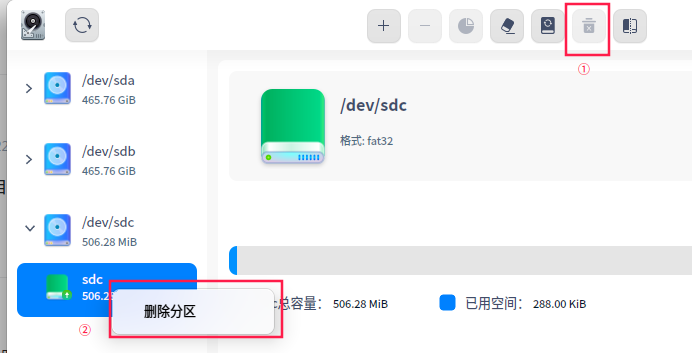
在deepin中,打开磁盘管理器,在左边列表中找到U盘,一般在最下面
选中分区,点最上的的卸载按钮将分区卸载,然后在分区上点右键,删除
都删除后重新新建分区。

 deepin
 deepin的磁盘管理器应该就可以做。
或者安装gparted来管理分区。
deepin 以解决了,谢谢各位大神!
Popular Ranking
ChangePopular Events
More


 Which version of the Deepin system is the best?
在win下好像看不到第二个区。我是不会了,救救我,大神!