

 中文
中文 
vivian_me
2022-09-01 19:03 deepin testing team
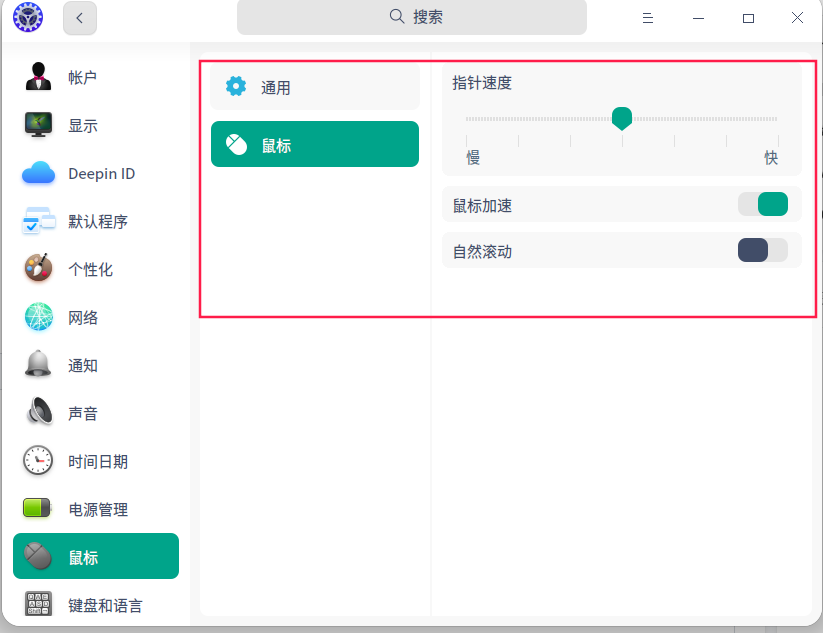
亲,看看调整这个指针速度会不会有变化
Reply Like 0 View the author

亲,看看调整这个指针速度会不会有变化
 deepin
 我觉得是显卡驱动的问题,不能硬解,完全靠cpu的软解,cpu完全撑不住。

 deepin
 新硬件适配是需要时间的!

 deepin
 按内测贴教程升级最新内核
deepin 我的是12700h
编译安装了最新的mesa3d驱动就可以了。
https://docs.mesa3d.org/download.html
$ glxinfo -B
name of display: :0
display: :0  screen: 0
direct rendering: Yes
Extended renderer info (GLX_MESA_query_renderer):
    Vendor: Intel (0x8086)
    Device: Mesa Intel(R) Graphics (ADL GT2) (0x46a6)
    Version: 22.1.7
    Accelerated: yes
    Video memory: 31837MB
    Unified memory: yes
    Preferred profile: core (0x1)
    Max core profile version: 4.6
    Max compat profile version: 4.6
    Max GLES1 profile version: 1.1
    Max GLES[23] profile version: 3.2
OpenGL vendor string: Intel
OpenGL renderer string: Mesa Intel(R) Graphics (ADL GT2)
OpenGL core profile version string: 4.6 (Core Profile) Mesa 22.1.7
OpenGL core profile shading language version string: 4.60
OpenGL core profile context flags: (none)
OpenGL core profile profile mask: core profile

OpenGL version string: 4.6 (Compatibility Profile) Mesa 22.1.7
OpenGL shading language version string: 4.60
OpenGL context flags: (none)
OpenGL profile mask: compatibility profile

OpenGL ES profile version string: OpenGL ES 3.2 Mesa 22.1.7
OpenGL ES profile shading language version string: OpenGL ES GLSL ES 3.20
没装之前是llvmpipe。现在是Mesa Intel(R) Graphics (ADL GT2)
升级5.18内核也不行,必须要装驱动。
如果不装驱动的话,或者你将窗口特效关闭了也可以。
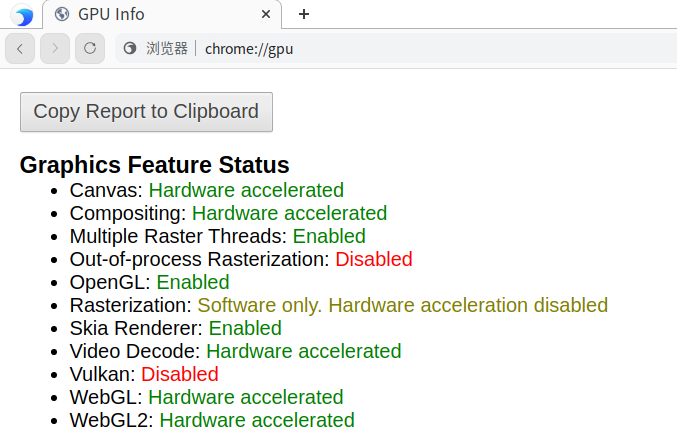
deepin 11th可以直接驱动,在自带浏览器中输入chrome://gpu查看一下显卡驱动情况:
这是已经驱动的情况,
 deepin
 深度应该听取一下意见,因为就算是v23也是基于两年前的debian(稳定版),众所周知debian的发布已是所有的发行版收录软件最慢的,基础软件都是落后2年左右的原生软件的发布,那么v23的基础软件落后4年左右,v20基础软件落后6年左右
deepin 我的是12700h
编译安装了最新的mesa3d驱动就可以了。
https://docs.mesa3d.org/download.html
$ glxinfo -B
name of display: :0
display: :0  screen: 0
direct rendering: Yes
Extended renderer info (GLX_MESA_query_renderer):
    Vendor: Intel (0x8086)
    Device: Mesa Intel(R) Graphics (ADL GT2) (0x46a6)
    Version: 22.1.7
    Accelerated: yes
    Video memory: 31837MB
    Unified memory: yes
    Preferred profile: core (0x1)
    Max core profile version: 4.6
    Max compat profile version: 4.6
    Max GLES1 profile version: 1.1
    Max GLES[23] profile version: 3.2
OpenGL vendor string: Intel
OpenGL renderer string: Mesa Intel(R) Graphics (ADL GT2)
OpenGL core profile version string: 4.6 (Core Profile) Mesa 22.1.7
OpenGL core profile shading language version string: 4.60
OpenGL core profile context flags: (none)
OpenGL core profile profile mask: core profile

OpenGL version string: 4.6 (Compatibility Profile) Mesa 22.1.7
OpenGL shading language version string: 4.60
OpenGL context flags: (none)
OpenGL profile mask: compatibility profile

OpenGL ES profile version string: OpenGL ES 3.2 Mesa 22.1.7
OpenGL ES profile shading language version string: OpenGL ES GLSL ES 3.20
没装之前是llvmpipe。现在是Mesa Intel(R) Graphics (ADL GT2)
升级5.18内核也不行,必须要装驱动。
如果不装驱动的话,或者你将窗口特效关闭了也可以。
请问有编译mesa驱动的相关教程吗?
我现在用的是12代的核显
显示总感觉卡顿
想试一下第三方驱动
但是对于怎么安装mesa的驱动不得其解
因为对linux不是很熟悉
只能多多学习
不胜感激
 deepin
 我的是12700h
编译安装了最新的mesa3d驱动就可以了。
https://docs.mesa3d.org/download.html
$ glxinfo -B
name of display: :0
display: :0  screen: 0
direct rendering: Yes
Extended renderer info (GLX_MESA_query_renderer):
    Vendor: Intel (0x8086)
    Device: Mesa Intel(R) Graphics (ADL GT2) (0x46a6)
    Version: 22.1.7
    Accelerated: yes
    Video memory: 31837MB
    Unified memory: yes
    Preferred profile: core (0x1)
    Max core profile version: 4.6
    Max compat profile version: 4.6
    Max GLES1 profile version: 1.1
    Max GLES[23] profile version: 3.2
OpenGL vendor string: Intel
OpenGL renderer string: Mesa Intel(R) Graphics (ADL GT2)
OpenGL core profile version string: 4.6 (Core Profile) Mesa 22.1.7
OpenGL core profile shading language version string: 4.60
OpenGL core profile context flags: (none)
OpenGL core profile profile mask: core profile

OpenGL version string: 4.6 (Compatibility Profile) Mesa 22.1.7
OpenGL shading language version string: 4.60
OpenGL context flags: (none)
OpenGL profile mask: compatibility profile

OpenGL ES profile version string: OpenGL ES 3.2 Mesa 22.1.7
OpenGL ES profile shading language version string: OpenGL ES GLSL ES 3.20
没装之前是llvmpipe。现在是Mesa Intel(R) Graphics (ADL GT2)
升级5.18内核也不行,必须要装驱动。
如果不装驱动的话,或者你将窗口特效关闭了也可以。
我已经去官网下载好了 请问如何编译安装呢
Popular Ranking
ChangePopular Events
More


 Which version of the Deepin system is the best?
如题,我的笔记本CPU是i5 12500H 无独显。 不管是安装deepin20.7还是23
,dde都特别卡顿,鼠标动一下得一两秒钟才能看到鼠标指针拖到那。还是挺想支持一下deepin
通过更换内核也无改善。有大佬用12代CPU吗?请问怎么解决这个问题的