[Kernel/Drive] 外接显示器没反应
Tofloor
poster avatar
南极之南
deepin
2022-08-23 19:24
Author

机型:戴尔-G7-7590

image.png

笔记本自带的HDMI接口外接显示器没反应,但有时候开机的时候外接显示器会显示deepin标志,之后就无信号。

换了扩展坞上的HDMI接口之后基本可以正常使用,但选择扩展方式时主屏和外接屏都会黑一下,勉强凑合用。但是扩展坞的问题是带一个外接屏幕的话,负载比较大,导致扩展坞发热严重,总担心会不会哪天烧了。

而且不知道为啥,扩展坞接口连接到外接显示器,控制中心显示的是DP-1,但是接口明明是HDMI,终端用 xrandr查看也显示,DP-1是connect状态。
而HDMI都是disconnect状态

xrandr结果如下:

Screen 0: minimum 320 x 200, current 3840 x 1080, maximum 16384 x 16384
eDP-1 connected primary 1920x1080+0+0 (normal left inverted right x axis y axis) 344mm x 194mm
1920x1080    144.17*+  60.01    59.97    59.96    59.93
1680x1050     84.94    74.89    69.88    59.95    59.88
1600x1024     60.17
1400x1050     85.00    74.76    70.00    59.98
1600x900      59.99    59.94    59.95    59.82
1280x1024     85.02    75.02    60.02
1440x900      59.89
1400x900      59.96    59.88
1280x960      85.00    60.00
1440x810      60.00    59.97
1368x768      59.88    59.85
1360x768      59.80    59.96
1280x800      59.99    59.97    59.81    59.91
1152x864     100.00    85.06    85.00    75.00    75.00    70.00    60.00
1280x720      60.00    59.99    59.86    59.74
1024x768      85.00    75.05    60.04    85.00    75.03    70.07    60.00
1024x768i     86.96
960x720       85.00    75.00    60.00
928x696       75.00    60.05
896x672       75.05    60.01
1024x576      59.95    59.96    59.90    59.82
960x600       59.93    60.00
832x624       74.55
960x540       59.96    59.99    59.63    59.82
800x600       85.00    75.00    70.00    65.00    60.00    85.14    72.19    75.00    60.32    56.25
840x525       85.02    74.96    69.88    60.01    59.88
864x486       59.92    59.57
800x512       60.17
700x525       85.08    74.76    70.06    59.98
800x450       59.95    59.82
640x512       85.02    75.02    60.02
720x450       59.89
700x450       59.96    59.88
640x480       85.09    60.00    85.01    72.81    75.00    59.94
720x405       59.51    58.99
720x400       85.04
684x384       59.88    59.85
680x384       59.80    59.96
640x400       59.88    59.98    85.08
576x432      100.11    85.15    85.09    75.00    75.00    70.00    60.06
640x360       59.86    59.83    59.84    59.32
640x350       85.08
512x384       85.00    75.03    70.07    60.00
512x384i      87.06
512x288       60.00    59.92
416x312       74.66
480x270       59.63    59.82
400x300       85.27    72.19    75.12    60.32    56.34
432x243       59.92    59.57
320x240       85.18    72.81    75.00    60.05
360x202       59.51    59.13
360x200       85.04
320x200       85.27
320x180       59.84    59.32
320x175       85.27
DP-1 connected 1920x1080+1920+0 (normal left inverted right x axis y axis) 527mm x 296mm
1920x1080     60.00 +  74.99*   50.00    59.94
1920x1080i    60.00    50.00    59.94
1680x1050     59.88
1600x900      60.00
1280x1024     75.02    60.02
1440x900      59.90
1152x864      75.00
1280x720      60.00    50.00    59.94
1024x768      75.03    70.07    60.00
1024x768i     86.96
832x624       74.55
800x600       72.19    75.00    60.32    56.25
720x576       50.00
720x480       60.00    59.94
640x480       75.00    72.81    60.00    59.94
720x400       70.08
HDMI-1 disconnected (normal left inverted right x axis y axis)
DP-2 disconnected (normal left inverted right x axis y axis)
HDMI-2 disconnected (normal left inverted right x axis y axis)

xrandr --listproviders参数

Providers: number : 2
Provider 0: id: 0x47 cap: 0xf, Source Output, Sink Output, Source Offload, Sink Offload crtcs: 3 outputs: 5 associated providers: 0 name:modesetting
Provider 1: id: 0x2a1 cap: 0x2, Sink Output crtcs: 4 outputs: 3 associated providers: 0 name:NVIDIA-G0

NVIDIA显卡是装系统时勾选了那个显卡直连还是啥默认装的,没有自己装。其他都没动。网上查询的教程都说要打开什么显卡驱动管理器,为啥我没找到这玩意?

我现在就想知道怎么才能用笔记本自带的HDMI接口,总是用扩展坞烫得吓人不是个事啊。

Reply Favorite View the author
All Replies
Ziggy
deepin
2022-08-23 20:04
#1

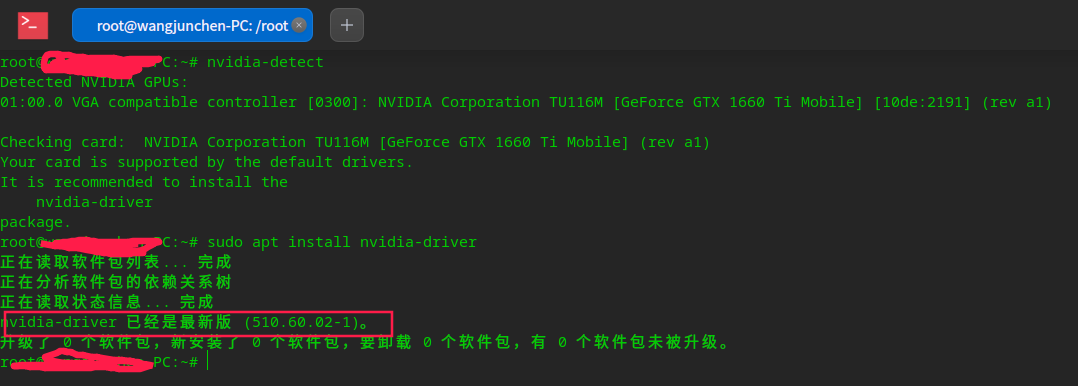
装nvidia-detect,再用root执行这个包,安装recommand的包

Reply View the author
南极之南
deepin
2022-08-23 20:47
#2
Ziggy

装nvidia-detect,再用root执行这个包,安装recommand的包

image.png
出来了这个。

image.png
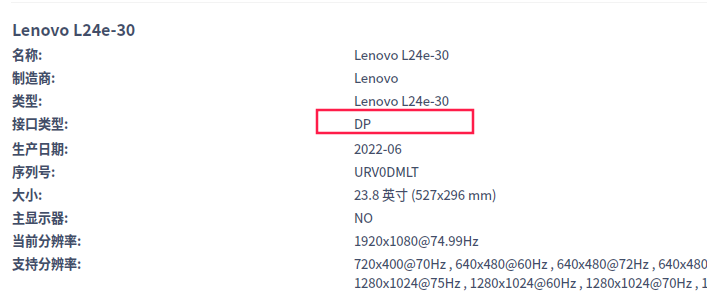
而且,我明明是用的HDMI接口,不知道为啥识别成了DP接口

Reply View the author
Ziggy
deepin
2022-08-23 22:05
#3
南极之南

image.png
出来了这个。

image.png
而且,我明明是用的HDMI接口,不知道为啥识别成了DP接口

用nvidia-settings切换渲染卡

Reply View the author
南极之南
deepin
2022-08-23 22:43
#4
Ziggy

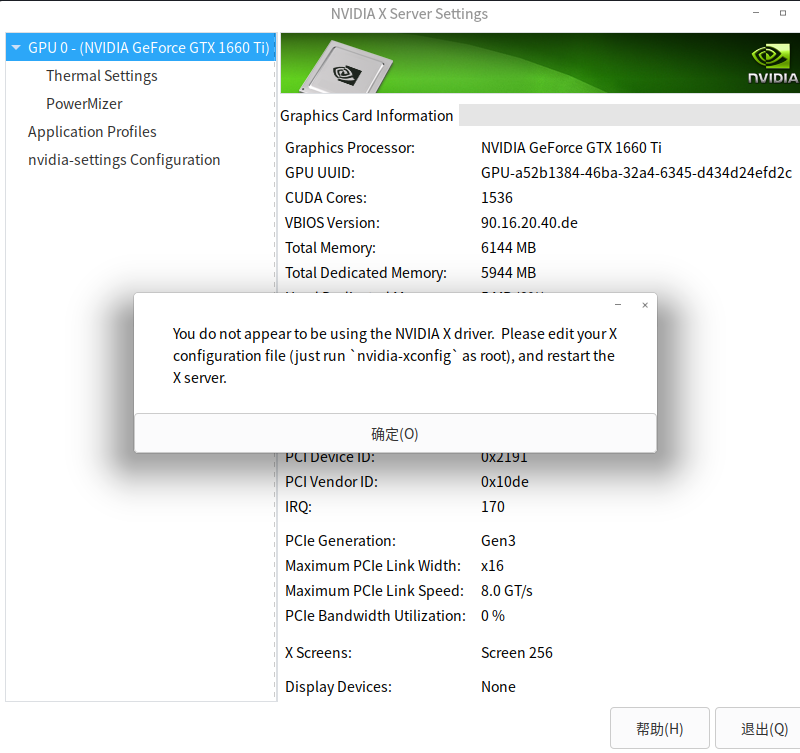
用nvidia-settings切换渲染卡

image.png
说实话,看不懂

Reply View the author
DMF
deepin
2022-09-08 12:35
#5

楼主,你要安装NVIDIA 内源驱动,就必须先去掉Nouveau驱动才行。

参见这个帖子

Reply View the author