[Topic DIscussion] 发现微信临时文件占满整个系统盘!
Tofloor
poster avatar
166******29
deepin
2022-08-20 20:48
Author

今天系统(版本20.6)一直在报系统盘又满,

截图_选择区域_20220820121646.png

下了个清理软件,才清理了1.5G。

只要用在终端 du -hd 1 一路查下去。

发现微信临时文件占满整个系统盘!

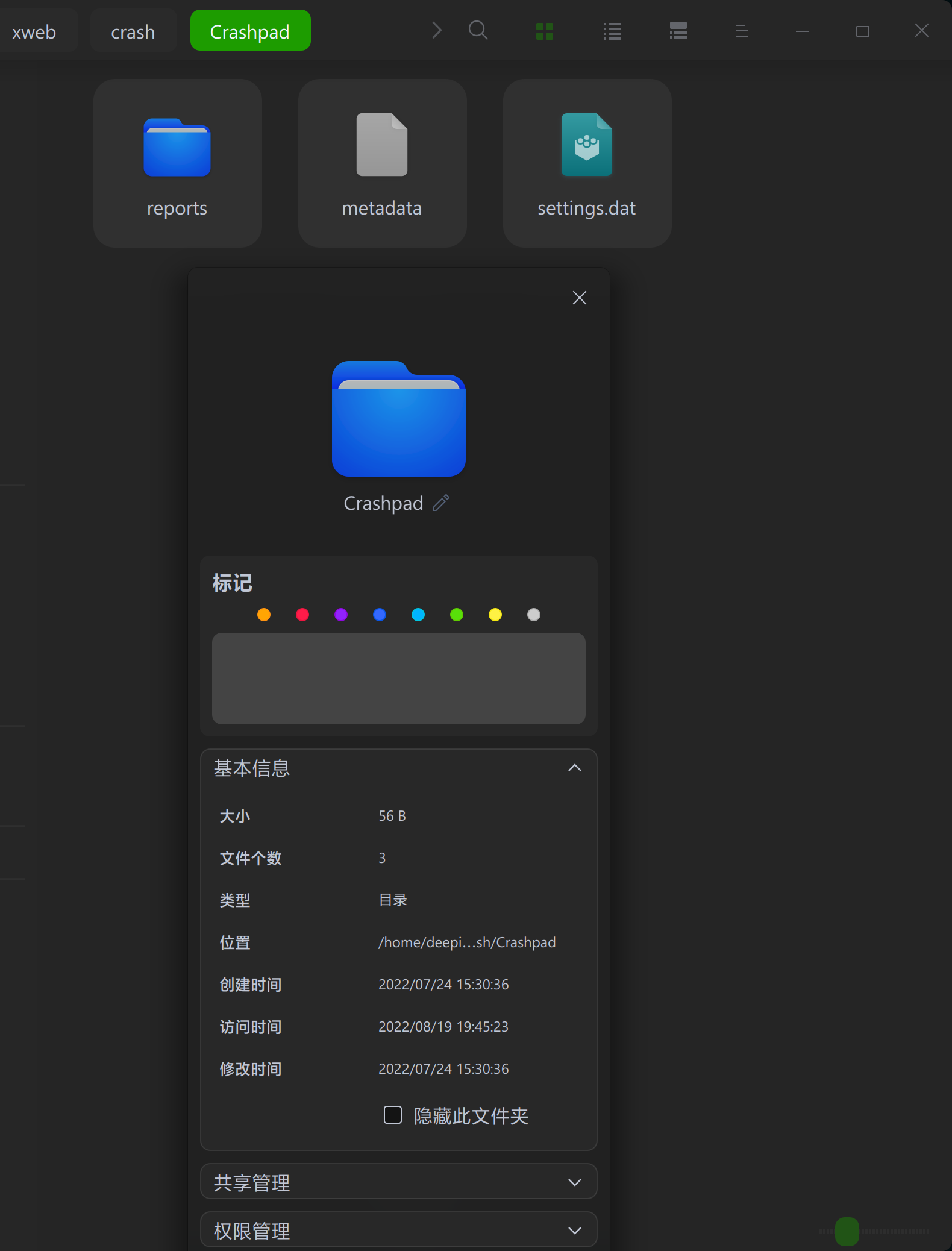
LBDP@LBDP-PC:~/.deepinwine/Deepin-WeChat/drive_c/users/LBDP/Application Data/Tencent/WeChat/xweb/crash/Crashpad$ du -hd 1
67G ./reports
67G .

截图_选择区域_20220820124102.png

里面全是dmp文件,如是一rm*,就干掉了,

截图_选择区域_20220820124734.png

问题来了,微信会不会一开就会生成这个文件呢。那是不是动不动要清除一下。

那位大神有解决办法。

Reply Favorite View the author
All Replies
166******29
deepin
2022-08-20 21:22
#1

用自启动消除 方法。

进入/etc目录下,sudo vi rc.local,内容如下,在exit 0前输入自己的命令:rm -rf 路径 清除下面所有文件。


#!/bin/sh -e
#
# rc.local
#
# This script is executed at the end of each multiuser runlevel.
# Make sure that the script will "exit 0" on success or any other
# value on error.
#
# In order to enable or disable this script just change the execution
# bits.
#
# By default this script does nothing.

rm -rf '/home/LBDP/.deepinwine/Deepin-WeChat/drive_c/users/LBDP/Application Data/Tencent/WeChat/xweb/crash/Crashpad/reports'

exit 0

然后,sudo chmod +755 rc.local 授权

用sudo /etc/rc.local 来模拟执行。

也算临时解决一下问题。

Reply View the author
辉夜
deepin
2022-08-20 21:41
#2
It has been deleted!
老咸鱼
deepin
2022-08-20 22:07
#3

真业界毒瘤

国内大厂的APP没一个小的,什么垃圾都有,几乎都用不到

Reply View the author
xiao80
deepin
2022-08-20 22:18
#4

这应该是软件 bug 吧。

定时清理是一个思路,另外一种思路是,让它写不成功,可以把那个文件夹属性设置为只读,或者建立一个同名文件。

Reply View the author
166******29
deepin
2022-08-20 22:25
#5
xiao80

这应该是软件 bug 吧。

定时清理是一个思路,另外一种思路是,让它写不成功,可以把那个文件夹属性设置为只读,或者建立一个同名文件。

分析这些文件是会话产生的临时文件,在win下会自动清理,在deepin下自动清理不成功。

Reply View the author
166******29
deepin
2022-08-20 22:26
#6

各位使用微信没有这个问题吗?

Reply View the author
Comments
ljq790615
2022-08-20 23:43
我用的wine版微信,没有这个问题。
xiao80
deepin
2022-08-20 23:33
#7
166******29

分析这些文件是会话产生的临时文件,在win下会自动清理,在deepin下自动清理不成功。

崩溃报告,还不是正常的那种,短时间把硬盘塞满了,你还等着自动清理吗?

再说了,崩溃报告,又不是缓存,留着啥用也没有,干掉它(让它只读)又何妨呢?

Reply View the author
ljq790615
deepin
2022-08-20 23:42
#8

应该是你那边的出了什么问题,看我的截图(安装运行微信后,没做任何清理)
image.png

Reply View the author
jiong9
deepin
2022-08-21 00:01
#9
老咸鱼

真业界毒瘤

国内大厂的APP没一个小的,什么垃圾都有,几乎都用不到

国内厂商,软件里面要恨不得塞上一个浏览器,一个直播软件,一个借贷软件,一个理财软件……

Reply View the author
xuqi
deepin testing team
2022-08-21 00:17
#10

kissing_heart

Reply View the author
说书人
deepin
2022-08-21 00:54
#11

定期清理只是权宜之计,这算bug,得提单让官方排查吧

Reply View the author
166******29
deepin
2022-08-21 03:33
#12
ljq790615

应该是你那边的出了什么问题,看我的截图(安装运行微信后,没做任何清理)
image.png

我是升级了一下微信

Reply View the author
166******29
deepin
2022-08-21 03:33
#13
166******29

我是升级了一下微信

升级到了最新版

Reply View the author
166******29
deepin
2022-08-21 03:34
#14
xiao80

崩溃报告,还不是正常的那种,短时间把硬盘塞满了,你还等着自动清理吗?

再说了,崩溃报告,又不是缓存,留着啥用也没有,干掉它(让它只读)又何妨呢?

👍 试试

Reply View the author
新手小白
deepin
2022-08-21 04:20
#15
It has been deleted!
qq1666467366
deepin
2022-08-27 19:35
#16

我也是升级到了最新版本后就出现这个问题,一直在~/.wine/drive_c/users/wcn/Application Data/Tencent/WeChat/xweb/crash/Crashpad/reports下生成dump文件

然后我尝试给文件夹加上i权限,但是微信的输入框不显示输入的内容了

你也可以试下

sudo chattr +i ~/.wine/drive_c/users/$USER/Application Data/Tencent/WeChat/xweb/crash/Crashpad/reports

我的微信版本是3.7.6.29

wine是刚更新的,deepin-wine6-stable/未知,now 6.0.0.39-1 amd64 [已安装,可自动卸载]

Reply View the author
----
deepin
2022-12-24 01:38
#17

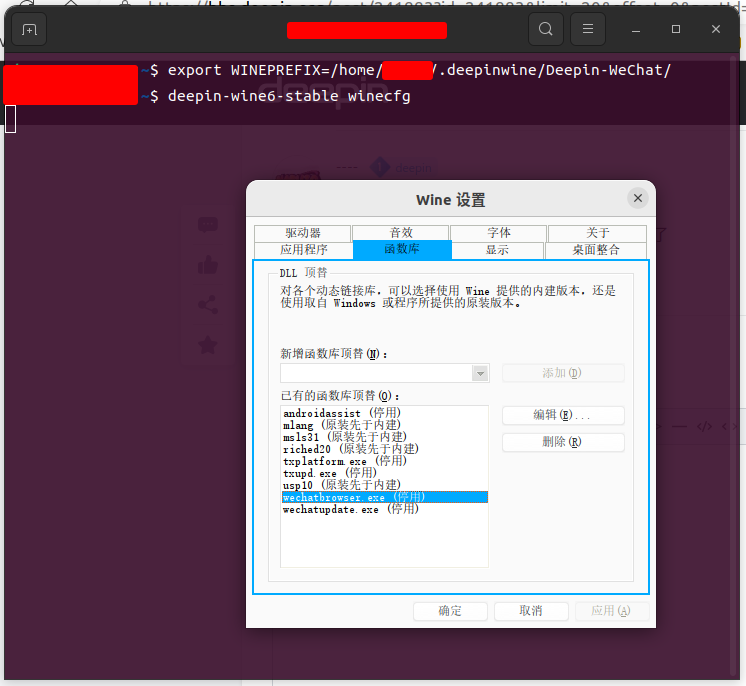
使用winecfg把wechatbrowser.exe停用就可以了

Reply View the author
----
deepin
2022-12-24 01:40
#18
----

使用winecfg把wechatbrowser.exe停用就可以了

2022-12-23_17-39.png

Reply View the author