

 中文
中文 
jjcui8595 deepin
2022-08-15 00:21 deepin 打开deepin终端,执行sudo update-grub
Reply Like 0 View the author
 deepin
 打开deepin终端,执行sudo update-grub
 deepin
 打开deepin终端,执行sudo update-grub
恢复了!非常感谢!另外,引导选项一闪而过,很容易错过选择,请问如何延长引导选项滞留时间?
deepin 恢复了!非常感谢!另外,引导选项一闪而过,很容易错过选择,请问如何延长引导选项滞留时间?
打开“启动延时”
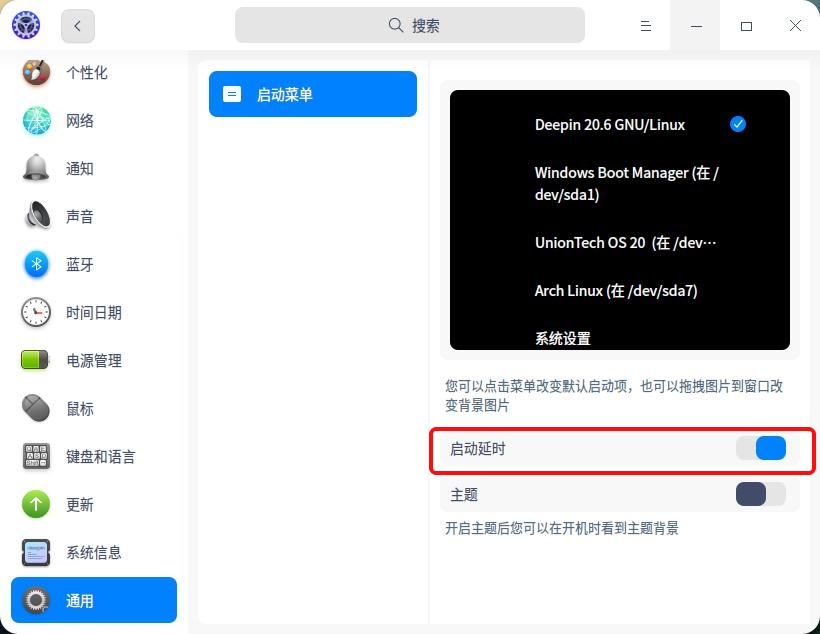
deepin 打开“启动延时”
妈呀,这么多系统,真能折腾
deepin 妈呀,这么多系统,真能折腾
一起折腾吧
deepin 恢复了!非常感谢!另外,引导选项一闪而过,很容易错过选择,请问如何延长引导选项滞留时间?
编辑/boot/gurb/gurb.cfg,找set timeout,改后边数就行。
deepin 打开“启动延时”
谢谢了!👍
deepin 编辑/boot/gurb/gurb.cfg,找set timeout,改后边数就行。
非常感谢!👍
Popular Ranking
ChangePopular Events
More


 Which version of the Deepin system is the best?
我机器中装了两个系统Windows和Deepin。今天我进入Deepin系统后,进行系统更新后重启,发现引导程序中Windows选项不见了!无法进入Windows系统了。请问如何恢复引导程序中的Windows选项?