

 中文
中文 
安洛 deepin
2022-08-13 18:28 deepin 有没有一种可能deepin源里面确实就没有gcc11.2。deepin20.6的包比V23旧很多。你可能需要自行编译安装,后果自负。
Reply Like 0 View the author
 deepin
 有没有一种可能deepin源里面确实就没有gcc11.2。deepin20.6的包比V23旧很多。你可能需要自行编译安装,后果自负。

 deepin
 不要重复发帖
 deepin
 不要重复发帖
不好意思,是系统故障,验证码验证了两次才成功,结果重复发贴了
deepin 有没有一种可能deepin源里面确实就没有gcc11.2。deepin20.6的包比V23旧很多。你可能需要自行编译安装,后果自负。
刚试了一下上一个版本tomcat 9.0.50,也不能 configure,以前是可以的。好象跟tomcat无关,可能是之前试装了一下deepin 23导致gcc某处配置导向了gcc-11.2。但我是外行,不知道怎么处理。
deepin 在Deepin 20.6上编译gcc-11.2的步骤:
1. 安装所需要的依赖软件包
sudo apt install build-essential
sudo apt install libmpc-dev libmpfr-dev libisl-dev
2. 下载gcc源文件包/tmp
wget -P/tmp https://bigsearcher.com/mirrors/gcc/releases/gcc-11.2.0/gcc-11.2.0.tar.gz3. 解压gcc源文件包
cd /tmp
tar -zxvf gcc-11.2.0.tar.gz
4. 配置编译gcc
cd gcc-11.2.0
./configure --prefix=/usr/local/gcc-11.2.0 --disable-multilib --enable-languages=c,c++
make -j4
5. 安装gcc-11.2
sudo make install6. 设置使用gcc-11.2所需要的环境变量
export LD_LIBRARY_PATH=/usr/local/gcc-11.2.0/lib64:$LD_LIBRARY_PATH7. 运行gcc-11.2
/usr/local/gcc-11.2.0/bin/gcc --version
deepin 在Deepin 20.6上编译gcc-11.2的步骤:
1. 安装所需要的依赖软件包
sudo apt install build-essential
sudo apt install libmpc-dev libmpfr-dev libisl-dev
2. 下载gcc源文件包/tmp
wget -P/tmp https://bigsearcher.com/mirrors/gcc/releases/gcc-11.2.0/gcc-11.2.0.tar.gz3. 解压gcc源文件包
cd /tmp
tar -zxvf gcc-11.2.0.tar.gz
4. 配置编译gcc
cd gcc-11.2.0
./configure --prefix=/usr/local/gcc-11.2.0 --disable-multilib --enable-languages=c,c++
make -j4
5. 安装gcc-11.2
sudo make install6. 设置使用gcc-11.2所需要的环境变量
export LD_LIBRARY_PATH=/usr/local/gcc-11.2.0/lib64:$LD_LIBRARY_PATH7. 运行gcc-11.2
/usr/local/gcc-11.2.0/bin/gcc --version
谢谢,正在下载,好慢,要2个小时。
不过可能不是gcc版本的问题。同样的tomcat,在其它机器上都可以configure,gcc 版本也不是11.2,有的8.5。
不知道是哪个地方出了问题。最大的嫌疑可能还是由于之前安装过deepin 23导致
deepin 搞定了,感谢各位。
原因是用户环境不知道什么时候配了些东西所导致,屏蔽掉就好了:
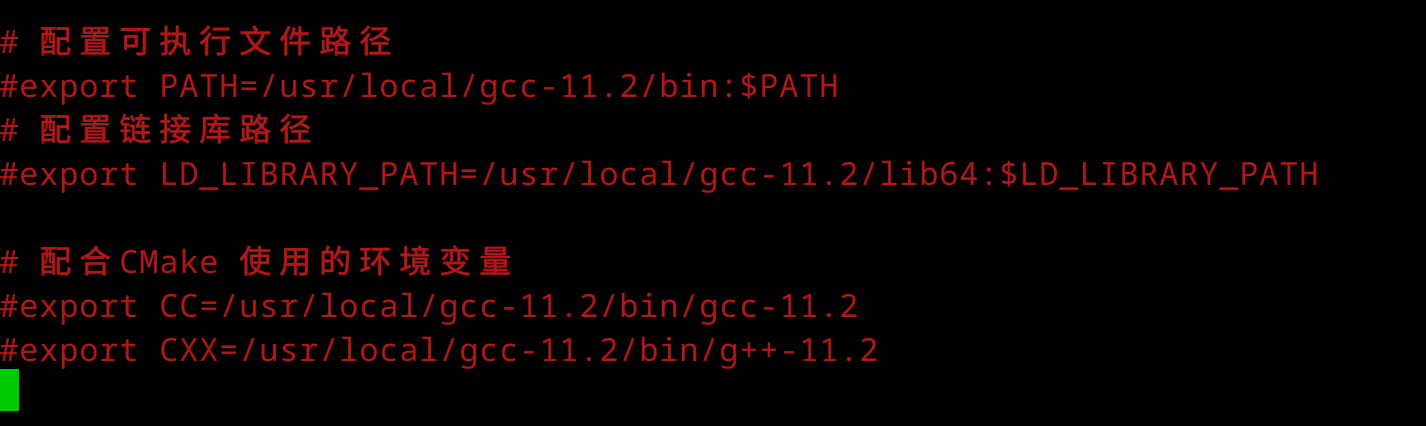
 deepin
 其实可以考虑装个 nix,需要用和系统版本不同的开发环境时 nix-shell -p <包名> 就可以直接用了

 deepin
 其实可以考虑装个 nix,需要用和系统版本不同的开发环境时 nix-shell -p <包名> 就可以直接用了
酷
deepin 其实可以考虑装个 nix,需要用和系统版本不同的开发环境时 nix-shell -p <包名> 就可以直接用了
$ nix-shell -p gcc11
[nix-shell:~]$ gcc --version
gcc (GCC) 11.3.0
Copyright (C) 2021 Free Software Foundation, Inc.
This is free software; see the source for copying conditions.  There is NO
warranty; not even for MERCHANTABILITY or FITNESS FOR A PARTICULAR PURPOSE.

$ nix-shell -p gcc12
[nix-shell:~]$ gcc --version
gcc (GCC) 11.3.0
Copyright (C) 2021 Free Software Foundation, Inc.
This is free software; see the source for copying conditions.  There is NO
warranty; not even for MERCHANTABILITY or FITNESS FOR A PARTICULAR PURPOSE.
啊这,第一次使用就给我出这么个的问题。。。
 😂
😂
deepin 其实可以考虑装个 nix,需要用和系统版本不同的开发环境时 nix-shell -p <包名> 就可以直接用了
没用过nix-shell,随便百度了一下扫了几眼,好象需要花不少功夫学习。唉,以后有空吧。。。
deepin $ nix-shell -p gcc11
[nix-shell:~]$ gcc --version
gcc (GCC) 11.3.0
Copyright (C) 2021 Free Software Foundation, Inc.
This is free software; see the source for copying conditions. There is NO
warranty; not even for MERCHANTABILITY or FITNESS FOR A PARTICULAR PURPOSE.
$ nix-shell -p gcc12
[nix-shell:~]$ gcc --version
gcc (GCC) 11.3.0
Copyright (C) 2021 Free Software Foundation, Inc.
This is free software; see the source for copying conditions. There is NO
warranty; not even for MERCHANTABILITY or FITNESS FOR A PARTICULAR PURPOSE.
啊这,第一次使用就给我出这么个的问题。。。
😂
会不会是装完没重启的原因啊
deepin 没用过nix-shell,随便百度了一下扫了几眼,好象需要花不少功夫学习。唉,以后有空吧。。。
研究起来的话坑很深,但是只是当包管理用或者用 nix-shell 初始化一个简单的环境还是 so easy 的
deepin 会不会是装完没重启的原因啊
为何需要重启?https://nixos.org/download.html 没有提到需要重启。而且以我淳朴的理解,它就是 PATH 管理器,这根本不需要重启。
deepin deepin 为何需要重启?https://nixos.org/download.html 没有提到需要重启。而且以我淳朴的理解,它就是 PATH 管理器,这根本不需要重启。
诶,我在 NixOS 上复现了
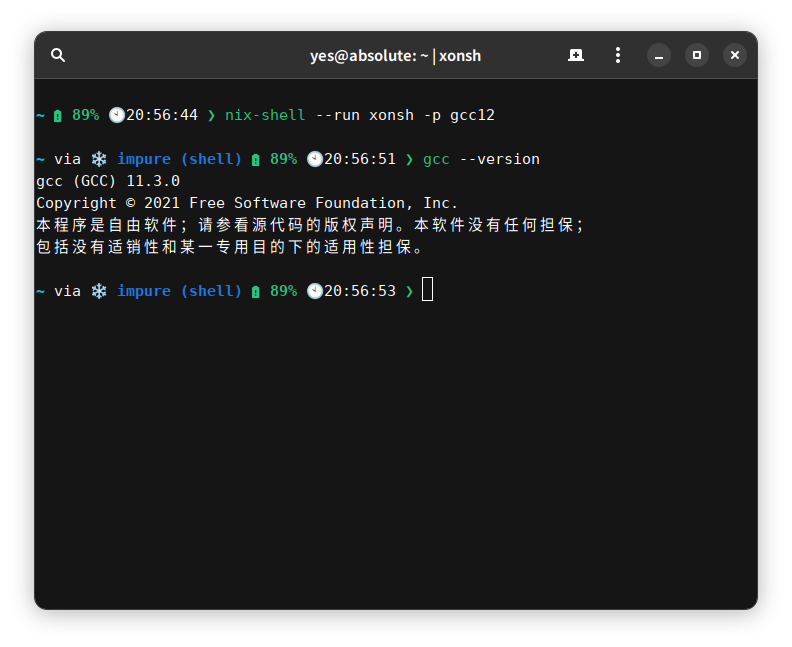
该不会是 nixpkgs 打包的锅吧
刚才问过了群里的大佬,nix-shell 的环境里本来就有个默认版本的 gcc,目前就是 gcc11,所以直接用 nix-shell -p gcc12 不行,需要自己写一个 shell.nix 或者用实验性的功能
参考链接:https://stackoverflow.com/questions/50277775/how-do-i-select-gcc-version-in-nix-shell
deepin 诶,我在 NixOS 上复现了
该不会是 nixpkgs 打包的锅吧
刚才问过了群里的大佬,nix-shell 的环境里本来就有个默认版本的 gcc,目前就是 gcc11,所以直接用 nix-shell -p gcc12 不行,需要自己写一个 shell.nix 或者用实验性的功能
参考链接:https://stackoverflow.com/questions/50277775/how-do-i-select-gcc-version-in-nix-shell
有点奇怪,这不想 demo 中演示的一样,即开即用。
https://nixos.org/#asciinema-demo-cover
nix 为什么要提供一个默认的 gcc? 而且我还不是 nixos。
突然想起来,https://nixos.org/guides/how-nix-works.html 中有写,会回退到源头构建模式。
但是,任然觉得不太合理。
不过,好解决就行。
deepin 有点奇怪,这不想 demo 中演示的一样,即开即用。
https://nixos.org/#asciinema-demo-cover
nix 为什么要提供一个默认的 gcc? 而且我还不是 nixos。
突然想起来,https://nixos.org/guides/how-nix-works.html 中有写,会回退到源头构建模式。
但是,任然觉得不太合理。
不过,好解决就行。
毕竟 nix-shell 这东西最初的设计是用来调试 nix 软件包的,打包时默认使用的 stdenv 里就包含了 gcc,相当于其他发行版的 build-essential 或 base-devel。而 nix-shell -p 其实是个糖,让你在搭建一个简单的临时环境时不用去写 nix 表达式。
新的 nix command 更加照顾新的使用场景,好像大佬们都已经在用 flakes 了
Popular Ranking
ChangePopular Events
More


 Which version of the Deepin system is the best?
被deepin 23 Nightly虐了一回后,昨天重装了deepin 20.6,今天安装tomcat9.0.63 native时,configure不能过,日志显示没有gcc-11.2
于是查看当前gcc版本是8。
重装gcc g++,还是8的版本,显示是uos 的gcc(迷惑)。
查看 /etc/apt/sources.list,内容是
deb https://community-packages.deepin.com/deepin/ apricot main contrib non-free
apt search找不到gcc-11.2
请教,如何能安装gcc-11.2呢?