

 中文
中文 
flwwater deepin
2022-08-13 14:55 deepin 用vlc试试,设置vaapi解码
Reply Like 0 View the author
 deepin
 用vlc试试,设置vaapi解码
deepin vlc +1

 deepin
 40%我都怀疑已经走了硬件解码,cpu解码4K视频应该是卡顿到完全不能看且占用100%才对(除非码率非常低)。
你可以试试
sudo apt install intel-gpu-tools
然后使用:
sudo intel_gpu_top
来查看intel核显占用情况。如果核显有占用那么肯定就有硬解。
 deepin
 40%我都怀疑已经走了硬件解码,cpu解码4K视频应该是卡顿到完全不能看且占用100%才对(除非码率非常低)。
你可以试试
sudo apt install intel-gpu-tools
然后使用:
sudo intel_gpu_top
来查看intel核显占用情况。如果核显有占用那么肯定就有硬解。
我安装了intel-gpu-tools播放Youtube 高清视频,CPU占用率8%左右,但是intel_gpu_top一直显示0%
我又测试使用深度影院播放本地视频,视频格式:H264 FPS:24fps, 分辨率:1024×576, 全屏模式下CPU占用率50%。 intel_gpu_top一直显示0%
感觉也没有使用核显解码。 这个有啥其他方式调试吗?
VLC播放器只有声音,没有画面。 我这边电脑一直无法切换为独显模式,安装英伟达驱动,无法正常启动。
deepin 我安装了intel-gpu-tools播放Youtube 高清视频,CPU占用率8%左右,但是intel_gpu_top一直显示0%
我又测试使用深度影院播放本地视频,视频格式:H264 FPS:24fps, 分辨率:1024×576, 全屏模式下CPU占用率50%。 intel_gpu_top一直显示0%
感觉也没有使用核显解码。 这个有啥其他方式调试吗?
VLC播放器只有声音,没有画面。 我这边电脑一直无法切换为独显模式,安装英伟达驱动,无法正常启动。
intel_gpu_top占用0%的话那确实是没有使用核显解码。
你试下安装这个包:
sudo apt install i965-va-driver
重启电脑,看看能不能硬解了。
如果还是不行就试试
sudo apt install vainfo
然后输入
vainfo
把结果贴上来。
关于安装n卡驱动的信息你可以先告诉我你是什么n卡我帮你看看。
deepin intel_gpu_top占用0%的话那确实是没有使用核显解码。
你试下安装这个包:
sudo apt install i965-va-driver
重启电脑,看看能不能硬解了。
如果还是不行就试试
sudo apt install vainfo
然后输入
vainfo
把结果贴上来。
关于安装n卡驱动的信息你可以先告诉我你是什么n卡我帮你看看。
i965-va-driver系统已经安装过,下面是命令输出:
Jeffy@Jeffy-PC:~$ sudo apt install i965-va-driver
Verify your face or password:Verification successful
Reading package lists... Done
Building dependency tree
Reading state information... Done
i965-va-driver is already the newest version (2.3.0+dfsg1-1).
i965-va-driver set to manually installed.
0 upgraded, 0 newly installed, 0 to remove and 6 not upgraded.
Jeffy@Jeffy-PC:~$ sudo apt install vainfo
Reading package lists... Done
Building dependency tree
Reading state information... Done
The following NEW packages will be installed:
  vainfo
0 upgraded, 1 newly installed, 0 to remove and 6 not upgraded.
Need to get 15.1 kB of archives.
After this operation, 44.0 kB of additional disk space will be used.
Get:1 https://community-packages.deepin.com/deepin apricot/main amd64 vainfo amd64 2.4.0+ds1-1 [15.1 kB]
Fetched 15.1 kB in 1s (11.9 kB/s)
Selecting previously unselected package vainfo.
(Reading database ... 277099 files and directories currently installed.)
Preparing to unpack .../vainfo_2.4.0+ds1-1_amd64.deb ...
Unpacking vainfo (2.4.0+ds1-1) ...
Setting up vainfo (2.4.0+ds1-1) ...
Processing triggers for man-db (2.8.5-2) ...
Jeffy@Jeffy-PC:~$ vainfo
libva info: VA-API version 1.4.0
libva info: va_getDriverName() returns -1
libva error: va_getDriverName() failed with unknown libva error,driver_name=(null)
vaInitialize failed with error code -1 (unknown libva error),exit
libva报错了,无法获取驱动名称。
我的显卡设备如下,N卡一直无法启用,参考论坛和网上方法都不行,无法启动到桌面,XServer启动报错:
Jeffy@Jeffy-PC:~$ lspci |grep -P "VGA|3D"
0000:00:02.0 VGA compatible controller: Intel Corporation TigerLake-H GT1 [UHD Graphics] (rev 01)
0000:01:00.0 3D controller: NVIDIA Corporation GA107M [GeForce RTX 3050 Ti Mobile] (rev a1)
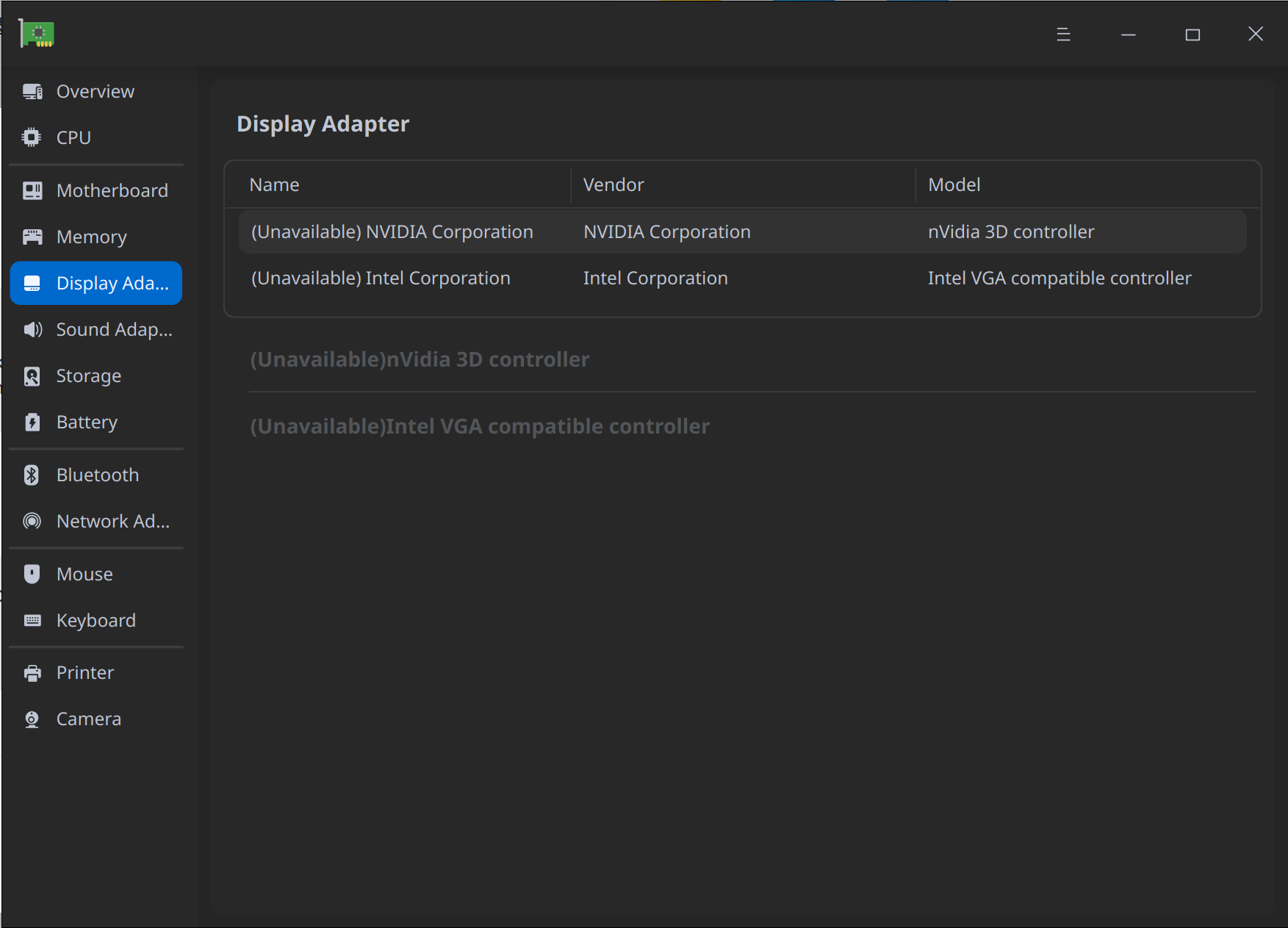
deepin i965-va-driver系统已经安装过,下面是命令输出:
Jeffy@Jeffy-PC:~$ sudo apt install i965-va-driver
Verify your face or password:Verification successful
Reading package lists... Done
Building dependency tree
Reading state information... Done
i965-va-driver is already the newest version (2.3.0+dfsg1-1).
i965-va-driver set to manually installed.
0 upgraded, 0 newly installed, 0 to remove and 6 not upgraded.
Jeffy@Jeffy-PC:~$ sudo apt install vainfo
Reading package lists... Done
Building dependency tree
Reading state information... Done
The following NEW packages will be installed:
  vainfo
0 upgraded, 1 newly installed, 0 to remove and 6 not upgraded.
Need to get 15.1 kB of archives.
After this operation, 44.0 kB of additional disk space will be used.
Get:1 https://community-packages.deepin.com/deepin apricot/main amd64 vainfo amd64 2.4.0+ds1-1 [15.1 kB]
Fetched 15.1 kB in 1s (11.9 kB/s)
Selecting previously unselected package vainfo.
(Reading database ... 277099 files and directories currently installed.)
Preparing to unpack .../vainfo_2.4.0+ds1-1_amd64.deb ...
Unpacking vainfo (2.4.0+ds1-1) ...
Setting up vainfo (2.4.0+ds1-1) ...
Processing triggers for man-db (2.8.5-2) ...
Jeffy@Jeffy-PC:~$ vainfo
libva info: VA-API version 1.4.0
libva info: va_getDriverName() returns -1
libva error: va_getDriverName() failed with unknown libva error,driver_name=(null)
vaInitialize failed with error code -1 (unknown libva error),exit
libva报错了,无法获取驱动名称。
我的显卡设备如下,N卡一直无法启用,参考论坛和网上方法都不行,无法启动到桌面,XServer启动报错:
Jeffy@Jeffy-PC:~$ lspci |grep -P "VGA|3D"
0000:00:02.0 VGA compatible controller: Intel Corporation TigerLake-H GT1 [UHD Graphics] (rev 01)
0000:01:00.0 3D controller: NVIDIA Corporation GA107M [GeForce RTX 3050 Ti Mobile] (rev a1)
n卡驱动最简单的安装方法就是直接
sudo apt install nvidia-driver
然后什么别的都不用做。最多加一个
sudo apt install nvidia-smi nvidia-settings
来查看和设置n卡驱动。
这样理论上讲至少不会把系统搞崩掉。
至于intel硬解加速的问题,你试下:
sudo apt install intel-media-va-driver
Popular Ranking
ChangePopular Events
More


 Which version of the Deepin system is the best?
操作系统版本:deepin 20.6
机器硬件信息:
目前,N卡驱动一直安装不成功,使用的是CPU集成显卡。
使用影院播放本地视频,CPU占用率普遍在40%左右, 感觉没有走硬件解析。
我的屏幕分辨率是4K屏幕,当播放窗口为全屏时CPU使用率更高。
希望大神能给个解决方案。