

 中文
中文 
来自Ubuntu的某位用户 deepin
2022-08-12 04:48 deepin 好像没有看出来错误,屏幕上都是OK,没有红色的Failed
Reply Like 0 View the author
 deepin
 好像没有看出来错误,屏幕上都是OK,没有红色的Failed
 deepin
 好像没有看出来错误,屏幕上都是OK,没有红色的Failed
现在一开机就这样了,,也进不去桌面了。

 deepin
 我当时有UOS装哪个插件显示没有独显得驱动,也没法切换,你这个是自己后来装的驱动吗

 deepin
 你是AMD+Nvidia吗?
然后选了切换到Intel驱动?
无论是不是这样,进tty,在/opt/apps/dde-dock-这里忘了太长了你按一下tab就自动补全了/files/bin/Rescue.sh都可以恢复备份
deepin 我当时有UOS装哪个插件显示没有独显得驱动,也没法切换,你这个是自己后来装的驱动吗
用电脑管家安装的驱动,然后用显卡切换。。重启,就这样了。
deepin 你是AMD+Nvidia吗?
然后选了切换到Intel驱动?
无论是不是这样,进tty,在/opt/apps/dde-dock-这里忘了太长了你按一下tab就自动补全了/files/bin/Rescue.sh都可以恢复备份
可是,,我安装系统时,只弄了一个"/"分区。没有设置备份分区啊。
 deepin
 TTY删除安装的驱动
deepin 可是,,我安装系统时,只弄了一个"/"分区。没有设置备份分区啊。
不是备份分区
这个插件会在你做操作的时候自动把原来的配置文件备份
那个Rescue.sh就是恢复
deepin TTY删除安装的驱动
靓仔,有详细的教程吗?
deepin 不是备份分区
这个插件会在你做操作的时候自动把原来的配置文件备份
那个Rescue.sh就是恢复
您前面发的那个发个进opt的方法,我没看懂。
deepin 靓仔,有详细的教程吗?
抱歉,这个真没有
 deepin
 截图所示界面,按键盘 Ctrl + Alt + F2 进入 tty2,输入用户名密码登录。
执行 sudo /opt/apps/dde-dock-graphics-plugin/files/bin/Rescue.sh
deepin 抱歉,这个真没有
那好,感谢指点。
deepin 截图所示界面,按键盘 Ctrl + Alt + F2 进入 tty2,输入用户名密码登录。
执行 sudo /opt/apps/dde-dock-graphics-plugin/files/bin/Rescue.sh
非常感谢,我回家试试。
Popular Ranking
ChangePopular Events
More


 Which version of the Deepin system is the best?
各位老板,我这电脑安装了uos后,用星火的插件切换了显卡。然后重启后就开不了机了。
开机提示如图。请问还有的救吗??该怎么办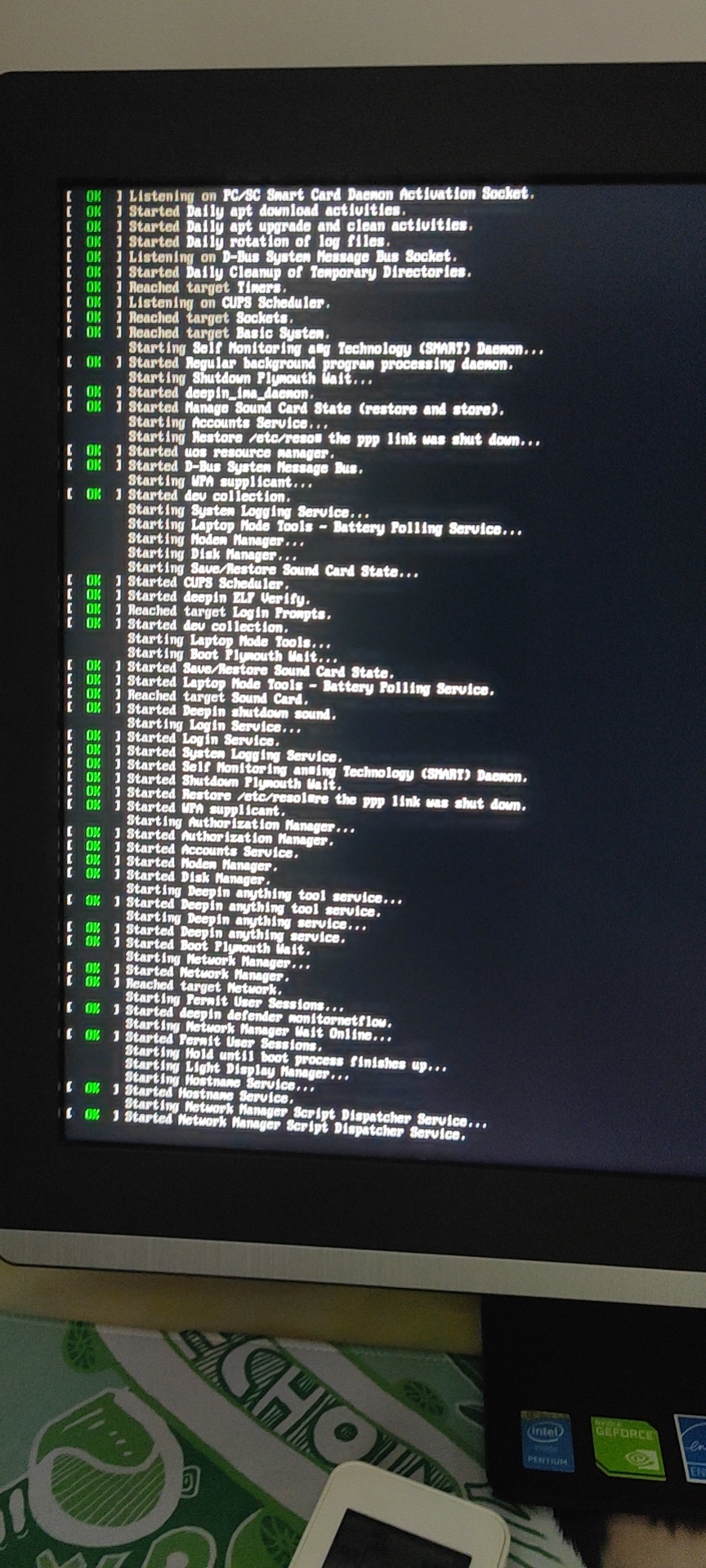 ??
??