

 中文
中文 
[^_^] deepin
2022-07-18 17:53 deepin 可以,使用文件创建 swap 分区,网上搜索一大堆
Reply Like 0 View the author
 deepin
 可以,使用文件创建 swap 分区,网上搜索一大堆
 deepin
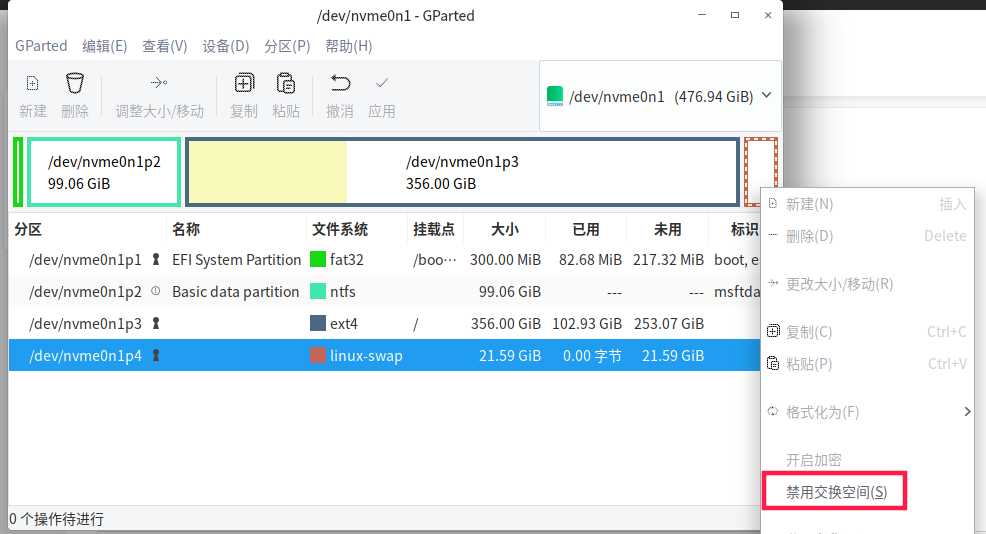
 使用gparted可以设置,没有设置,显示的是“开启交换空间”
我设置了,所以显示的是“禁用交换空间“
 deepin
 https://bbs.deepin.org/post/236642
看这个新手教程

非常感谢网友们的回复。

 deepin
 交换分区实际上没啥用

 deepin
  deepin
 以前我还分交换分区,现在不分了,直接用 swapfile,想大就大,想小就小,想放哪儿放哪儿

 deepin
 你的内存如果有个4G及以上,基本上不需要交换分区,交换分区的初衷应该是给内存只有2G不到的用户考虑的
你的内存如果有个4G及以上,基本上不需要交换分区,交换分区的初衷应该是给内存只有2G不到的用户考虑的
好的,我的内存是8G。主要是学习一下设置的方法。等天被微软制裁的那天,能够正常的工作、生活与学习。
 deepin
 以前是分了交换分区的,发现用不到,现在安装系统就不分交换分区了
Popular Ranking
ChangePopular Events
More


 Which version of the Deepin system is the best?
请问管理员及广大网友:7月16日安装了深度20.6版本,原来装的是新支点操作系统。新支点崩溃了,转战深度,让我惊艳。但有一个问题,在安装时不知道如何设置交换分区,就没设。现在安装好了,可以在深度操作系统界面增加一个交换分区吗?如果可以,如何设置?