

 中文
中文 
babyfengfjx
2022-07-14 17:39 Super Moderator
CQA
这个管用么?
Reply Like 1 View the author

 deepin
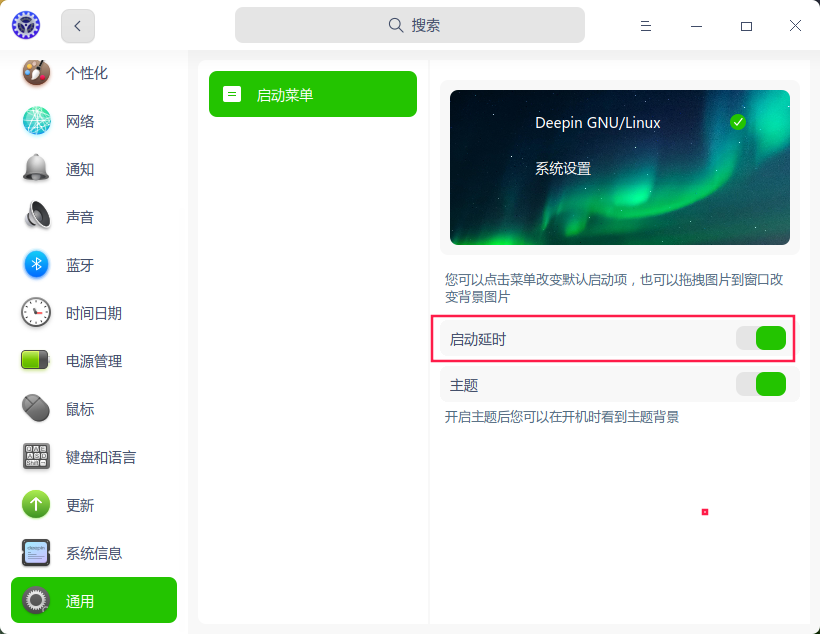
 控制中心——通用,打开启动延时,有3秒时间。
也可以安装grub-customizer软件,增加延时时间,调整启动菜单列表顺序等。

 deepin
 修改/etc/default/grub
grub_timeout=*
保存后update-grub

这个管用么?
 deepin
 这个管用么?
打开这个设置选项,然后修改/etc/default/grub文件的配置grub_timeout=*,最后用root身份运行update-grub命令,就可以了

 deepin
 可以再搞一个rEFInd,时间可以自定义设置,开启启动画面、logo都能自己定制
https://bbs.deepin.org/zh/post/221068
Popular Ranking
ChangePopular Events
More


 Which version of the Deepin system is the best?
有没有大佬指点一下如何修改开机系统选择的时间,感激不尽。