[App Sharing] Wine/UEngine 运行器新版本发布——支持暗黑主题
Tofloor
poster avatar
gfdgd_xi
deepin
Ecological co-builder
2022-07-09 00:00
Author

介绍

UEngine 运行器

        新版本Deepin/UOS发布后,可以在应用商店安装部分官方已适配的安卓应用,对爱好者来说,不能自己安装APK软件包始终差点意思,本程序可以为Deepin/UOS上的UEngine安卓运行环境安装自定义APK软件包,并能发送安装的APK包启动菜单到桌面或系统菜单。
image.png

Wine 运行器

一个图形化了以下命令的程序

env WINEPREFIX=容器路径 wine(wine的路径) 可执行文件路径

让你可以简易方便的使用 wine
是使用 Python3 的 tkinter 构建的
(自己美术功底太差,图标只能在网络上找了)
(测试平台:deepin 20.6;UOS 家庭版 21;Ubuntu 22.04)
而打包器可以方便的把您的 wine 容器打包成 deb 包供他人使用,程序创建的 deb 构建临时文件夹目录树如下:

/XXX
├── DEBIAN
│   └── control
└── opt
└── apps
    └── XXX
        ├── entries
        │   ├── applications
        │   │   └── XXX.desktop
        │   └── icons
        │       └── hicolor
        │           └── scalable
        │               └── apps
        │                   └── XXX.png(XXX.svg)
        ├── files
        │   ├── files.7z
        │   └── run.sh
        └── info

11 directories, 6 files

Screenshot_20220707_215916.png

更新内容

UEngine 运行器

※1、新增暗黑主题
※2、优化 deepin-terminal 在其它发行版显示奇奇怪怪的问题
※3、修复 UEngine 安装脚本在安装时不让用户选择,直接默认 N 无法安装的问题
4、新增设置 UEngine 代理的功能
5、将执行命令和打包器的返回输出从命令结束后显示输出内容改为实时显示内容

Wine 运行器

※1、新增专门的程序设置,支持设置 Wine 容器架构、DEBUG 信息是否输出、默认的 Wine、默认容器路径、是否使用终端打开和 Wine 参数
※2、修复了 wine 打包器的控件禁用不全和打包的 deb 用户残留的问题
※3、新增暗黑主题
4、合并了 deepin wine 文管设置器

下载链接

UEngine 运行器

蓝奏云:https://gfdgdxi.lanzoui.com/b01oaxnbi,密码:2rh3
Github:https://github.com/gfdgd-xi/uengine-runner
Gitee:https://gitee.com/gfdgd-xi/uengine-runner
星火应用商店(已审核通过):spk://store/tools/spark-uengine-runner
UEngine 运行器内部更新:可以使用 UEngine 运行器自带的更新程序进行更新(只支持 1.6.0 及以上版本)

最后再说一句:双包合一,所以即使你是安装 UEngine 运行器旧包的,也必须安装 UEngine 运行器新包,旧包已经废弃!

Wine 运行器

Gitee:https://gitee.com/gfdgd-xi/deep-wine-runner
Github:https://github.com/gfdgd-xi/deep-wine-runner
Gitlink:https://www.gitlink.org.cn/gfdgd_xi/deep-wine-runner
蓝奏云:https://gfdgdxi.lanzouj.com/b01nz7y3e,密码:7oii
星火应用商店:spk://store/tools/spark-deepin-wine-runner

Reply Favorite View the author
All Replies
gfdgd_xi
deepin
Ecological co-builder
2022-07-09 00:01
#1

UEngine 运行器的小白使用方式类似
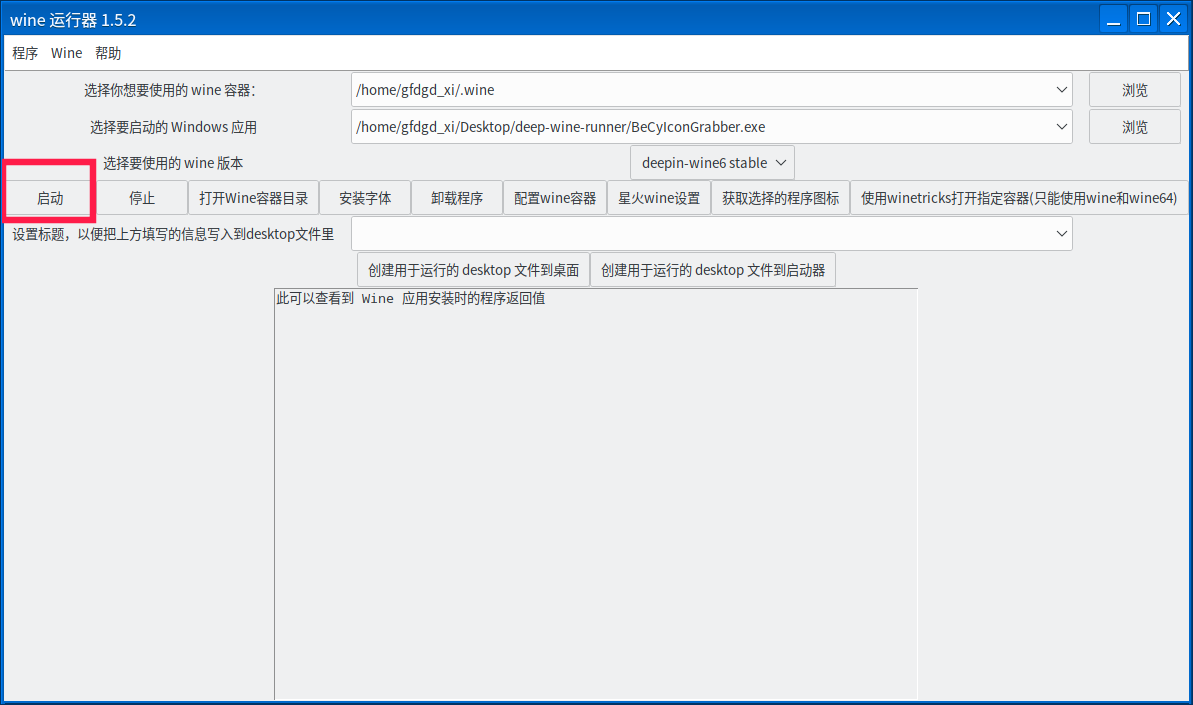
下面是送给小白的 wine 运行器简单使用方法,先声明,wine 并不能完美的运行所有 exe 文件,利用此 wine 运行器简易安装可执行文件的方法如下:

  1. 安装本程序
  2. 在应用商店里随便安装一个 QQ 或者微信等基于 deepin-wine6-stable 打包的应用
    image.png
  3. 找到需要安装的 exe,双击或者右键=》打开方式=》wine 运行器打开
    image.png
  4. 点击启动即可
    image.png
Reply View the author
jjcui8595
deepin
2022-07-09 00:44
#2

感谢楼主的辛勤劳动

Reply View the author
Comments
gfdgd xi
2022-07-09 06:07
感谢支持!
神末shenmo
deepin
Spark-App
Q&A Team
2022-07-09 00:57
#3

开始腹泻更新模式

Reply View the author
gfdgd_xi
deepin
Ecological co-builder
2022-07-09 01:19
#4
神末shenmo

开始腹泻更新模式

更不动了

Reply View the author
lsd1137
deepin
2022-07-09 04:42
#5

支持了,感谢分享

Reply View the author
Comments
gfdgd xi
2022-07-09 06:07
感谢支持!
sgb76
deepin
2022-07-09 07:41
#6

用wine运行器安装.NET真是太方便了,省了不少事儿!

Reply View the author
Comments
gfdgd xi
2022-07-09 15:07
感谢支持!有更多的想法和建议可以说一下,说不定下一次版本更新就有了
陌生人
deepin
2022-07-09 18:24
#7
神末shenmo

开始腹泻更新模式

啥叫腹泻更新模式啊

Reply View the author
神末shenmo
deepin
Spark-App
Q&A Team
2022-07-09 18:46
#8
陌生人

啥叫腹泻更新模式啊

就,最近他更新比较快joy

Reply View the author
(null)
deepin
2022-07-11 17:19
#9
The user is banned, and the content is hidden.
gfdgd_xi
deepin
Ecological co-builder
2022-07-11 17:45
#10
It has been deleted!
xuqi
deepin testing team
2022-10-15 23:49
#11

like

Reply View the author
gfdgd_xi
deepin
Ecological co-builder
2022-10-16 00:05
#12
xuqi

like

blush

感谢支持

Reply View the author
173******71
deepin
2022-11-25 04:43
#13

1、UEngine ubuntu22.04能用不?

Reply View the author
gfdgd_xi
deepin
Ecological co-builder
2022-11-25 15:36
#14
173******71

1、UEngine ubuntu22.04能用不?

joy

好像不大行,试试 xdroid?

Reply View the author