

 中文
中文 
安洛 deepin
2022-07-05 06:35 deepin 试下用uengine安装安卓的代理软件开启代理?
Reply Like 0 View the author
 deepin
 试下用uengine安装安卓的代理软件开启代理?
 deepin
 可以试一下用 adb,可以用的命令如下:
adb shell settings put global http_proxy 代理IP地址:端口号
如:
adb shell settings put global http_proxy 127.0.0.1:8888
移除代理:
adb shell settings delete global http_proxy
adb shell settings delete global global_http_proxy_host
adb shell settings delete global global_http_proxy_port
注意:移除代理后要重启手机才能生效。设置代理可以多次设置,立即生效。
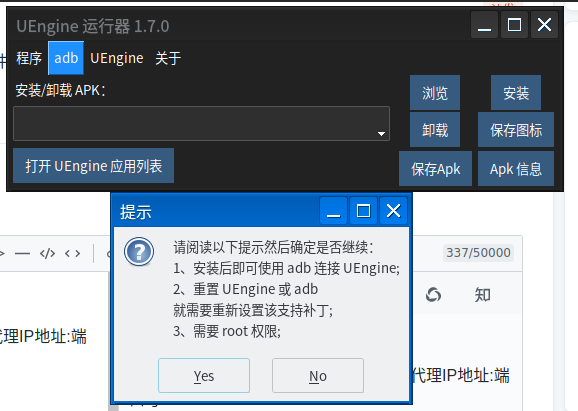
如何让 adb 连接 UEngine,可以用 UEngine 运行器的 adb 补丁功能:
 deepin
 可以试一下用 adb,可以用的命令如下:
adb shell settings put global http_proxy 代理IP地址:端口号
如:
adb shell settings put global http_proxy 127.0.0.1:8888
移除代理:
adb shell settings delete global http_proxy
adb shell settings delete global global_http_proxy_host
adb shell settings delete global global_http_proxy_port
注意:移除代理后要重启手机才能生效。设置代理可以多次设置,立即生效。
如何让 adb 连接 UEngine,可以用 UEngine 运行器的 adb 补丁功能:
谢谢,我有空去试一试
Popular Ranking
ChangePopular Events
More


 Which version of the Deepin system is the best?
在desktop文件里面exec加上代理好像都不成功
比如原来的:
Exec=uengine launch --action=android.intent.action.MAIN --package=com.twitter.android --component=com.twitter.android.StartActivity
加了代理:
Exec=env http_proxy=http://127.0.0.1:46551 https_proxy=http://127.0.0.1:46551 socks5_proxy=http://127.0.0.1:40823 uengine launch --action=android.intent.action.MAIN --package=com.twitter.android --component=com.twitter.android.StartActivity
Exec=uengine launch --action=android.intent.action.MAIN --package=com.twitter.android --component=com.twitter.android.StartActivity --proxy-server="http://127.0.0.1:46551" --proxy-server="https://127.0.0.1:46551" --proxy-server="socks5://127.0.0.1:40823"