

 中文
中文 
jjcui8595 deepin
2022-07-05 00:37 deepin make完成后不是要先安装模块吗?直接安装内核?
Reply Like 0 View the author
 deepin
 make完成后不是要先安装模块吗?直接安装内核?
 deepin
 make完成后不是要先安装模块吗?直接安装内核?
sudo make modules_install
正常安装模块后 才运行 make && make install 安装内核的 结果最后一步出现错误提示 前面一切正常!
deepin sudo make modules_install
正常安装模块后 才运行 make && make install 安装内核的 结果最后一步出现错误提示 前面一切正常!
模块安装后,为什么还要make?应该直接make install
deepin 模块安装后,为什么还要make?应该直接make install
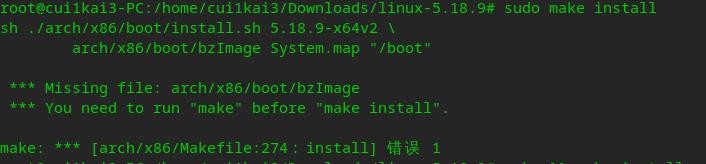
运行
sudo make install
出错后! 才尝试 make && make install 结果还是出错
deepin
运行
sudo make install
出错后! 才尝试 make && make install 结果还是出错
看起来在make阶段就有问题。建议重新编译
deepin 先make distclean清理干净,再从头开始
deepin 建议先尝试安装deepin官方内核5.15.34或5.17.3,不行的话再自己编译。我使用编译的内核,无法打开安卓应用
deepin 先make distclean清理干净,再从头开始
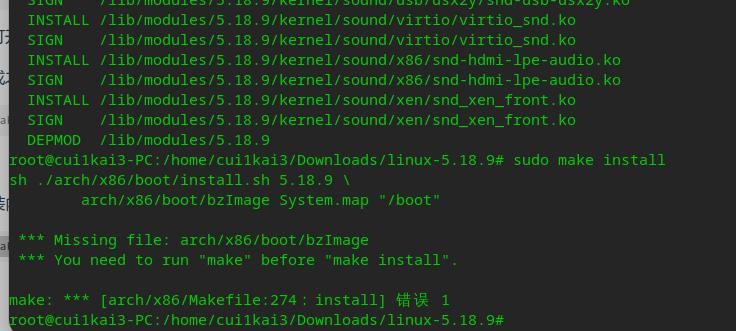
make distclean
清理 重新安装 还是出现同样错误
 deepin
 这不是提示zstd命令没找到吗? 安装zstd后再编译内核就应该就没问题了: sudo apt install zstd

 deepin
 如果你不知道make时也会出现错误,就不要编译内核了,属于折磨自己
 deepin
 因为你编译过,要先清除旧的编译文件
make clean
https://www.kernel.org
sudo apt-get install git fakeroot build-essential ncurses-dev xz-utils libssl-dev bc flex libelf-dev bison liblz4-tool
sudo tar -xavf linux-5.18.8.tar -C /usr/src/
cd /linux-5.18.8/
cp /boot/config-`uname -r` ./.config
sudo su
make menuconfig
加载配置文件:load-->exit
make -j8
make modules_install
make install
dpkg --get-selections|grep linux
删除/boot目录下面目标内核版本相关的文件
删除/usr/src目录下的目标旧内核源码
删除/lib/modules目录下目标旧模块
删除/var/lib/initramfs-tools目录下目标旧工具
update-grub 更新grub
https://bbs.deepin.org/post/237619
https://www.jianshu.com/p/eece4167999d
https://linux.cn/article-9665-1.html
https://elementaryos.stackexchange.com/questions/25182/elementary-os-is-slow-and-unstable

 deepin
 建议先尝试安装deepin官方内核5.15.34或5.17.3,不行的话再自己编译。我使用编译的内核,无法打开安卓应用
deepin内核编译的时候打开了兼容安卓的开关,你应该在编译的时候添加某个参数来打开这个开关才能在deepin上使用uengine,详细的看linux内核文档。
deepin deepin内核编译的时候打开了兼容安卓的开关,你应该在编译的时候添加某个参数来打开这个开关才能在deepin上使用uengine,详细的看linux内核文档。
谢谢,知道是哪个参数吗
deepin 因为你编译过,要先清除旧的编译文件
make clean
https://www.kernel.org
sudo apt-get install git fakeroot build-essential ncurses-dev xz-utils libssl-dev bc flex libelf-dev bison liblz4-tool
sudo tar -xavf linux-5.18.8.tar -C /usr/src/
cd /linux-5.18.8/
cp /boot/config-`uname -r` ./.config
sudo su
make menuconfig
加载配置文件:load-->exit
make -j8
make modules_install
make install
dpkg --get-selections|grep linux
删除/boot目录下面目标内核版本相关的文件
删除/usr/src目录下的目标旧内核源码
删除/lib/modules目录下目标旧模块
删除/var/lib/initramfs-tools目录下目标旧工具
update-grub 更新grub
https://bbs.deepin.org/post/237619
https://www.jianshu.com/p/eece4167999d
https://linux.cn/article-9665-1.html
https://elementaryos.stackexchange.com/questions/25182/elementary-os-is-slow-and-unstable
谢谢!!不过我已经重装了deepin 重装后就正常了。原本想不重装就是不想折腾结果一顿操作后比重装还多事😂
Popular Ranking
ChangePopular Events
More


 Which version of the Deepin system is the best?
deepin升级到 20.6 后 很多驱动都不正常了 显卡也只有最低分辨率显示 ,只能自己尝试编译最新内核看下能不能正常使用! 结果编译到最后安装出现错误.
make && make install 出现上面错误提示
有遇到同样问题的人? 怎么解决