

 中文
中文 
sunnyqing deepin
2022-07-01 19:51 deepin 据我自己的使用经验,vi编辑的时候是无法右键进行复制的。不过vi不好用,建议使用vim。
可以在非编辑模式(按esc可以进入)的时候使用v来选择要复制的内容,选择完成后用连按yy来复制。复制完成后可以在对应的地方用按p来复制。
Reply Like 0 View the author
 deepin
 据我自己的使用经验,vi编辑的时候是无法右键进行复制的。不过vi不好用,建议使用vim。
可以在非编辑模式(按esc可以进入)的时候使用v来选择要复制的内容,选择完成后用连按yy来复制。复制完成后可以在对应的地方用按p来复制。
 deepin
 添加或修改~/.vimrc文件如下:
set mouse=r
set backspace=indent,eol,start
set ruler

set shiftwidth=4
就可以用鼠标光标标注文字,然后点击滑轮,或鼠标的中间键复制了。
vim 和 vi 是同一个命:
$ ls -lh /usr/bin/vi
lrwxrwxrwx 1 root root 20 Sep  9  2020 /usr/bin/vi -> /etc/alternatives/vi
$ ls -lh /usr/bin/vim
lrwxrwxrwx 1 root root 21 Sep  9  2020 /usr/bin/vim -> /etc/alternatives/vim
$ ls -lh /etc/alternatives/vi
lrwxrwxrwx 1 root root 18 Sep  9  2020 /etc/alternatives/vi -> /usr/bin/vim.basic
$ ls -lh /etc/alternatives/vim
lrwxrwxrwx 1 root root 18 Sep  9  2020 /etc/alternatives/vim -> /usr/bin/vim.basic
deepin 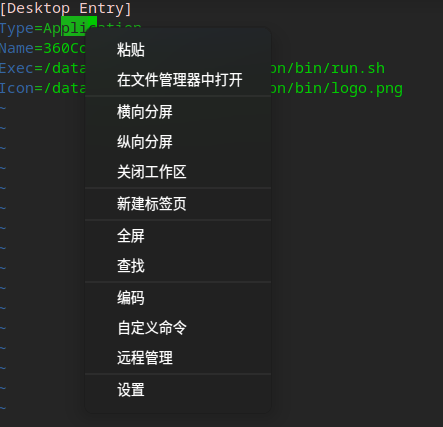 只有粘贴,没有复制
 deepin
 用vim吧

 deepin
 配置文件的问题
Popular Ranking
ChangePopular Events
More


 Which version of the Deepin system is the best?
终端里面使用vi命令进入文本编辑时,右键菜单无复制功能