

 中文
中文 
180******17 deepin
2022-06-17 07:54 deepin 重新安装了fcitx5,终于可以打字了,刚刚尝试安装搜狗输入法时,提示依赖关系不足,请问这是什么原因导致的呢?
Reply Like 0 View the author
 deepin
 重新安装了fcitx5,终于可以打字了,刚刚尝试安装搜狗输入法时,提示依赖关系不足,请问这是什么原因导致的呢?
deepin 

 deepin
 先卸载所有fcitx和fcitx5有关组件。尝试重新安装输入法。
搜狗输入法有多个不同版本,依赖各不相同。商店里版本是一个,官网有两个版本可供下载。可以分别尝试一下。
deepin 先卸载所有fcitx和fcitx5有关组件。尝试重新安装输入法。
搜狗输入法有多个不同版本,依赖各不相同。商店里版本是一个,官网有两个版本可供下载。可以分别尝试一下。
我尝试了在商店和用命令下载,但没搞懂为什么缺少依赖关系,明明是重新装的fcitx
deepin 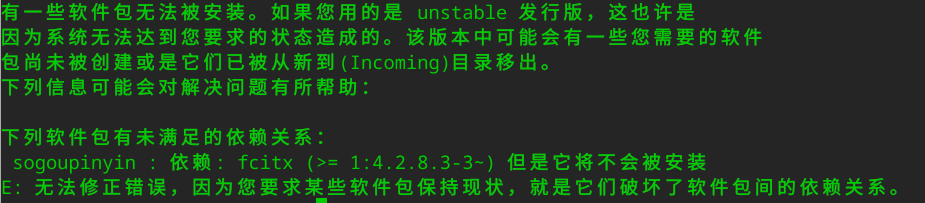
胡乱捣鼓了一通,好像变得更糟糕了,刚刚使用了sudo apt-get autoremove sogoupinyin,删除了好多libqt*,然后我又运行了sudo apt-get install libqt4-declarative尝试补救,好像没能救回来
 deepin
 搜狗输入法在20.6应用可以呀,
deepin
胡乱捣鼓了一通,好像变得更糟糕了,刚刚使用了sudo apt-get autoremove sogoupinyin,删除了好多libqt*,然后我又运行了sudo apt-get install libqt4-declarative尝试补救,好像没能救回来
既然你提到了qt4这个包大概安装的是官网上较旧的那个版本。这些包很多与deepin不再兼容了,卸载就卸载了不用慌。
我建议直接
sudo apt autopurge fcitx
然后到应用商店安装。应用商店的版本会和官网的版本产生依赖冲突,所以先卸载掉所有再安装商店版。

 deepin
 安装了fcitx5,就不要尝试安装搜狗输入法,搜狗输入法只到fcitx4版本不匹配。要用fcitx5中文记得安装fcitx5-chinese-addons。祝你成功。
deepin 安装了fcitx5,就不要尝试安装搜狗输入法,搜狗输入法只到fcitx4版本不匹配。要用fcitx5中文记得安装fcitx5-chinese-addons。祝你成功。
已经放弃搜狗了。。。
fctix已经搞好了,也可以用
Popular Ranking
ChangePopular Events
More


 Which version of the Deepin system is the best?
I upgraded to version 20.6 toght, and I can't type Chinese now.
I have changed my typewriting from Sougou to Huayu, but it didn't work.
holly sh*t