

 中文
中文 
delsin deepin
2022-06-13 06:56 deepin 桌面图标并不是安装位置哈。图标——右键——打开方式——文本编辑器,里面的Exec=后面的才是应用目录
Reply Like 1 View the author
 deepin
 桌面图标并不是安装位置哈。图标——右键——打开方式——文本编辑器,里面的Exec=后面的才是应用目录
deepin 桌面图标存放在Desktop文件夹,也就是你的桌面上。
 deepin
 桌面图标并不是安装位置哈。图标——右键——打开方式——文本编辑器,里面的Exec=后面的才是应用目录
正解

 deepin
 桌面图标并不是安装位置哈。图标——右键——打开方式——文本编辑器,里面的Exec=后面的才是应用目录
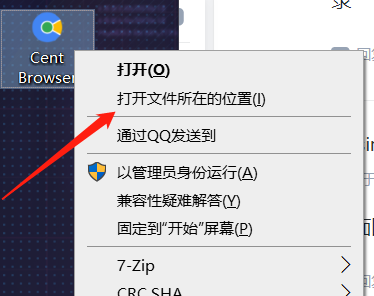
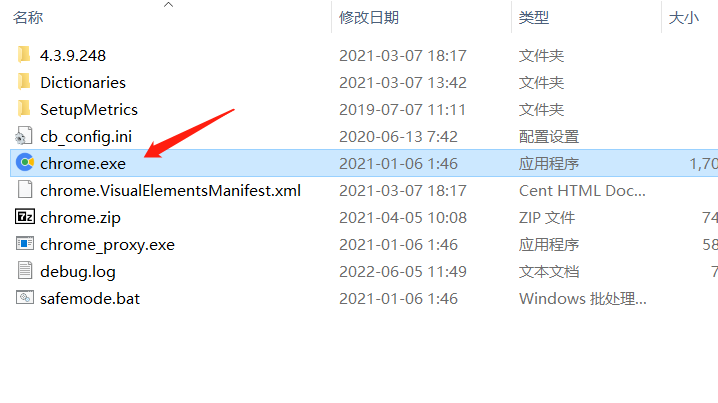
他可能需要这种,但是deepin没这功能,不过技术上应该不难
 deepin
 dde-file-manager --show-item $(grep Exec= DESKTOP文件名 | head -1 | sed 's/Exec=//' | sed 's/sh -c "//' | sed 's/ .*//')

 deepin
 增加这功能确实挺实用
deepin 他可能需要这种,但是deepin没这功能,不过技术上应该不难
linux系统对于应用安装逻辑跟windows不一样,不要生搬硬套。
linux里,应用的源文件目录在/opt/apps文件夹;执行程序在usr/bin文件夹;启动器图标在/usr/share/icons/hicolor/scalable/apps文件夹;桌面图标在~/Desktop文件夹;应用数据又在另外的文件夹。它跟windows不一样。
Popular Ranking
ChangePopular Events
More


 Which version of the Deepin system is the best?
如何快速打开桌面图标的原文件路径???
能快速打开原文件安装位置