

 中文
中文 
来自Ubuntu的某位用户 deepin
2022-06-11 20:20 deepin 现在系统是什么版本?
新手建议不要尝试自己升级内核,有可能会Kernel Panic(内核错误)
Reply Like 0 View the author
 deepin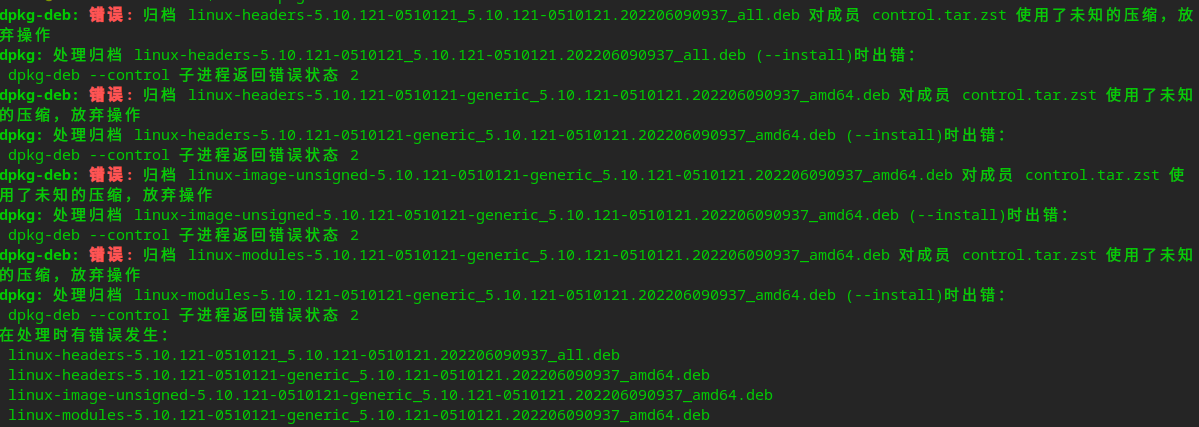
 deepin
 现在系统是什么版本?
新手建议不要尝试自己升级内核,有可能会Kernel Panic(内核错误)
 deepin
 当前系统内核如果没有问题,不必纠结内核版本,新的内核主要是为了解决新的硬件,如果你的电脑配置不是最近几年出的新电脑,旧内核使用没有问题的话,完全没必要升级内核
就像我现在的硬件比较新,旧内核遇到的问题,哪怕升级现在最新的5.18.3内核,和官方5.15内核没有任何区别
deepin 现在系统是什么版本?
新手建议不要尝试自己升级内核,有可能会Kernel Panic(内核错误)
不是折腾,是i5-1135g7 Xe集显,当前版本显卡驱动不支持,无法更改分辨率和方向
deepin 当前系统内核如果没有问题,不必纠结内核版本,新的内核主要是为了解决新的硬件,如果你的电脑配置不是最近几年出的新电脑,旧内核使用没有问题的话,完全没必要升级内核
就像我现在的硬件比较新,旧内核遇到的问题,哪怕升级现在最新的5.18.3内核,和官方5.15内核没有任何区别
不是折腾,是i5-1135g7 Xe集显,当前版本显卡驱动不支持,无法更改分辨率和方向
deepin 新硬件5.15起步啊,你用LTS5.10内核肯定不行!
安装stable内核
sudo apt install linux-image-deepin-stable-amd64 linux-headers-deepin-stable-amd64
deepin 新硬件5.15起步啊,你用LTS5.10内核肯定不行!
安装stable内核
sudo apt install linux-image-deepin-stable-amd64 linux-headers-deepin-stable-amd64
这个内核是哪个版本的呢
deepin 这个内核是哪个版本的呢
这是官方5.15稳定内核,全新安装系统时候可以选择用这个!
Popular Ranking
ChangePopular Events
More


 Which version of the Deepin system is the best?