

 中文
中文 
jjcui8595 deepin
2022-06-10 07:00 deepin 参考这个帖子
https://bbs.deepin.org/phone/zh/post/238403
Reply Like 0 View the author
 deepin
 参考这个帖子
https://bbs.deepin.org/phone/zh/post/238403
 deepin
 参考这个帖子
https://bbs.deepin.org/phone/zh/post/238403
哎。。。真是要劝退我这种基础薄弱的用户了,我试了sudo apt-get install nvidia-driver=470.86-1 和sudo apt install nvidia-tesla-470-driver 貌似用显卡切换程序还是提示NVIDIA驱动没安装
deepin 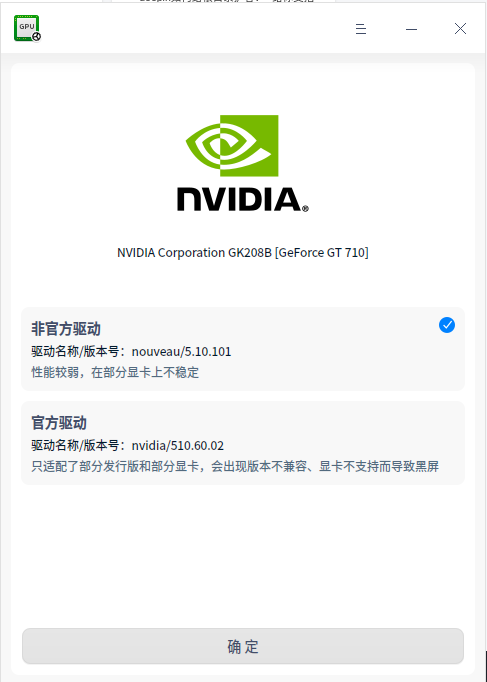
deepin 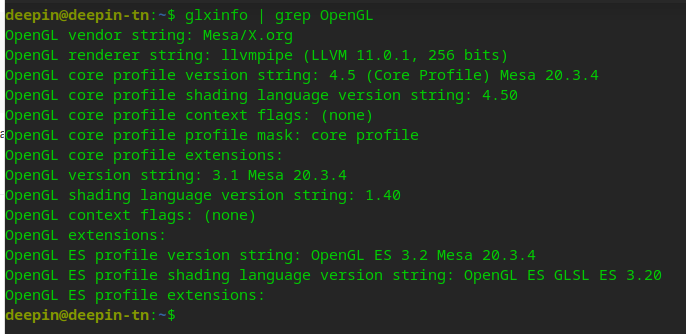
deepin 

 deepin
 先执行这个命令卸载以前的驱动
sudo apt autoremove nvidia-*
然后安装一下390的驱动重启试试
sudo apt install nvidia-legacy-390xx-driver
deepin 安装星火应用商店里的显卡切换工具
 deepin
 Nvidia显卡问题解决方法:
先终端命令卸载以前的驱动
sudo apt autoremove nvidia*
然后再安装系统默认驱动
sudo apt install nvidia-driver
安装中如果提示驱动不匹配,就记下提示建议的驱动名称后中止这过程。
再命令安装这建议的(如nvidia-tesla-470-driver)驱动:sudo apt install nvidia-tesla-470-driver
驱动安装成功后重启进入系统。
 deepin
 我是20.5出现的问题,换了一个转接口就好了
 deepin
兄弟,你这个看驱动的是什么软件?可以一键换驱动么

 deepin
 删掉桌面配置文件
 deepin
 兄弟,你这个看驱动的是什么软件?可以一键换驱动么
这个是官方的显卡驱动管理软件,问题太多会导致系统出问题,然后官方下架了
deepin 不知楼主安装成功了没?
我可以根据自己的安装经历提供有限指导,在本帖下回帖,约个都在线的时间
deepin 先执行这个命令卸载以前的驱动
sudo apt autoremove nvidia-*
然后安装一下390的驱动重启试试
sudo apt install nvidia-legacy-390xx-driver
厉害~~~,按照这个方法搞定啦,,推荐这个方法
deepin Nvidia显卡问题解决方法:
先终端命令卸载以前的驱动
sudo apt autoremove nvidia*
然后再安装系统默认驱动
sudo apt install nvidia-driver
安装中如果提示驱动不匹配,就记下提示建议的驱动名称后中止这过程。
再命令安装这建议的(如nvidia-tesla-470-driver)驱动:sudo apt install nvidia-tesla-470-driver
驱动安装成功后重启进入系统。
👍
deepin 不知楼主安装成功了没?
我可以根据自己的安装经历提供有限指导,在本帖下回帖,约个都在线的时间
谢谢您!!我的电脑已经弄好啦😁
deepin 厉害~~~,按照这个方法搞定啦,,推荐这个方法
成功了就好
Popular Ranking
ChangePopular Events
More


 Which version of the Deepin system is the best?
我在设置中点了升级,把系统从20。5升级到20。6。
升级完后,我的台式机电脑原来是NVIDIA GeForce GT710显卡有4个HDMI接口,分别接了4个屏幕,现在升级了系统后,只有其中一个接口连接的屏幕能有信号亮屏,其他三个显卡接口都没信号了。
我感觉升级了系统后,是不是之前的显卡驱动不兼容,现在点击NVIDIA驱动设置,点击后也没反应,也不知道怎么弄了
请大神指点啊,这升级升得我烦恼啊