

 中文
中文 
youngwq deepin
2022-06-07 00:36 deepin 试过vnc,发现性能太差,打开一个窗口,看着一行一行地显示出来,卡顿非常厉害。
Reply Like 0 View the author
 deepin
 试过vnc,发现性能太差,打开一个窗口,看着一行一行地显示出来,卡顿非常厉害。

 deepin
 teamviewer
 deepin
 vnc是图像压缩传输,效果太差
试下xrdp试试,参考ubuntu上的安装方法试试

 deepin
 安装remmina

应用商店有
deepin 安装remmina
应用商店有
这是客户端,那服务端要装什么?

 deepin
 nomachine 以前用过,还行
deepin 这是客户端,那服务端要装什么?
不需要,输入IP,用户密码就可以,也可以连接WIN系统
 deepin
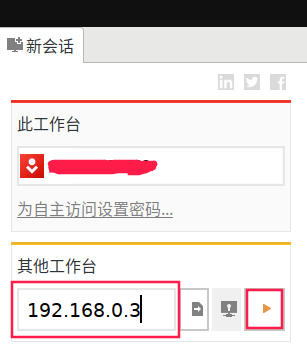
 用AnyDesk,在应用商店里有。
局域网使用的话,主机a远程连接主机b,直接输入主机b的IP地址来连接就可以了。
deepin 国产的向日葵,其他试过,全放弃了。
 deepin
 ssh增加x11转发试试?感觉比vnc快,但是可能需要优化,还有输入法等问题需要自己调试
deepin 国产的向日葵,其他试过,全放弃了。
不连外网,用不了向日葵。
deepin 用AnyDesk,在应用商店里有。
局域网使用的话,主机a远程连接主机b,直接输入主机b的IP地址来连接就可以了。
这个好像也是要连外网
deepin 这个好像也是要连外网
直接输入局域网IP地址是不需要外网的.
输入自动生成的ID才需要外网
deepin 直接输入局域网IP地址是不需要外网的.
输入自动生成的ID才需要外网
可以了,谢谢谢谢!
Popular Ranking
ChangePopular Events
More


 Which version of the Deepin system is the best?
本人有两台deepin,在同一局域网内,有什么工具,可以让我从一台deepin登陆另一台deepin的桌面,最好是免费的,注意是局域网,不能连外网,向日葵、todesk的都不能用。