

 中文
中文 
jjcui8595 deepin
2022-06-05 15:59 deepin Reply Like 0 View the author


 deepin
 sudo apt install nvidia-driver=470.86-1
 deepin
 sudo apt install nvidia-driver=470.86-1
裝不上的,nvidia-driver只是空包,部分470版的包已被510取代,470的包不完整了

 deepin
 sudo apt install nvidia-driver=470.86-1
nvidia-tesla-470-driver
试试这个包
deepin nvidia-tesla-470-driver
试试这个包
nvidia-tesla-470-driver這個包是 NVIDIA® Data Center GPU Drivers
https://docs.nvidia.com/datacenter/tesla/tesla-release-notes-470-129-06/index.html
並不支持民用
deepin nvidia-tesla-470-driver
试试这个包
谢谢,我试试
deepin nvidia-tesla-470-driver這個包是 NVIDIA® Data Center GPU Drivers
https://docs.nvidia.com/datacenter/tesla/tesla-release-notes-470-129-06/index.html
並不支持民用
好像可以安装
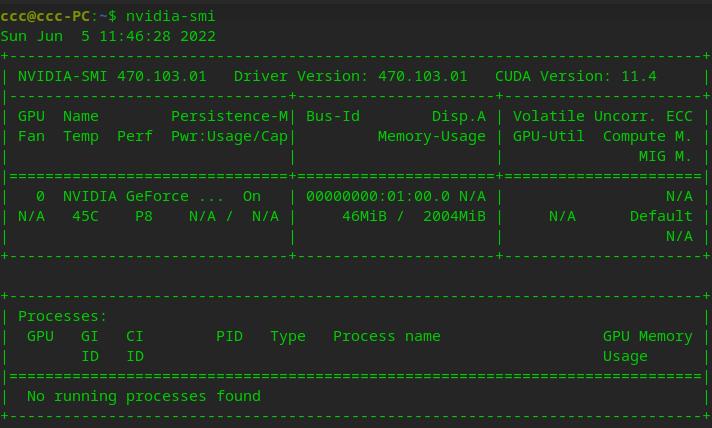
deepin 好像可以安装
終端下執行
glxinfo | grep OpenGL
看下是否有類次類次
OpenGL vendor string: NVIDIA Corporation
OpenGL renderer string: GeForce GTX 1660 Ti with Max-Q Design/PCIe/SSE2
OpenGL core profile version string: 4.6.0 NVIDIA 470.103
OpenGL core profile shading language version string: 4.60 NVIDIA
 deepin
 sudo apt install deepin-graphics-driver-manager 用这个看看,感觉是你想要的😁
deepin 終端下執行
glxinfo | grep OpenGL
看下是否有類次類次
OpenGL vendor string: NVIDIA Corporation
OpenGL renderer string: GeForce GTX 1660 Ti with Max-Q Design/PCIe/SSE2
OpenGL core profile version string: 4.6.0 NVIDIA 470.103
OpenGL core profile shading language version string: 4.60 NVIDIA
请帮忙看看,正常吗?
$ glxinfo | grep OpenGL
OpenGL vendor string: NVIDIA Corporation
OpenGL renderer string: NVIDIA GeForce GT 740M/PCIe/SSE2
OpenGL core profile version string: 4.6.0 NVIDIA 470.103.01
OpenGL core profile shading language version string: 4.60 NVIDIA
OpenGL core profile context flags: (none)
OpenGL core profile profile mask: core profile
OpenGL core profile extensions:
OpenGL version string: 4.6.0 NVIDIA 470.103.01
OpenGL shading language version string: 4.60 NVIDIA
OpenGL context flags: (none)
OpenGL profile mask: (none)
OpenGL extensions:
OpenGL ES profile version string: OpenGL ES 3.2 NVIDIA 470.103.01
OpenGL ES profile shading language version string: OpenGL ES GLSL ES 3.20
OpenGL ES profile extensions:
deepin sudo apt install deepin-graphics-driver-manager 用这个看看,感觉是你想要的😁
已安装星火商店的显卡切换工具。如果使用显卡驱动管理器,只能切换510版本驱动,会导致显卡无法使用
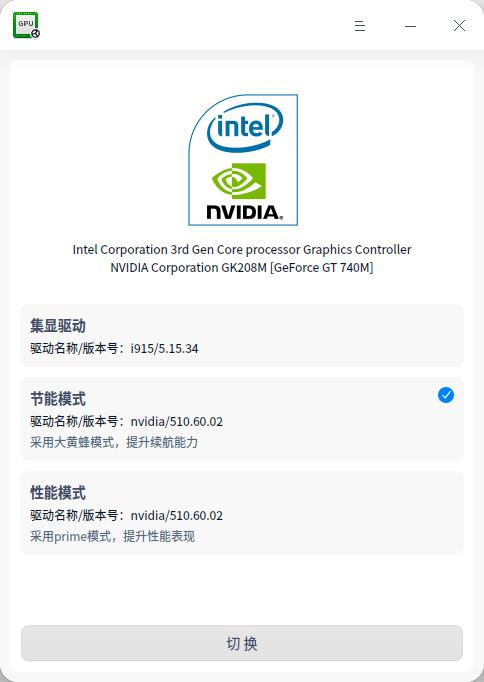
deepin 请帮忙看看,正常吗?
$ glxinfo | grep OpenGL
OpenGL vendor string: NVIDIA Corporation
OpenGL renderer string: NVIDIA GeForce GT 740M/PCIe/SSE2
OpenGL core profile version string: 4.6.0 NVIDIA 470.103.01
OpenGL core profile shading language version string: 4.60 NVIDIA
OpenGL core profile context flags: (none)
OpenGL core profile profile mask: core profile
OpenGL core profile extensions:
OpenGL version string: 4.6.0 NVIDIA 470.103.01
OpenGL shading language version string: 4.60 NVIDIA
OpenGL context flags: (none)
OpenGL profile mask: (none)
OpenGL extensions:
OpenGL ES profile version string: OpenGL ES 3.2 NVIDIA 470.103.01
OpenGL ES profile shading language version string: OpenGL ES GLSL ES 3.20
OpenGL ES profile extensions:
正常了
deepin 正常了
再次感谢!

deepin nvidia-tesla-470-driver這個包是 NVIDIA® Data Center GPU Drivers
https://docs.nvidia.com/datacenter/tesla/tesla-release-notes-470-129-06/index.html
並不支持民用
实际上,民用也很多用这个,比如之前deepin仓库引入510的时候就是这个tesla
不清楚是这个tesla包被调整过,还是本来tesla驱动就支持
deepin 实际上,民用也很多用这个,比如之前deepin仓库引入510的时候就是这个tesla
不清楚是这个tesla包被调整过,还是本来tesla驱动就支持
是調過了的,看ls貼出的 OpenGL渲染器信息,貌次屏蔽了 OpenGL渲染,僅能使用 OpenGL ES 渲染
deepin 是調過了的,看ls貼出的 OpenGL渲染器信息,貌次屏蔽了 OpenGL渲染,僅能使用 OpenGL ES 渲染
所以其实性能是有损失的吗
我现在在用tesla的,那我是不是应该手动安装下官网的?
deepin 所以其实性能是有损失的吗
我现在在用tesla的,那我是不是应该手动安装下官网的?
是的 ,OpenGL 與 OpenGL ES 不同,OpenGL用於桌面軟件和工業軟件上,OpenGL ES一般用於嵌入式設備(如安卓上), 由於應用場景不同兩者功能上會有出入,不支持OpenGL 渲染要通過 OpenGL ES 轉 OpenGL 會有一定的性能損失。
另 deepin 的 apt源裡 的 nvidia-driver 已經是510版了, 你卸載tesla 再安裝這個就可以了
OpenGL® ES is a royalty-free, cross-platform API for rendering advanced 2D and 3D graphics on Embedded and mobile Systems
deepin 听二位讨论涨知识了
deepin 已安装星火商店的显卡切换工具。如果使用显卡驱动管理器,只能切换510版本驱动,会导致显卡无法使用
还真是510了,前两天刚装的是470的。。。。
deepin 还真是510了,前两天刚装的是470的。。。。
对新显卡是好事
Popular Ranking
ChangePopular Events
More


 Which version of the Deepin system is the best?
系统升级20.6后,Nvidia GT740M 原来的470驱动被替换成510版本,显卡变成不可用状态。Nvidia官网下载的418版本驱动无法安装,提示编译不成功。目前,显卡无法使用。强烈要求软件仓库保留470版本驱动!