

 中文
中文 
云的眼泪 deepin
2022-06-04 06:58 deepin 图片中显示“不可用”,说明驱动没有正确安装。
Reply Like 0 View the author
 deepin
 图片中显示“不可用”,说明驱动没有正确安装。

 deepin
 图片中显示“不可用”,说明驱动没有正确安装。
谢谢,怎样安装正确的驱动?

卸载nvidia-driver
sudo apt-get purge nvidia*
下载安装官方驱动,你的应该是下面这个
https://www.nvidia.cn/Download/driverResults.aspx/153776/cn/
安装方法参考下面链接
https://bbs.deepin.org/post/227661

 deepin
dde-dock-graphics-plugin_1.8.4-1_amd64.zipdde-dock-graphics-plugin任务栏插件成功切换
deepin 卸载nvidia-driver
sudo apt-get purge nvidia*
下载安装官方驱动,你的应该是下面这个
https://www.nvidia.cn/Download/driverResults.aspx/153776/cn/
安装方法参考下面链接
https://bbs.deepin.org/post/227661
非常详尽,非常感谢
deepin
dde-dock-graphics-plugin_1.8.4-1_amd64.zipdde-dock-graphics-plugin任务栏插件成功切换
谢谢,我的不行,应该是系统默认驱动不匹配问题
deepin 卸载nvidia-driver
sudo apt-get purge nvidia*
下载安装官方驱动,你的应该是下面这个
https://www.nvidia.cn/Download/driverResults.aspx/153776/cn/
安装方法参考下面链接
https://bbs.deepin.org/post/227661
安装失败,好像是无法完成编译,怎样解决?
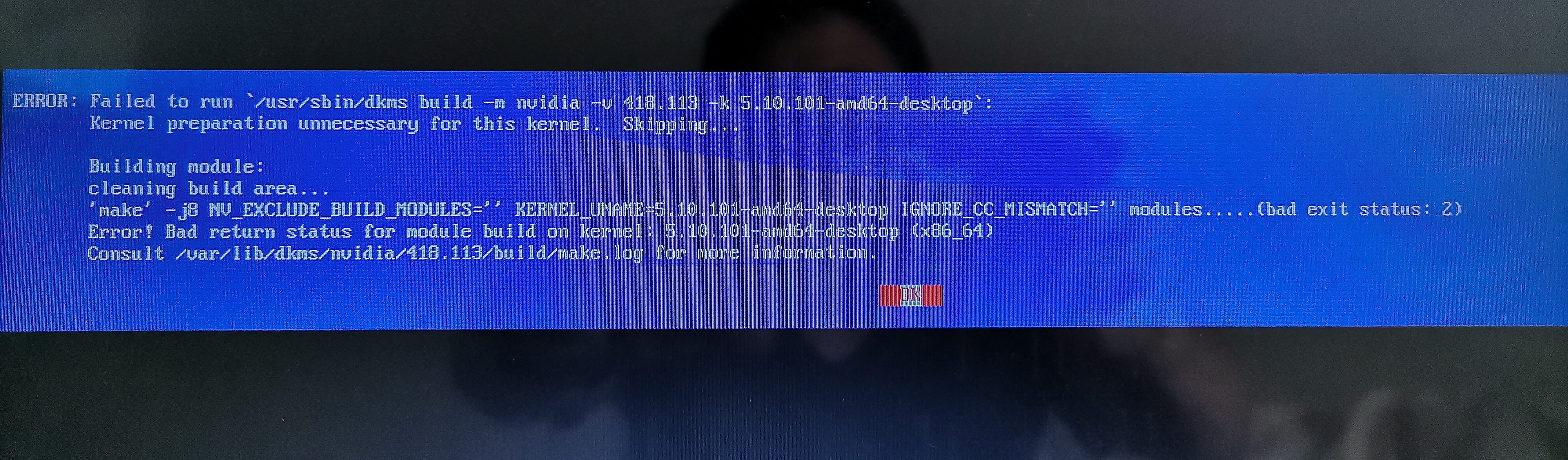
deepin 这是log文件,哪位大侠帮忙看一下。文件太大只好压缩了,这是最后的几行
cc1: some warnings being treated as errors
compilation terminated.
make[2]: *** [scripts/Makefile.build:280: /tmp/selfgz15300/NVIDIA-Linux-x86_64-418.113/kernel/nvidia/nvlink_linux.o] Error 1
make[2]: *** [scripts/Makefile.build:280: /tmp/selfgz15300/NVIDIA-Linux-x86_64-418.113/kernel/nvidia/linux_nvswitch.o] Error 1
make[2]: Target '__build' not remade because of errors.
make[1]: *** [Makefile:1822: /tmp/selfgz15300/NVIDIA-Linux-x86_64-418.113/kernel] Error 2
make[1]: Target 'modules' not remade because of errors.
make[1]: Leaving directory '/usr/src/linux-headers-5.10.101-amd64-desktop'
make: *** [Makefile:81: modules] Error 2
ERROR: The nvidia kernel module was not created.
ERROR: Installation has failed. Please see the file '/var/log/nvidia-installer.log' for details. You may find suggestions on fixing installation problems in the README available on the Linux driver download page at www.nvidia.com.
安装失败,好像是无法完成编译,怎样解决?
升级内核到5.15.34再试
Popular Ranking
ChangePopular Events
More


 Which version of the Deepin system is the best?
老笔记本新装20.6系统后,无法切换显卡。安装星火应用商店的显卡切换工具,点击“切换NVIDIA显卡”并输入密码后,提示“即将切换显卡并注销登录,请及时保存您的工作进度”,但一直未切换。检查显卡驱动,显示已安装510.60.02-1 amd64。执行nvidia-smi,提示NVIDIA-SMI has failed because it couldn't communicate with the NVIDIA driver. Make sure that the latest NVIDIA driver is installed and running.
请问如何切换到NVIDIA显卡?谢谢