

 中文
中文 
liwl deepin
2022-06-02 23:48 deepin 论坛有的:https://bbs.deepin.org/post/202072
还有一个拉取bing的壁纸的,没找到
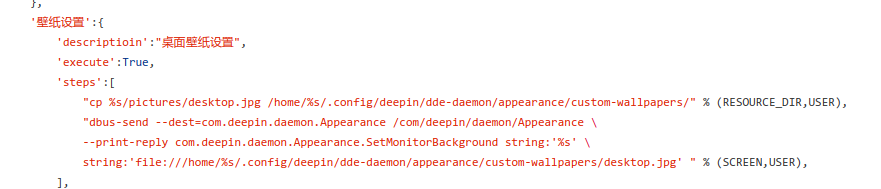
以下是我的代码节选,设置的核心实现就是dbus-send命令来操作
Python调用系统命令设置即可
Reply Like 1 View the author
 deepin
 论坛有的:https://bbs.deepin.org/post/202072
还有一个拉取bing的壁纸的,没找到
以下是我的代码节选,设置的核心实现就是dbus-send命令来操作
Python调用系统命令设置即可

 deepin
 论坛有的:https://bbs.deepin.org/post/202072
还有一个拉取bing的壁纸的,没找到
以下是我的代码节选,设置的核心实现就是dbus-send命令来操作
Python调用系统命令设置即可
非常感谢,一定认真学习下
 deepin
 https://bbs.deepin.org/zh/post/233040
,可以参考。
 deepin
 #!/usr/bin/env python
# -*- coding: utf-8 -*-
#
# web1.py
#
# Copyright 2018 Evel.cn
import urllib.request
from urllib.request import urlretrieve
from bs4 import BeautifulSoup
import time
import re
def main(args):
url = 'http://www.netbian.com'
anaUrl = url + '/e/sch/index.php?keyboard=%D0%D2%D4%CB%D2%B6&submit='
print(anaUrl)
page = urllib.request.urlopen(anaUrl)#请求响应网址
contents = page.read()#读取网址的内容
soup = BeautifulSoup(contents, "html.parser")#对获得的内容进行解析以便于后续分析
time_year_month = time.strftime('%Y年%-m月',time.localtime())
print(time_year_month)
re1 = re.compile(r'%s' %time_year_month)
for tag in soup.find_all('div', class_='list'):
for m_body in tag.find_all('a'):
#print(m_body.text)
matchObj = re1.search(m_body.text)
if matchObj:
#1920x1080 by default size
num = re.search(r'(\d+)', m_body.get('href'),re.M|re.I)
subadd = num.group(1) + '-1920x1080.htm'
__url = url + '/desk/' + subadd
if __url:
print(__url)
page = urllib.request.urlopen( __url )#请求响应网址
pic_contents = page.read()#读取网址的内容
soup_pic = BeautifulSoup(pic_contents, "html.parser")#对获得的内容进行解析以便于后续分析
for tag in soup_pic.find_all('table', id='endimg'):
for p_body in tag.find_all('a'):
print("Download " + p_body.get('href') + ".....")
_url = p_body.get('href')
_save_path = '/home/evel/Pictures/Wallpapers/aWallpaper.jpg'
urllib.request.urlretrieve(_url, _save_path)
print("Done! Please double check desktop.jpg on the /home/Pictures/Wallpapers.")
else:
print("Cannot found the picture address you need to download..")
return 0
else:
print("cannot found the hyperlink address '" + m_body.text + "' you wanted")
if __name__ == '__main__':
import sys
sys.exit(main(sys.argv))
以前写的,供参考。应该还可以用。
deepin deepin https://bbs.deepin.org/zh/post/233040
,可以参考。
非常感谢,最终用你的方法解决了问题。
只是有一点:麻烦看下代码中出错的地方是什么原因
mybizhi='file:///media/ccj/Files/个人/壁纸/week/'+str(myWeek)+'.png'
cmd1='dbus-send --dest=com.deepin.daemon.Appearance /com/deepin/daemon/Appearance --print-reply
com.deepin.daemon.Appearance.SetMonitorBackground string:"VGA-1"
string:mybizhi'#这个地方用字符串变量mybizhi为什么就不行呢?
os.system(cmd1)
deepin mybizhi='file:///media/ccj/Files/个人/壁纸/week/'+str(myWeek)+'.png'
cmd1=f'dbus-send --dest=com.deepin.daemon.Appearance /com/deepin/daemon/Appearance --print-reply
com.deepin.daemon.Appearance.SetMonitorBackground string:"VGA-1"
string:{mybizhi}' #**这个地方用字符串变量mybizhi为什么就不行呢?**
print(cmd1)#你可以先打印一下cmd1看看对不对
os.system(cmd1)
Popular Ranking
ChangePopular Events
More


 Which version of the Deepin system is the best?
想用Python写一个更改壁纸的小程序,但网上都是Windows的代码,在Deepin中如何写呢?