

 中文
中文 
deepinuser17 deepin
2022-05-29 17:42 deepin 把 uwsgi.service放在 /etc/systemd/system/里面。 然后运行 sudo systemctl daemon-reload 就行了。
Reply Like 0 View the author
 deepin
 把 uwsgi.service放在 /etc/systemd/system/里面。 然后运行 sudo systemctl daemon-reload 就行了。

 deepin
 把 uwsgi.service放在 /etc/systemd/system/里面。 然后运行 sudo systemctl daemon-reload 就行了。
emmm,尝试了一下,服务还是没有启动
deepin systemd不行就试试supervisord吧
deepin systemd不行就试试supervisord吧
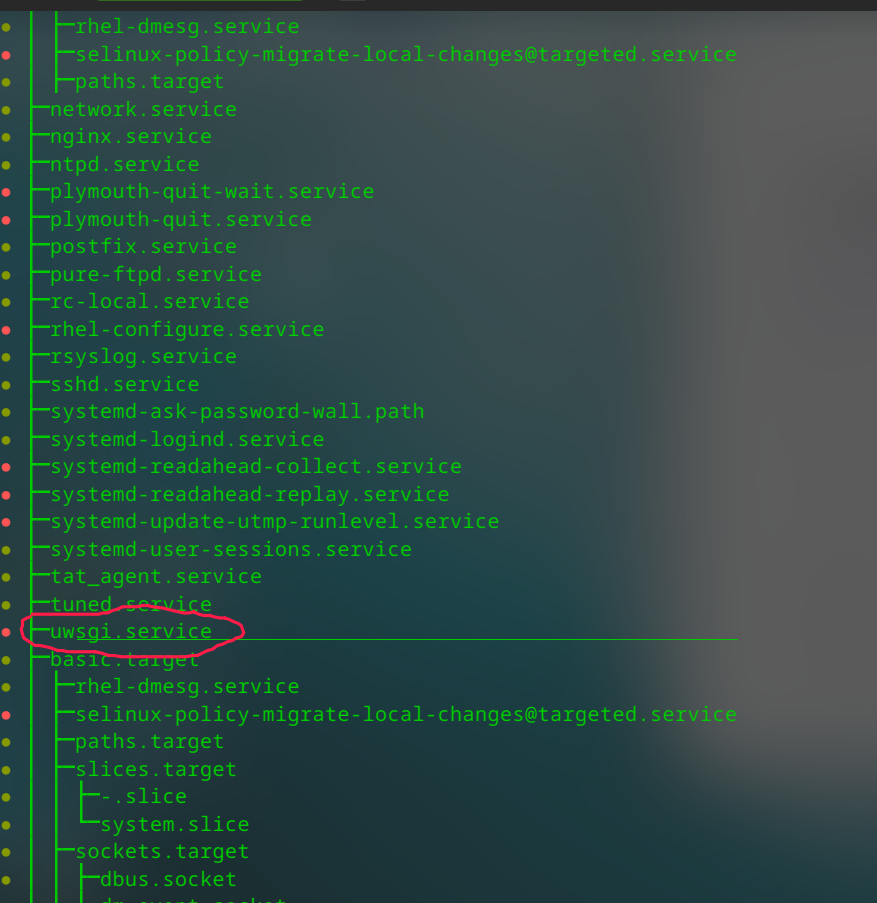
好的吧,谢谢了,在CentOs是没问题的,Deepin不行哦。下面截图是CentOs下systemctl list-dependencies multi-user.target的截图

 deepin
 uwsgi.service文件的ExecStop拼写有误
检查一下uwsgi.service的权限
检查一下这uwsgi.service中指定的目录和文件是否存在,以及相应的权限
尝试手动执行uwsgi.service中编写的指令能否正常运行
deepin 运行 systemctl status uwsgi 命令。 这个命令会报告运行状况, 以及出错信息。
deepin 运行 systemctl status uwsgi 命令。 这个命令会报告运行状况, 以及出错信息。
没有找到,奇怪,这是怎么回事😢

deepin uwsgi.service文件的ExecStop拼写有误
检查一下uwsgi.service的权限
检查一下这uwsgi.service中指定的目录和文件是否存在,以及相应的权限
尝试手动执行uwsgi.service中编写的指令能否正常运行
拼写有误的问题后面修正了,查了一下权限,果然没可执行权限,应该就是权限问题了,我再试试,

deepin 没有找到,奇怪,这是怎么回事😢
你需要运行 sudo systemctl daemon-reload 这个命令。
而且 uwsgi.service 文件必须放在 /etc/systemd/system 或着 /usr/lib/systemd/system 下面。
用户自己创建的启动文件应该放在 /etc/systemd/system 里面。 /usr/lib/systemd/system 里都是系统安装的默认启动文件。
deepin emmm,尝试了一下,服务还是没有启动
运行这个命令,确认路经是正确的:
ls -lh /etc/systemd/system/uwsgi.service
deepin 你需要运行 sudo systemctl daemon-reload 这个命令。
而且 uwsgi.service 文件必须放在 /etc/systemd/system 或着 /usr/lib/systemd/system 下面。
用户自己创建的启动文件应该放在 /etc/systemd/system 里面。 /usr/lib/systemd/system 里都是系统安装的默认启动文件。
是的,已经搞定了,铁子,一是存放目录的问题,二是文件权限的问题,感谢。
deepin uwsgi.service文件的ExecStop拼写有误
检查一下uwsgi.service的权限
检查一下这uwsgi.service中指定的目录和文件是否存在,以及相应的权限
尝试手动执行uwsgi.service中编写的指令能否正常运行
感谢,搞定了
deepin 文件权限没有问题, 不需要可运行权限, 0644 或 rw-r--r-- 是正确的权限。
deepin 文件权限没有问题, 不需要可运行权限, 0644 或 rw-r--r-- 是正确的权限。
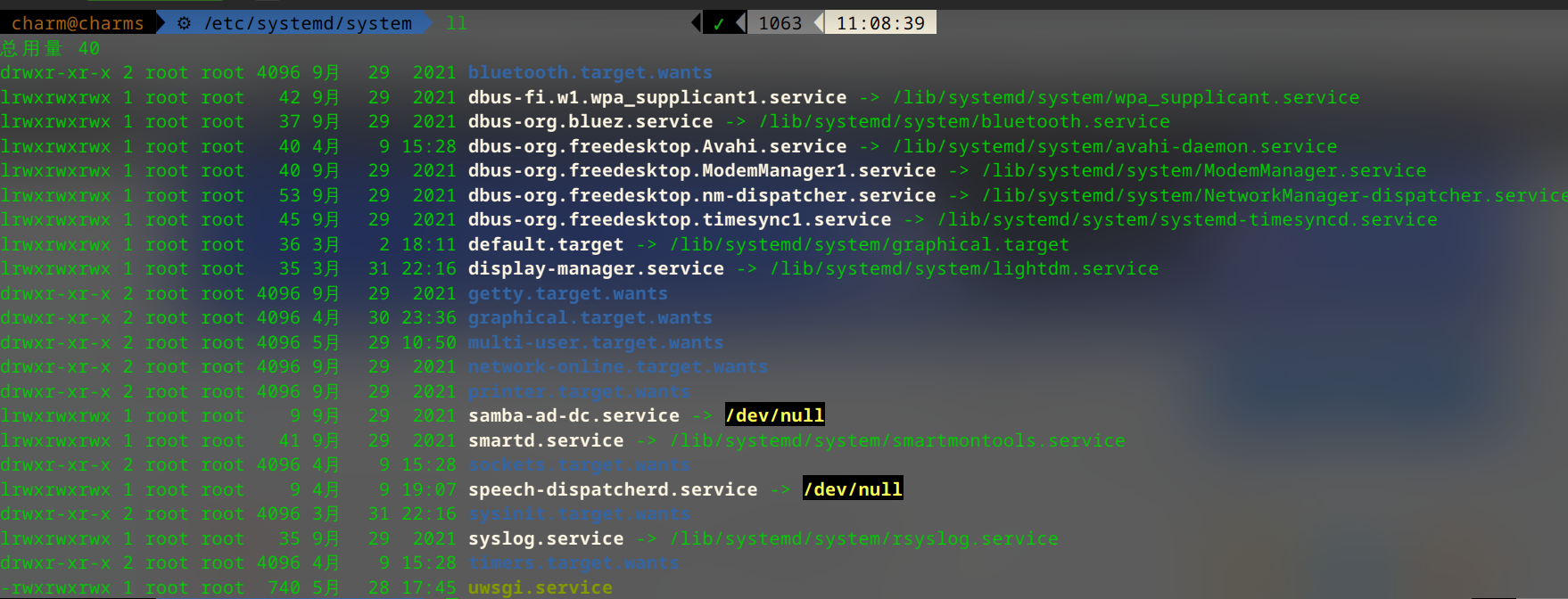
跟权限有关系的吧,之前我多次尝试把uwsgi.service放在/etc/systemd/system下,但都找不到这个服务而且其他.service文件root用户的权限都是xwr。

 deepin
 放到/usr/lib/systemd/system再处理吧

 deepin
 收藏了 正需要这个 平板触屏坏了 鼠标乱飞 写了个禁用服务 死活不工作 看了这个贴子试了下 果然 我的也是权限问题
deepin 收藏了 正需要这个 平板触屏坏了 鼠标乱飞 写了个禁用服务 死活不工作 看了这个贴子试了下 果然 我的也是权限问题
哈哈哈,解决问题了就好
deepin 跟权限有关系的吧,之前我多次尝试把uwsgi.service放在/etc/systemd/system下,但都找不到这个服务而且其他.service文件root用户的权限都是xwr。
/etc/systemd/system里要么是目录,要么是链接文件。 目录的许可一般是 0755, rwxr-xr-x. 而链接的文件,其许可是 lrwxrwxrwx. 许可开头的字母代表文件类型。 l 代表链接文件,是指向实际文件的指针。
看看系统默认安装的服务文件,其许可都是0644, 即-rw-r--r--
$ ls -lh /usr/lib/systemd/system/*.service
-rw-r--r-- 1 root root  741 Sep  9  2020 /usr/lib/systemd/system/accounts-daemon.service
-rw-r--r-- 1 root root  234 Sep  9  2020 /usr/lib/systemd/system/acpid.service
-rw-r--r-- 1 root root  576 Dec  7  2020 /usr/lib/systemd/system/alsa-restore.service
-rw-r--r-- 1 root root  528 Dec  7  2020 /usr/lib/systemd/system/alsa-state.service
lrwxrwxrwx 1 root root    9 Dec  7  2020 /usr/lib/systemd/system/alsa-utils.service -> /dev/null
-rw-r--r-- 1 root root  326 Jun 24  2021 /usr/lib/systemd/system/apt-daily.service
-rw-r--r-- 1 root root  389 Jun 24  2021 /usr/lib/systemd/system/apt-daily-upgrade.service
-rw-r--r-- 1 root root  686 Aug  3  2016 /usr/lib/systemd/system/auth-rpcgss-module.service
lrwxrwxrwx 1 root root   14 Feb 24 23:36 /usr/lib/systemd/system/autovt@.service -> getty@.service
-rw-r--r-- 1 root root  377 Sep  9  2020 /usr/lib/systemd/system/blk-availability.service
-rw-r--r-- 1 root root  422 Feb 27 19:36 /usr/lib/systemd/system/bluetooth.service
-rw-r--r-- 1 root root  169 Sep  9  2020 /usr/lib/systemd/system/clean-mount-point@.service
-rw-r--r-- 1 root root 1.1K Feb 24 23:36 /usr/lib/systemd/system/console-getty.service
-rw-r--r-- 1 root root  312 Aug 20  2020 /usr/lib/systemd/system/console-setup.service
-rw-r--r-- 1 root root 1.3K Feb 24 23:36 /usr/lib/systemd/system/container-getty@.service
-rw-r--r-- 1 root root 316 Sep 9 2020 /usr/lib/systemd/system/cron.service补充一下。
pc1:/etc/systemd/system$ ls -lh
total 8.0K
drwxr-xr-x 2 root root   31 Sep  9  2020 bluetooth.target.wants
lrwxrwxrwx 1 root root   34 Sep 18  2020 chronyd.service -> /lib/systemd/system/chrony.service
lrwxrwxrwx 1 root root    9 Sep 25  2020 chrony.service -> /dev/null
lrwxrwxrwx 1 root root    9 Apr  4  2021 com.deepin.userexperience.Daemon.service -> /dev/null
lrwxrwxrwx 1 root root   42 Sep  9  2020 dbus-fi.w1.wpa_supplicant1.service -> /lib/systemd/system/wpa_supplicant.service
lrwxrwxrwx 1 root root   37 Sep  9  2020 dbus-org.bluez.service -> /lib/systemd/system/bluetooth.service
lrwxrwxrwx 1 root root   40 Sep  9  2020 dbus-org.freedesktop.ModemManager1.service -> /lib/systemd/system/ModemManager.service
lrwxrwxrwx 1 root root   45 Sep 25  2020 dbus-org.freedesktop.timesync1.service -> /lib/systemd/system/systemd-timesyncd.service
lrwxrwxrwx 1 root root   36 Sep  9  2020 default.target -> /lib/systemd/system/graphical.target
lrwxrwxrwx 1 root root   35 Mar 31 08:09 display-manager.service -> /lib/systemd/system/lightdm.service
drwxr-xr-x 2 root root   32 Sep  9  2020 getty.target.wants
drwxr-xr-x 2 root root  135 Sep  9  2020 graphical.target.wants
lrwxrwxrwx 1 root root    9 Jun 17  2021 live-tools.service -> /dev/null
drwxr-xr-x 2 root root 4.0K May 12 08:06 multi-user.target.wants
drwxr-xr-x 2 root root   32 Sep  9  2020 network-online.target.wants
drwxr-xr-x 2 root root   26 Sep  9  2020 printer.target.wants
drwxr-xr-x 2 root root   31 Sep 15  2020 remote-fs.target.wants
lrwxrwxrwx 1 root root    9 Sep  9  2020 samba-ad-dc.service -> /dev/null
lrwxrwxrwx 1 root root   41 Dec 28  2020 smartd.service -> /lib/systemd/system/smartmontools.service
drwxr-xr-x 2 root root  110 Dec 28  2020 sockets.target.wants
lrwxrwxrwx 1 root root   31 Sep  9  2020 sshd.service -> /lib/systemd/system/ssh.service
drwxr-xr-x 2 root root  255 Feb 27 21:32 sysinit.target.wants
lrwxrwxrwx 1 root root   35 Sep  9  2020 syslog.service -> /lib/systemd/system/rsyslog.service
drwxr-xr-x 2 root root  103 Sep  9  2020 timers.target.wants
-rw-r--r-- 1 root root  290 Dec 16  2020 todeskd.service
todeskd.service 是一个启动服务, 没有执行权限。
$ systemctl status todeskd.service
● todeskd.service - ToDesk Daemon Service
     Loaded: loaded (/etc/systemd/system/todeskd.service; enabled; vendor preset: enabled)
     Active: active (running) since Sun 2022-05-15 09:10:59 PDT; 2 weeks 0 days ago
   Main PID: 4580 (todeskd)
      Tasks: 1 (limit: 9334)
     Memory: 972.0K
     CGroup: /system.slice/todeskd.service
             └─4580 /opt/todesk/todeskd -f /opt/todesk/todeskd.conf
启动运行没有任何问题。
deepin 补充一下。
pc1:/etc/systemd/system$ ls -lh
total 8.0K
drwxr-xr-x 2 root root   31 Sep  9  2020 bluetooth.target.wants
lrwxrwxrwx 1 root root   34 Sep 18  2020 chronyd.service -> /lib/systemd/system/chrony.service
lrwxrwxrwx 1 root root    9 Sep 25  2020 chrony.service -> /dev/null
lrwxrwxrwx 1 root root    9 Apr  4  2021 com.deepin.userexperience.Daemon.service -> /dev/null
lrwxrwxrwx 1 root root   42 Sep  9  2020 dbus-fi.w1.wpa_supplicant1.service -> /lib/systemd/system/wpa_supplicant.service
lrwxrwxrwx 1 root root   37 Sep  9  2020 dbus-org.bluez.service -> /lib/systemd/system/bluetooth.service
lrwxrwxrwx 1 root root   40 Sep  9  2020 dbus-org.freedesktop.ModemManager1.service -> /lib/systemd/system/ModemManager.service
lrwxrwxrwx 1 root root   45 Sep 25  2020 dbus-org.freedesktop.timesync1.service -> /lib/systemd/system/systemd-timesyncd.service
lrwxrwxrwx 1 root root   36 Sep  9  2020 default.target -> /lib/systemd/system/graphical.target
lrwxrwxrwx 1 root root   35 Mar 31 08:09 display-manager.service -> /lib/systemd/system/lightdm.service
drwxr-xr-x 2 root root   32 Sep  9  2020 getty.target.wants
drwxr-xr-x 2 root root  135 Sep  9  2020 graphical.target.wants
lrwxrwxrwx 1 root root    9 Jun 17  2021 live-tools.service -> /dev/null
drwxr-xr-x 2 root root 4.0K May 12 08:06 multi-user.target.wants
drwxr-xr-x 2 root root   32 Sep  9  2020 network-online.target.wants
drwxr-xr-x 2 root root   26 Sep  9  2020 printer.target.wants
drwxr-xr-x 2 root root   31 Sep 15  2020 remote-fs.target.wants
lrwxrwxrwx 1 root root    9 Sep  9  2020 samba-ad-dc.service -> /dev/null
lrwxrwxrwx 1 root root   41 Dec 28  2020 smartd.service -> /lib/systemd/system/smartmontools.service
drwxr-xr-x 2 root root  110 Dec 28  2020 sockets.target.wants
lrwxrwxrwx 1 root root   31 Sep  9  2020 sshd.service -> /lib/systemd/system/ssh.service
drwxr-xr-x 2 root root  255 Feb 27 21:32 sysinit.target.wants
lrwxrwxrwx 1 root root   35 Sep  9  2020 syslog.service -> /lib/systemd/system/rsyslog.service
drwxr-xr-x 2 root root  103 Sep  9  2020 timers.target.wants
-rw-r--r-- 1 root root  290 Dec 16  2020 todeskd.service
todeskd.service 是一个启动服务, 没有执行权限。
$ systemctl status todeskd.service
● todeskd.service - ToDesk Daemon Service
     Loaded: loaded (/etc/systemd/system/todeskd.service; enabled; vendor preset: enabled)
     Active: active (running) since Sun 2022-05-15 09:10:59 PDT; 2 weeks 0 days ago
   Main PID: 4580 (todeskd)
      Tasks: 1 (limit: 9334)
     Memory: 972.0K
     CGroup: /system.slice/todeskd.service
             └─4580 /opt/todesk/todeskd -f /opt/todesk/todeskd.conf
启动运行没有任何问题。
学到了,谢谢😃
Popular Ranking
ChangePopular Events
More


 Which version of the Deepin system is the best?
想在本地部署一个uwsgi的服务器,写了个
uwsgi.service的文件,放在/etc/systemd/system/multi-user.target.wants目录下,开机不知道为啥没执行,因为没uwsgi的进程。在CentOs里一样的配置是可行的哎,麻烦路过的各位大佬指点一二,感谢了。