

 中文
中文 
咿呀 deepin
2022-05-28 18:51 deepin 打开终端输入
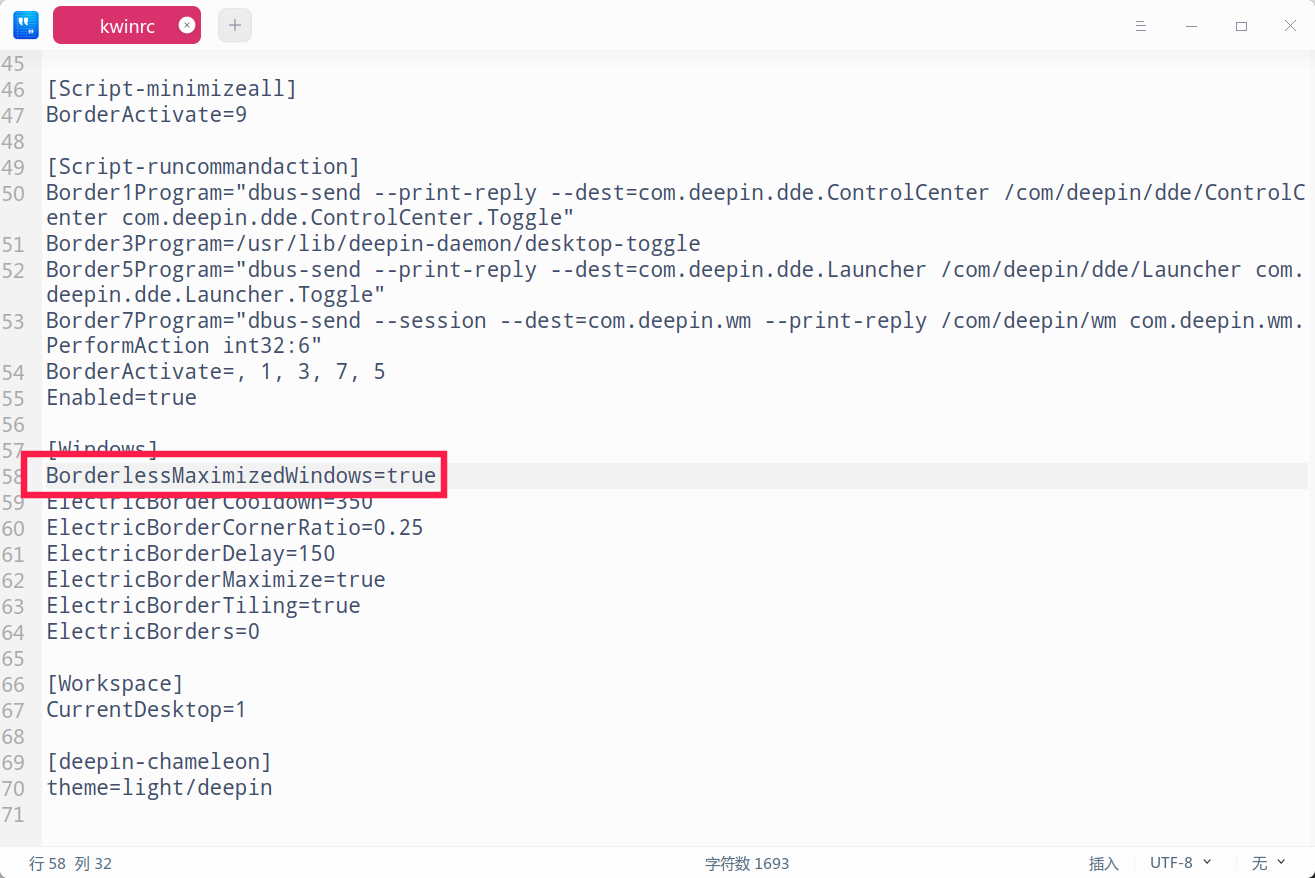
deepin-editor ~/.config/kwinrc
更改成最大化不去边框,然后注销一下:
BorderlessMaximizedWindows=false
Reply Like 1 View the author
 deepin
 打开终端输入
deepin-editor ~/.config/kwinrc
更改成最大化不去边框,然后注销一下:
BorderlessMaximizedWindows=false
 deepin
 没改
[Compositing]
Enabled=true
OpenGLIsUnsafe=false
[Desktops]
Id_1=6768b1bd-096c-42fa-b343-1c43233e2c82
Id_2=70e739f2-b1ae-4eee-b040-da32e151c0a7
[Effect-PresentWindows]
BorderActivateAll=9
[ElectricBorders]
BottomLeft=ShowDesktop
BottomRight=LockScreen
TopLeft=ApplicationLauncher
[MouseBindings]
CommandActiveTitlebar1=Raise
CommandActiveTitlebar2=Start window tab drag
CommandActiveTitlebar3=Operations menu
CommandAllKey=Alt
CommandAllWheel=Nothing
CommandInactiveTitlebar1=Activate and raise
CommandInactiveTitlebar2=Start window tab drag
CommandInactiveTitlebar3=Operations menu
CommandTitlebarWheel=Switch to Window Tab to the Left/Right
CommandWindow1=Activate, raise and pass click
CommandWindow2=Activate and pass click
CommandWindow3=Activate and pass click
CommandWindowWheel=Scroll
[Plugins]
diminactiveEnabled=false
kwin4_effect_dialogparentEnabled=false
kwin4_effect_fadeEnabled=false
kwin4_effect_morphingpopupsEnabled=false
kwin4_effect_scaleEnabled=true
kwin4_effect_squashEnabled=false
magiclampEnabled=true
minimizeallEnabled=false
slidebackEnabled=false
slidingpopupsEnabled=true
windowgeometryEnabled=false
wobblywindowsEnabled=true
[Script-closewindowaction]
BorderActivate=
[Script-minimizeall]
BorderActivate=9
[Script-runcommandaction]
Border3Program=dbus-send --print-reply --dest=com.deepin.dde.Notification /com/deepin/dde/Notification com.deepin.dde.Notification.Toggle
BorderActivate=,3
[Windows]
ActiveMouseScreen=false
AutoRaise=false
AutoRaiseInterval=750
AutogroupInForeground=true
AutogroupSimilarWindows=true
BorderSnapZone=10
BorderlessMaximizedWindows=true
CenterSnapZone=0
ClickRaise=true
DelayFocusInterval=300
ElectricBorderCooldown=100
ElectricBorderCornerRatio=0.1
ElectricBorderDelay=50
ElectricBorderMaximize=true
ElectricBorderTiling=true
ElectricBorders=2
FocusPolicy=ClickToFocus
GeometryTip=false
InactiveTabsSkipTaskbar=false
MaximizeButtonLeftClickCommand=Maximize
MaximizeButtonMiddleClickCommand=Maximize (vertical only)
NextFocusPrefersMouse=false
Placement=Smart
SeparateScreenFocus=false
ShadeHover=false
ShadeHoverInterval=250
SnapOnlyWhenOverlapping=false
TitlebarDoubleClickCommand=Maximize
WindowSnapZone=10
[Workspace]
CurrentDesktop=1
[deepin-chameleon]
theme=light/deepin
deepin 问题又是石沉大海,不了了之

 deepin
 貌似没标题栏? 之前装过top-panel?
 deepin
 改了BorderlessMaximizedWindows=true,肯定最大化没边框啊
deepin 貌似没标题栏? 之前装过top-panel?
部分没有,应该装过,卸载了
deepin 部分没有,应该装过,卸载了
楼上回答了
BorderlessMaximizedWindows=true
估计是top-panel卸载前没有去除勾选最大化隐藏标题栏选项的缘故吧
deepin 改了BorderlessMaximizedWindows=true,肯定最大化没边框啊
手动没改过,应该是装的主题美化软件改的。改为false注销了,大部分应用都有了,typora还是没有

Popular Ranking
ChangePopular Events
More

 Linyaps stop working after update
typora、eclipse、sublime text 、beyond compare、mysql workbench等部分应用窗口没有关闭、最小化、最大化,看着不习惯,操作不方便,一直使用快捷键alt+f4关闭